Contract Expiration Date vs. Notice Deadline vs. Termination Date
What Each Date Actually Means
A contract carries three dates, and a contract manager tracks each one separately. Confusing any two is how a renewal slips through, or a wind-down starts on the wrong day.
The expiration date is when the current term ends on its own. The notice deadline is when someone must act to change that outcome. The termination date is when the agreement actually stops — often a different day than either of the other two.
The table below sorts the three by what actually triggers each one: an arriving calendar date, or a person sending a notice.
| Date | What triggers it | Passive or active |
|---|---|---|
| Expiration date | The scheduled end of the current term arrives | Passive — no action is required for it to arrive |
| Notice deadline | The auto-renewal or termination-for-convenience clause sets a window before expiration | Active — someone must send notice before it passes |
| Termination date | A party exercises a termination right, or the term simply runs its course | Depends on which of the other two dates drove it |
Expiration Date
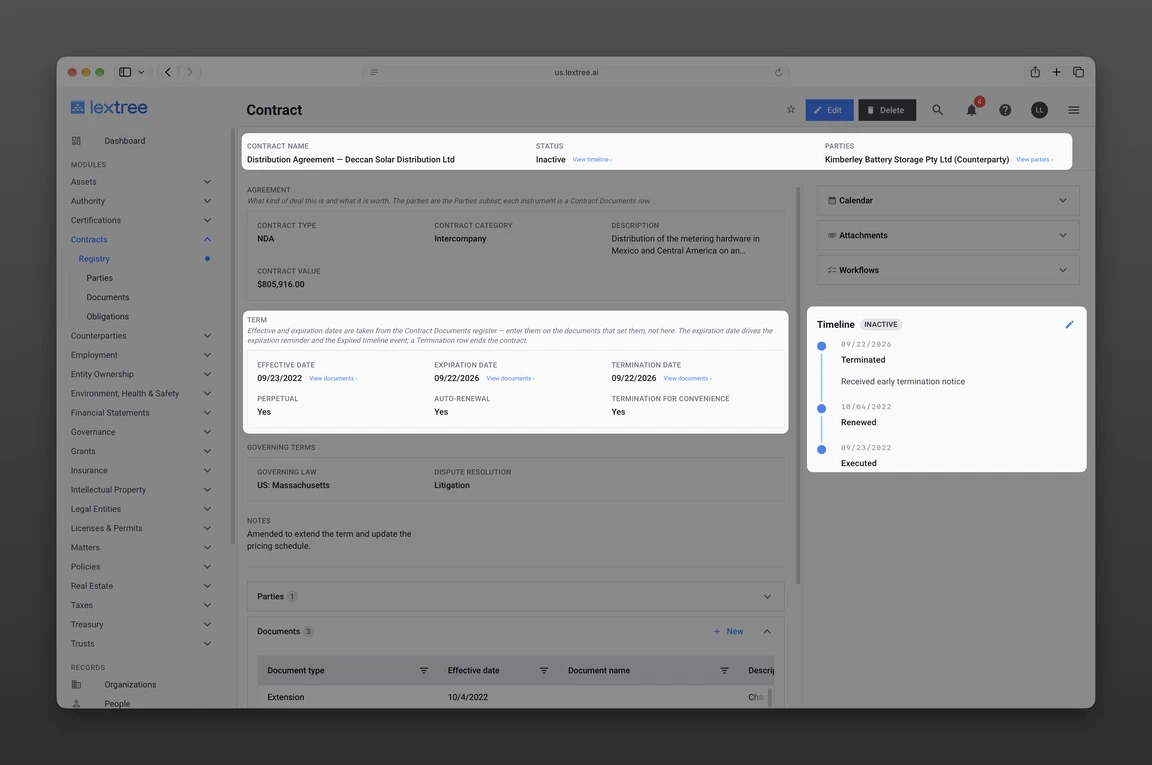
The expiration date is the date the current term ends on its own. It arrives whether or not anyone acts. Lextree tracks it as one of three distinct date fields on the Contract record, alongside effective date and termination date.
An agreement with no auto-renewal language only ever uses this one date. The term simply ends.
Notice Deadline
The notice deadline isn’t a separately named field on the contract itself. It’s the date, set back from the expiration date, by which a party must send non-renewal notice or exercise a renegotiation right. The contract’s own auto-renewal or termination-for-convenience clause sets that window.
It’s the one date on this list that’s genuinely load-bearing. Miss it, and the option to act is gone — even though the expiration date hasn’t arrived yet.
Two agreements with the same expiration date can carry different notice deadlines. That auto-renewal notice window follows the notice period in each contract’s own clause — 30, 60, or 90 days — not one fixed interval portfolio-wide.
Termination Date
The termination date is the date the agreement actually stops. It can land earlier than any scheduled expiration date, once a party exercises a termination right.
Like expiration date, it’s a field on the Contract record itself. It isn’t typed in by hand. A contract’s effective and expiration dates are set by whichever document in its register most recently established or moved them.
A termination date works the same way: it’s set by the document that ends the agreement, such as a termination notice or mutual termination agreement. A contract that’s never terminated early still ends up with a termination date — it just coincides with whatever expiration date the term last carried.
The Decision Each Date Triggers
Expiration date’s decision is none, by default. The term ends or silently renews, depending on the contract’s auto-renewal flag. That’s why people often mistake it for the actionable date — it’s really just the deadline the notice deadline exists to beat.
Notice deadline’s decision is binary: act, or lose the option. Send notice to prevent auto-renewal, or exercise a renegotiation right, before this date passes. Calendar it independently of the expiration date — by the time expiration arrives, the notice window it protected has already closed.
Termination date’s decision is about what stops and what survives. Before treating the relationship as closed, confirm which obligations survive termination. Each obligation on the contract carries its own flag for whether it does.
An Auto-Renewing Agreement, Annotated
Contract Terms at a Glance
Meridian Freight Co. has a Master Services Agreement with Anchor Point Logistics, effective February 1, 2024, on an initial term with 12-month auto-renewal. The current term’s expiration date is January 31, 2026. The auto-renewal clause requires 60 days’ written notice of non-renewal, and a separate termination-for-convenience clause requires 30 days’ written notice.
Meridian Freight Co., Anchor Point Logistics, and every date and term above are invented for illustration. This isn’t legal advice on drafting or enforcing a notice or termination clause — confirm your own contract’s language with counsel.
What Happens at Each Date
The notice deadline falls on December 2, 2025 — 60 days before the January 31, 2026 expiration date. That’s the last day to send non-renewal notice.
If nobody sends it, the expiration date arrives on January 31, 2026. The term then rolls silently to January 31, 2027 — nothing visibly “happens,” which is the point.
A termination date plays out on a separate, independent timeline. Say Meridian instead invokes termination for convenience on March 15, 2026 — mid-term, after the auto-renewal already took effect. With 30 days’ notice, the termination date lands on April 14, 2026: the date obligations actually stop.
The general pattern holds regardless of the numbers. A notice deadline is always earlier than the expiration date it protects. A termination date can fall at any point, independent of either one — it isn’t “the same thing” as expiration under a different name.
Where Lextree Keeps These Dates
Fields on the Contract Record
Effective date, expiration date, and termination date are each a distinct field on the Contract record — not one date reused for three meanings. The notice deadline itself isn’t a fourth date field on the contract. It lives on a Contract Obligation, the record that captures a duty, right, or restriction extracted from the agreement.
That obligation is tracked by its nature, its obligor, and its own next due or deadline date. A portfolio review of only the contract’s own dates catches expiration and termination — but misses the notice deadline sitting on the obligation underneath it.
Obligation statuses and contract lifecycle states — Executed, Renewed, Expired, Terminated, Superseded — are the labels the Contracts module comes seeded with. They aren’t a fixed taxonomy: a legal team can configure the states to match its own terminology.
Reminders Before the Deadline
A Contract Expiration Reminder fires 180 days before a contract’s expiration date, with follow-ups at 90, 60, and 30 days. That schedule keeps a notice deadline falling inside the window from arriving unannounced.
Separately, a Contract Renewal Decision workflow is suggested 120 days before an in-force contract’s expiration date. It prompts the renew, renegotiate, or terminate call with enough runway to act on it.
These are two different mechanisms — a reminder schedule and a workflow trigger — not one system described twice. Neither is calendared by hand against a date that must be remembered and re-entered on every renewal. Both stay tied to the contract record, so a reminder or workflow prompt still fires against the current expiration date after an amendment moves it.
Questions Contract Managers Ask
- What is the difference between contract expiration and termination? Expiration is the term ending on its own, on schedule. Termination is a party ending the agreement early — or confirming it actually stopped — which can land on an entirely different date.
- How do I calculate a contract’s notice deadline? Subtract the notice period stated in the auto-renewal or termination-for-convenience clause from the expiration date it protects. A 60-day notice period against a January 31 expiration date lands the deadline on December 2 of the prior year. A contract notice period calculator does that subtraction for you, with every step shown.
- What happens if I miss a contract’s notice deadline? The term renews automatically, per the contract’s auto-renewal flag. The expiration date itself doesn’t change the outcome — it’s the date the renewal takes effect, not the date the decision was due.
- Does an expired contract still need a termination notice? No. Expiration ends the term on its own. A termination notice is only needed to end a contract before its scheduled expiration date arrives.
Getting these three dates right starts with keeping them as three separate facts instead of one date under three names. The Contracts module’s registry carries expiration and termination as their own fields on every agreement. Advance reminders before a deadline arrives mean a notice window never depends on someone remembering it.
For a broader look at how those pieces fit into day-to-day portfolio work, see a contract management workflow built around these dates. Some teams start from a structured contract register before moving the same fields into a system that reminds them. Either way, the goal is the same: bring these dates into one central record instead of three.
Lextree Editorial
Author