How to Track Legal Entities in a Spreadsheet
Decide what one entity row tracks
Someone hands you a list of thirty entities — subsidiaries, joint ventures, a few dormant shells — and says, keep track of these. Figuring out how to track legal entities in a spreadsheet starts with a structural decision, not a naming one: what does a single row stand for? You open a blank workbook. The instinct is to start naming columns: entity name, state, agent, status, due date. That instinct is premature — get the row wrong and every column added afterward inherits the mistake. Before naming a single column, it helps to be clear on the difference between a legal entity and a business registration — that distinction is what the two-table structure below is built to preserve.
To track legal entities in a spreadsheet, use two tables, not one. An entity table holds one row per legal entity — legal name, entity type, jurisdiction of formation, formation date, tax ID. An event table holds one row per registration, filing, or agent appointment, joined by the entity’s exact legal name.
One row per entity
The obvious grain is one row per entity. Each row is one legal entity: legal name, entity type, jurisdiction of formation, formation date, tax ID. For a corporate family where every subsidiary is registered in exactly one state, this works well — genuinely well. It is flat, filterable, and every field maps cleanly onto the entity’s identity.
The ceiling is structural, not aesthetic. A row can hold exactly one value per column, and an entity has exactly one formation date but as many registrations as it has jurisdictions. The flat list assumes one registration, one registered agent, one filing due date, per entity. The moment any entity has two of anything, the row runs out of room.
One row per event
The second grain is one row per event — a row is something that happened to an entity: a registration filed, an annual report submitted, a registered agent appointed, a good-standing certificate pulled. Entities are the nouns in this system; registrations and filings are the verbs, and nouns and verbs cannot share a table. An entity row describes what something is. An event row describes what happened, when, and to whom.
Both grains have to exist, in two separate tables joined by the entity’s identity. That join is only as reliable as the spelling discipline behind it: every event row must carry the entity name exactly as it appears in the entity table. This sounds pedantic until you have watched it fail — a lookup or a filter breaks silently on “Acme Holdings, LLC” versus “Acme Holdings LLC,” returning zero rows or the wrong ones, with no error message at all. Most spreadsheet best-practice advice leads with naming conventions and stops there, never explaining what actually breaks when the convention slips.
Naming discipline only goes so far — some fields should never be free text at all. Entity type, jurisdiction of formation, standing status, and filing type each draw from a fixed vocabulary, so each belongs on a dropdown built with Excel’s Data Validation list — or the Google Sheets equivalent — pointing at a validation range on a separate lookup tab. The same discipline fixes the join: the entity legal name is the one field every lookup depends on, so enter it once in the entity table and pull it into each event row with XLOOKUP against that table rather than retyping it. A typed name is a broken join waiting to happen; a validated reference is not.
Resist one more shortcut: giving each entity its own tab, one worksheet per company. A tab per entity is the column-per-state mistake rotated ninety degrees — you cannot filter or aggregate across thirty tabs, while filtering thirty thousand rows in one table is trivial. The event table needs to stay a single table, keyed by entity name, or none of its filtering advantages survive.
The column-per-state trap
Here is where the one-row-per-entity model breaks, in concrete numbers. Take a Delaware LLC that foreign-qualifies in California. The instinct — a reasonable one, at first — is to add four columns: CA Registration No., CA Agent, CA Status, CA Next Due. Texas arrives next: four more columns. New York: four more again. Twelve columns now exist to describe three states, and every other entity in the workbook — the ones registered only in Delaware — carries twelve permanently blank cells.
The column-per-state layout does not fail at the tenth state or the twentieth. It fails at the second foreign qualification, the moment a second jurisdiction needs its own set of columns and the pattern has to repeat. That is the collapse point, and it arrives far earlier than most people budget for.
What makes this worse than merely ugly is what happens downstream. Adding a state means restructuring the sheet — inserting columns, which breaks absolute references, splits filters, and invalidates any pivot table built against the old range. And nothing in the layout distinguishes a blank cell that means “not registered here” from a blank cell that means “nobody has entered this yet.” Whoever inherits the file six months later has no way to tell the two apart.
What columns an entity spreadsheet needs
A legal entity tracking spreadsheet needs ten columns at minimum:
- Entity legal name — exactly as it appears on the formation document
- Entity type — LLC, corporation, LP, nonprofit corporation
- Jurisdiction of formation
- Formation date
- EIN or other tax identification number
- Fiscal year end
- Registered agent of record
- Current standing status
- Next filing due date
- Date last verified
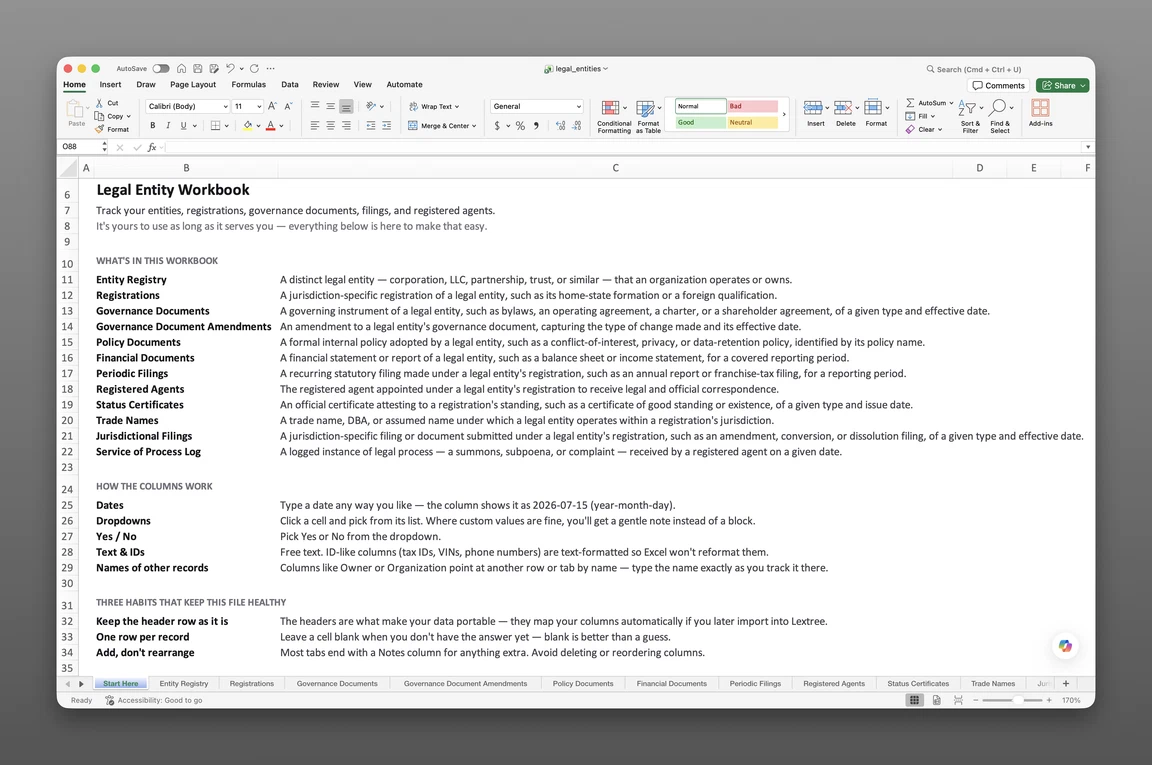
Items seven, eight, and nine are the three that cannot survive a second jurisdiction, because an entity has exactly one formation but as many registered agents, standing statuses, and filing due dates as it has registrations. That is the seam where the entity table ends and the event table begins — the point at which a flat list needs a companion table, not more columns. Teams that would rather start from a working structure than build the join logic from scratch can begin with a pre-built legal entity tracking workbook and adapt the row grain to their own portfolio.
Track entity filings by jurisdiction
Foreign qualification as rows
Once the event table exists, foreign qualification becomes straightforward. Every jurisdiction where the entity transacts business gets its own row, tagged by registration type — formation, foreign qualification, branch, or trade name registration. Each row carries its own registration number, qualification date, and registered agent, because none of those three facts is shared across jurisdictions even when the entity is the same.
Withdrawal needs the same discipline. When an entity stops doing business in a state, the row for that registration closes: an end date, a status change. It is never deleted. Deleting it erases the evidence the entity was ever qualified there, and that evidence is exactly what a diligence request asks for: not just where an entity is registered today, but where it has ever been registered. A newly acquired subsidiary arrives with this history already in progress, which is exactly why it needs its own records checklist for a newly acquired subsidiary before its registrations get folded into the shared table.
Annual report due dates
An annual report row should model the obligation, not just the date: filing type, jurisdiction, reporting period, due date, frequency, filed date, and confirmation number. Frequency earns its own column because cadence genuinely varies. Delaware requires an annual report, several states run biennially, California’s Statement of Information is annual for corporations but biennial for LLCs, and franchise tax reports run on their own schedule entirely.
Due dates are computed, not stored — the detail generic spreadsheet advice never covers. Some jurisdictions anchor the due date to the entity’s formation anniversary, some to a fixed calendar date shared by every entity in the state, and some to fiscal year end. A bare due-date column with no record of which anchor rule produced it will silently regenerate the wrong date the following year, once someone rolls the sheet forward. Filed date and confirmation number answer a different question than due date — not “is this filed” but “was this filed on time.” That distinction matters when good standing is challenged and the entity must prove timeliness, not just completion. Officer and director rosters belong in a separate file, not this one. For a closer look at keeping that recurring obligation separate from each year’s filing record, see a multi-state annual report tracker.
Registered agent changes mid-year
The agent of record is a relationship with a start and an end, not a fact that gets overwritten. It needs an effective date column and an expiration date column, not a single name cell that gets typed over when the agent changes. When an agent resigns or is replaced, the old row stays in the table and the new row sits beside it. Overwriting the old name destroys the only record of who was agent of record on a given date — exactly the question service-of-process disputes turn on.
Standing status needs the same treatment, paired with a next-verification date — a date to check again, not the date it was last checked. Good standing is a point-in-time assertion, and it decays the moment a filing is missed somewhere else in the portfolio. Without a re-check column forcing a future look, a spreadsheet will keep reporting last year’s good standing with total, unwarranted confidence.
Version control on a shared spreadsheet
How working copies multiply
The mechanism is mundane and repeats everywhere. The file lives on a shared drive. Someone finds it locked because a colleague already has it open, so they save a copy to work in. That copy becomes the one holding the current registered agent change, while the original sits untouched. Filenames like _FINAL, _FINAL_v3, and _v3_JM_edits are not a naming problem; they are the visible symptom of a file format that cannot accept two simultaneous writers.
Once two copies exist, there is no merge path back to one. Reconciling them is a manual, row-by-row comparison, and the reconciler has no way to tell which of two conflicting due dates is newer — both look equally authoritative. So how do you stop two people from overwriting the same entity row? On a shared drive, you cannot — file locking only serializes access, one editor at a time, and does nothing once a second copy has been saved. In a cloud-hosted sheet you can at least make a conflict detectable after the fact, with an “updated by” and “updated at” column pair on every row.
Change tracking that holds
A shared drive plus file locking gives you one writer at a time, no field-level history, and no record of who changed what. Track Changes, built into Excel for reviewing documents, was never designed for a register, and does not survive being saved into a new copy — precisely what happens every time someone works around a lock.
Google Sheets, or Excel on OneDrive or SharePoint, gives you something structurally different: real simultaneous editing and cell-level revision history that can answer “who changed this due date, and when” without anyone having to ask in advance. For most teams, moving the file onto one of these platforms is the single most effective change available, and it costs nothing beyond the migration itself.
Neither platform gives you everything. Nothing in cell-level history prevents a bad edit, and nothing notifies anyone when a due date moves — version history is forensic, meaning someone has to already suspect a problem before going looking. The practical discipline that makes either platform hold: protect the header row and validation ranges, restrict edit access to the people who own the record, and never delete a row — close it with an end date instead.
Cloud revision history has a limit of its own: it is not a backup. It protects against a bad edit, not a deleted file, a revoked account, or a workbook that left with someone’s laptop. That is the standing risk in managing legal entities in Excel — the corporate record lives in a file a single person can destroy — so keep a dated export of the workbook outside the editing platform, on the same cadence you re-verify standing.
Thresholds a shared spreadsheet hits
Entities, jurisdictions, and editors
A legal entity spreadsheet does not have a hard entity limit — it has a reliability limit, and the two are not the same thing. The table below reflects operating thresholds observed in practice, not technical ceilings; the file itself can hold rows numbering in the tens of thousands.
| Dimension | Comfortable | Strained | Past the limit |
|---|---|---|---|
| Entities | Up to ~25 | 25–75 | Over ~100 |
| Registrations per entity | 1–2 | 3–5 | More than 5 |
| Total registration rows | Under ~100 | 100–250 | Over ~250 |
| Simultaneous editors | 1 owner | 2–3, cloud-hosted | More than 3 |
| Filing deadlines per year | Under ~50 | 50–200 | Over ~200 |
Translate the bottom row into what it feels like to live with: 100 entities averaging two filings a year is roughly four deadlines landing every single week, indefinitely, with no reminder firing on its own. The closest a spreadsheet gets to a reminder is conditional formatting on the next-due-date column, flagging cells red as a deadline approaches. The spreadsheet itself does not fail at that volume — the human polling cycle does, because no one can reliably remember to reopen the file and scan for what is coming due.
So how many entities can a spreadsheet handle? A properly normalized workbook handles a few hundred entities without technical strain, but it stops being reliable somewhere around 75 to 100, because the binding constraint is maintenance burden rather than file format or row count.
What breaks first as a shared entity spreadsheet grows? The registration table breaks first, at the second foreign qualification. Concurrent editing breaks second, at the second regular editor.
Signs you’ve outgrown the spreadsheet
A handful of symptoms tend to show up before anyone formally decides the spreadsheet has failed:
- Answering a diligence request means opening more than one file to assemble the answer
- Someone asks who the registered agent was in March, and no one can answer without digging
- A deadline is discovered after it has already passed, from a state notice rather than from the sheet
- Two people have made conflicting edits to the same entity in the same week
- Access is all-or-nothing — everyone who can open the file can also edit any entity in it
None of this is a flaw in any particular spreadsheet. It is what every spreadsheet, however carefully structured, cannot do at scale: it sends no reminders on its own, cannot restrict edit access per entity, and keeps no audit trail of who changed what. Those are operational ceilings, not missing features to build around — they are the line where a spreadsheet ends and dedicated entity management begins. Teams past that point can start from a structured entity workbook rather than rebuilding the join logic themselves.
Lextree Editorial
Author