How to Track Tax Return Extensions and Payment Due Dates
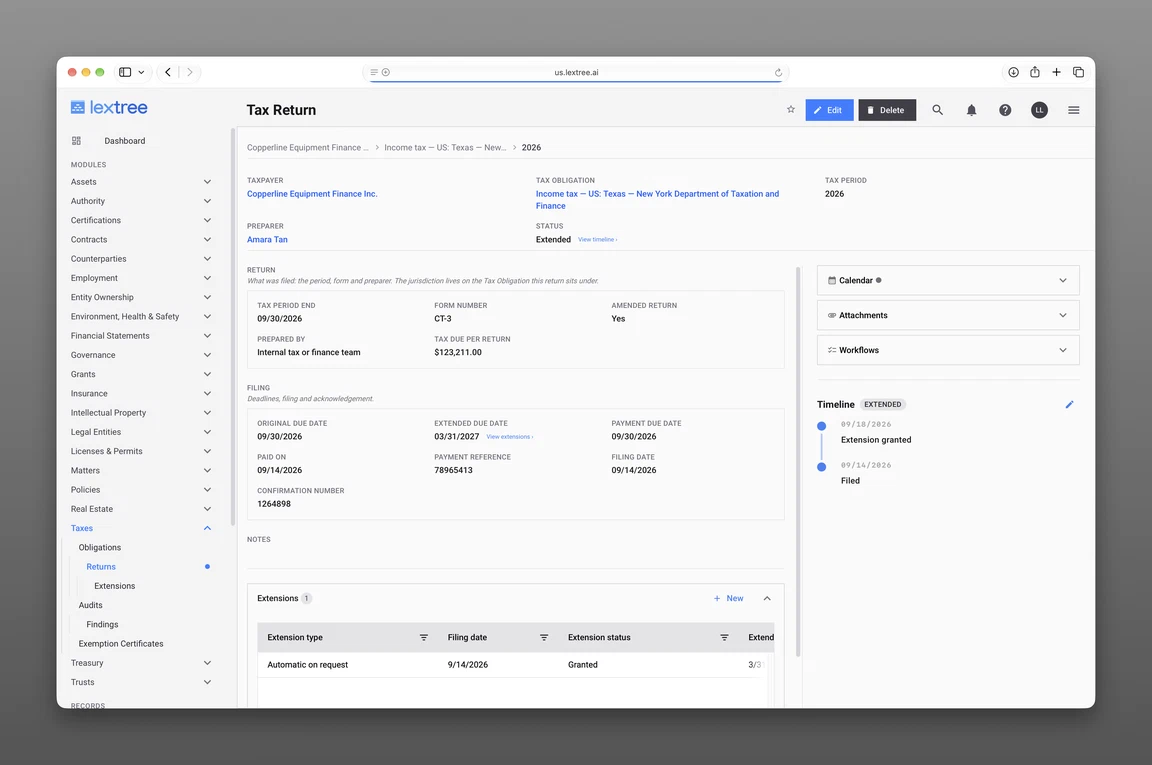
Three dates on one return
Tracking tax return extensions and payment due dates comes down to three date fields on one return record: an original due date, an extended due date, and a payment due date. Each answers a different question and drives its own reminder. The extension is a separate record, kept under the return it extends.
Which dates apply, and whether any of them move, differs by jurisdiction and tax type. The record’s job is to hold the dates you were given — confirming each one is a question for the tax authority or your adviser. Original due date vs extended due date vs payment due date is the distinction these three fields exist to hold apart. They’re what the Taxes module comes set up with, beside the return’s tax period and form number. A company can rename them or add its own.
The original due date
The original due date is the date the return was due before anything happened to it. Someone on your team enters it from what the tax authority or your adviser confirmed. The record doesn’t calculate it, and it doesn’t know any jurisdiction’s schedule on its own.
It stays on the record even after an extension is granted. A later reader needs to know the return was extended, not simply filed late. Keeping both dates side by side — instead of overwriting one — is the only way to tell them apart.
This field drives the seeded Tax return due reminder. The return carries a live alert against its original date as soon as it’s recorded, before anyone decides whether to seek an extension.
The extended due date
The extended due date is the one field on the return you don’t type yourself. Lextree copies it automatically from the most recent Granted extension, using that extension’s filing date to decide which one is most recent.
An empty extended due date can mean one of two things, and the field alone can’t tell you which. Either no extension was ever requested, or one was requested and hasn’t been recorded as Granted yet. The next section resolves that difference.
The extended due date drives its own reminder, the seeded Extended tax return due event. A return that picks up a later date keeps a live alert against that date too.
The payment due date
The payment due date is its own field, entered on the return independently of both dates above. It holds one thing: the date you were told the payment on this return was due.
It’s a separate field, not a copy of either neighboring date, because it gets confirmed on its own. A derived field has nothing left of its own to confirm.
Paid on and Payment reference sit beside it as the record of what happened. The amount involved is the return’s Tax due per return. The payment due date drives the seeded Tax payment due reminder, the last of the return’s three events.
The extension is a linked record
Filing an extension doesn’t open a second return or start a new period. The period keeps one return record. An extension is a separate record — linked to that return and shown underneath it, in the module where a return’s dates and its extensions are recorded.
A single return can accumulate more than one extension record over its life. That’s why the extension gets its own record instead of a field on the return. It’s also why the return follows the latest Granted one by filing date.
The record holds what you were told and what came back. Preparing and filing the return itself still happens in your tax software or with your preparer.
Fields on an extension
Here’s what to record when you file a tax extension — seven fields on the extension’s own record, each one answering a question about the request rather than the return it sits under:
- Extension type — Automatic on request or Subject to approval, as the request was described to you, not as a rule
- Filing date — when the extension itself was filed
- Extension status — Requested, Granted, or Denied
- Extended due date — entered here first; a Granted status is what then copies this value onto the return
- Amount paid with request — the amount, if any, paid alongside the request
- Confirmation number — what came back for this specific request
- Notes — anything about the request worth keeping that doesn’t fit another field
These are the labels and statuses the Taxes module comes set up with, and a company can adjust them for its own workflow. The extension record itself carries no timeline and no reminders of its own. The return’s three date fields, and their three events, are what remind anyone of anything.
Where the confirmation lives
Requested, Granted, and Denied are three states of the same request. The status is what a later reader checks before trusting the extended date it produced.
The confirmation number sits on the extension record; the acknowledgement itself is kept with the return itself. A status of Granted with nothing behind it is just a claim. The confirmation number and a stored acknowledgement make that claim checkable by someone who wasn’t the one who filed it.
Worth noting: a tax authority can return no confirmation number at all. That’s a reason to keep the record, not to leave it blank — record whatever did come back, and note the absence in Notes.
Extension granted also appears recorded as a state on the return, alongside Filed, Accepted, Rejected, and Amended.
One extended return, field by field
Here is one return, before and after an extension is granted. The company below, Sample Larkfield Holdings, Inc., is fictional. Every value in this example is invented for illustration, and none of it is legal or tax advice — it states nothing about what any authority requires.
Before the extension
Sample Larkfield Holdings’ return starts with its own facts recorded:
- Tax period: FY2025
- Tax period end: 2025-12-27
- Preparer: the company’s outside accounting firm
- Tax due per return: 21,750.00
| Field | Value | Who fills it | Which reminder it drives |
|---|---|---|---|
| Original due date | 2026-04-09 | Entered from what the tax authority confirmed | Tax return due |
| Extended due date | (blank) | Filled automatically once an extension is Granted | Extended tax return due |
| Payment due date | 2026-04-23 | Entered separately, from what the reader was told | Tax payment due |
At this point the record already carries two confirmed dates and one blank. The blank is information in its own right — it says no Granted extension exists yet, not that anyone forgot to fill it in.
After the extension is granted
Sample Larkfield Holdings files an extension. The extension record now carries:
| Field | Value | What it answers |
|---|---|---|
| Extension type | Automatic on request | What kind of request this was |
| Filing date | 2026-04-07 | When the extension was filed |
| Extension status | Granted | Whether the request was approved |
| Extended due date | 2026-11-12 | The date this extension pushes to |
| Amount paid with request | 18,400.00 USD | What accompanied the request |
| Confirmation number | SAMPLE-EXT-0000412 | What came back for this request |
The Granted status is what fills the return’s Extended due date with 2026-11-12. The Original due date stays untouched at 2026-04-09. The Payment due date field still holds 2026-04-23, the value the company entered — no field on the extension record writes to it or to the Original due date. If the tax authority or adviser later confirms a different payment date, someone enters it on the return. The return goes on to reach 2026-10-26 with a filing date and confirmation number SAMPLE-RET-0000509, and its timeline reads Extension granted, then Filed. Sample Larkfield Holdings still has one return record for FY2025, with one extension recorded under it.
Extensions the group is carrying
One company’s return is a note to itself. Nineteen returns across a group of entities is a question somebody asks out loud every filing season — which ones are still open, and which are covered. Reading the returns register by extension status answers it directly: which returns carry a Granted extension, which have a Requested one still open, and which have none at all. Sample Larkfield Components LLC, a subsidiary of Sample Larkfield Holdings, is the second entity here. Its return carries no extension — a plain contrast against the one above. That’s what tracking tax return extensions across multiple entities looks like. Multi-entity tax deadline tracking comes down to the same move: one register instead of nineteen files.
Three dates on a return mean three separate events, each a dated reminder of its own — the seeded Tax return due, Extended tax return due, and Tax payment due. That’s why the payment due date is never folded into the filing date. One reminder attached to a single date can only fire for one of the three questions a return raises.
This sits inside a wider record: the standing obligation a return sits under and turning those dates into scheduled work. Behind both of them sit the person who answers for whichever date comes first and the outside firm that prepares the return. A team still doing this in loose files can start with a tax compliance tracker template in Excel and grow into the register above.
Frequently asked questions
Here’s how to track tax return extensions and payment due dates once they’re on the record, question by question.
Which date is which
What dates belong on a tax return record? An original due date, an extended due date, and a payment due date make up the core three. A filing date and a paid-on date join them once the return and payment are complete. Each is its own field on the record, not a note derived from another one.
Why is the payment due date a separate field from the extended due date? Because each one gets confirmed on its own. A field that only copies another field’s value has nothing left of its own to confirm. Keeping them separate lets each date be checked against its own source.
Why isn’t one due date field enough on a tax return? A return raises three separate questions: when it was originally due, when it’s due if extended, and when payment is due. One reminder attached to a single field can only answer one of them.
What does an empty extended due date mean? Either no extension has been requested, or one has been requested and isn’t recorded as Granted yet. The extension’s status tells you which.
Extensions and confirmations
How do you record a tax return extension? As a tax return extension record of its own, linked to the return. It carries extension type, filing date, extension status, extended due date, amount paid with request, confirmation number, and notes. A Granted status is the one thing that fills in the return’s own extended due date.
Where do you keep the extension confirmation? The confirmation number sits on the extension record itself. The acknowledgement it refers to stays with the return. If a tax authority sends back no confirmation number at all, that gets recorded in Notes rather than left blank.
How do you see which entities are currently on extension? Read the returns register by extension status — Granted, Requested, or none — across every entity at once. That beats opening one return at a time to find out.
Lextree Editorial
Author