Authorized Signatory List Template for Excel
Free authorized signatory list template for Excel — track signing authorities, POAs, delegations, and dollar limits in one workbook.
1 Excel workbook · 6 worksheets — free, no credit card.
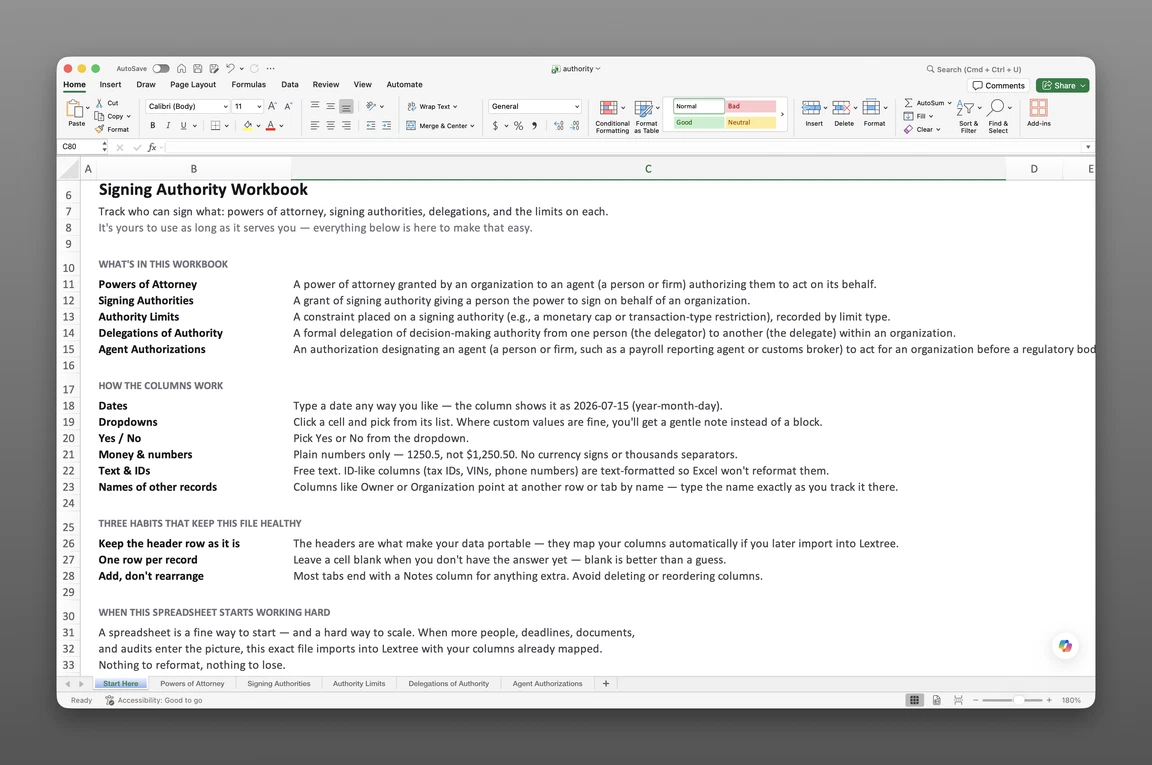
Inside the authorized signatory list template
- Start Here
How the workbook works — column conventions, dropdown lists, and three habits that keep the file usable a year from now.
- Powers of Attorney
Every POA the organization has granted — General, Special (limited purpose), Substitute, or Statutory commercial power — with agent, scope, jurisdiction, notarization, legalization, and registration detail.
- Signing Authorities
Who can sign what — contracts, banking and payments, procurement, tax filings, employment documents, legal documents, or all authorities — and the basis and expiration date for each grant.
- Delegations of Authority
Each handoff of authority — delegator, delegate, scope, approval limit, and whether the delegate can sub-delegate further.
- Agent Authorizations
Regulatory agent designations — process agents, tax representatives, fiscal representatives, customs brokers — and the body each answers to.
- Corporate Seals
Every seal the entity holds — seal type, custodian, physical location, and issued and retired dates.
Get the template
Enter your email and we’ll send the authorized signatory list template to your inbox. Free — no credit card, no call, no follow-up sequence you didn’t ask for.
- Tracked fields across the five data sheets
- 101
- Pre-built dropdown lists
- 17
- Worksheets, ready to fill in
- 6
What an authorized signatory list is (and what this template tracks)
An authorized signatory list is a record of who can bind an organization — sign contracts, checks, tax filings — and under what limits. It’s the answer to “who could sign this, and were they allowed to” when a bank, auditor, or counterparty asks. This authorized signatory list template tracks signing authorities, dollar limits, powers of attorney, delegations, and regulatory agent designations in one workbook.
Two distinctions matter before you start filling it in. First, this is a tracking workbook, not a policy document — it records who holds authority and its limits, not the prose rules that grant it. Your delegation of authority policy or bylaws still govern how a grant gets made; this workbook logs the result.
Second, an authorized signatory list is entity-wide, not a bank signature card. A signature card covers one account at one institution. This template is broader — every signing authority, POA, and delegation across every account, contract type, and jurisdiction.
That entity-wide scope is exactly why controllers and corporate secretaries reach for it: instead of one signature card per subsidiary, they get a single view of every signer across every entity in the portfolio.
If you need bank-account signatories tied to specific accounts, Treasury is where Lextree handles that.
What’s inside the Excel workbook
Six worksheets — Start Here plus five data sheets carrying 101 fields between them — plus a hidden Options sheet powering 17 dropdown lists so entries stay consistent from row to row.
Start Here covers column conventions — dates render as YYYY-MM-DD, and ID-style columns stay text-formatted so leading characters don’t get stripped. Dropdown cells flag it if you type a custom value instead of picking from the list. Three habits keep the file usable: keep the header row intact, one row per record, and add new rows rather than rearranging existing ones.
Powers of Attorney (38 fields) is this workbook’s power of attorney tracker template — every POA the organization has granted, one row per grant: organization, name, POA type (General, Special (limited purpose), Substitute, or Statutory commercial power), who signed for the principal, notary, scope, authority categories, and the resolution that authorized it. A Status: Event / Status: Date / Status: Description trio (Granted, Expired, Revoked, Superseded) tracks the grant’s current state on the row itself. Execution and effective dates, duration basis (Fixed expiry date, Until revoked, Until the transaction completes, or Statutory maximum), revocability (Revocable, Irrevocable, or Irrevocable until a stated date or event), and governing law and place of execution (both by country and subdivision) set the legal scope. The formality fields carry real weight: whether notarization is required and its date and reference, legalization requirement (Not required, Apostille, or Consular legalization) and reference, certified translation on file, and registration requirement, number, and date — because some POAs must be recorded with a public office to be effective, not just signed. Revocation date, method (Notice to the agent, Deed of revocation, or Registry filing), and whether third parties were notified close out the row.
Signing Authorities (15 fields) is the base grid: organization, authority type (Contracts, Banking and payments, Procurement, Tax and regulatory filings, Employment documents, Legal documents, or All authorities), signer, a Status: Event/Date/Description trio, authority scope, and the authority basis (Board resolution, Delegation of authority, Officer appointment, Signing policy or DoA matrix, or Bylaws) it rests on. A specimen-signature-on-file flag and a may-delegate flag round out the row, alongside effective, expiration, and revocation dates.
Delegations of Authority (18 fields) is the workbook’s delegation of authority matrix template — the log of who handed authority to whom: organization, delegation type (Standing, Temporary, or Single transaction), delegate, delegator, authority delegated, and the reason for the delegation (Planned absence, Travel, Vacancy, Workload, Emergency cover, or Permanent reassignment). Delegation basis, approval limit, and a may-sub-delegate flag carry the dollar and downstream-authority detail that used to live on a separate matrix sheet — it’s on this row now. Delegate-acknowledged and handback-confirmed flags close the loop on both ends of the handoff.
Agent Authorizations (19 fields) covers designations tied to a regulator rather than an internal role: organization, agent type (Process agent, Tax representative, Partnership representative, Fiscal representative (VAT/GST), Customs broker or agent, Regulatory representative, or Data protection representative), agent, regulatory body, and jurisdiction (country and subdivision). Prescribed form, agent consent on file, and filing date and reference document how the designation was made official, with a field for whether the authority acknowledged it, plus effective, expiration, and revocation dates. A lapsed process agent designation, for example, can mean the organization has no one authorized to accept service in a jurisdiction.
Corporate Seals (11 fields) is a new sheet: organization, seal type (Corporate (common) seal, Duplicate seal, Securities seal, Facsimile seal, or Electronic seal), issued date, custodian, an identifier, physical location, and retired date. It’s a short sheet, but custody of a seal is exactly the kind of fact that otherwise lives only in one person’s memory.
How to build an authorized signatory list in Excel
Six steps, in order:
- One row per grant, not per person. A single person can hold several signing authorities, POAs, and delegations at once — give each grant its own row so limits and expirations don’t get flattened together.
- Put the approval limit on the delegation itself. Rather than a separate matrix sheet, keep the dollar or approval limit as a field on the Delegations of Authority row it belongs to — easier to update without touching an unrelated record.
- Give powers of attorney their own record type, with governing law, place of execution, notarization, and legalization fields — a POA is a different legal instrument from an internal signing authority, and it needs different columns.
- Log delegations and sub-delegation rights explicitly. If a delegate can hand authority further downstream, record that permission — don’t assume it and don’t leave it silent.
- Watch expiration dates as closely as effective dates. A signing authority list works only if it reflects who can currently sign right now — a lapsed grant left active is worse than no record at all.
- Reconcile against board resolutions periodically. Every grant should trace back to something that authorized it; a standing reconciliation catches grants that were never formally approved.
Or skip the setup — the template above has all of this built in.
How to use the template
Recording signers and authority types
Start in Signing Authorities: one row per signer per authority type, with effective date and scope. If someone holds authority for both contracts and tax filings, that’s two rows, not one with a combined description.
Setting approval limits on delegations
In Delegations of Authority, fill in the approval limit alongside the delegation type and reason. Keep the may-sub-delegate flag current rather than assuming it — that’s the control, not just a note in the description.
Tracking powers of attorney by jurisdiction
Each POA gets its own row in the Powers of Attorney sheet, with governing law and place of execution filled in by country and subdivision. Mark whether notarization and legalization are required, and log the notarization date, legalization date, and registration date once each is done. An unnotarized POA that’s supposed to be notarized is an open liability.
Logging delegations, agent designations, and seals
Use Delegations of Authority for internal handoffs and Agent Authorizations for anything tied to a regulator. Keep the can-sub-delegate flag current. If a delegate’s sub-delegation rights are revoked, update the row rather than leaving it ambiguous. Log custodianship in Corporate Seals whenever a seal changes hands, not just when one is issued.
Authorized signatory list vs. bank signature card vs. delegation of authority policy
These sound like the same thing and get filed together. They aren’t, and they don’t serve the same audience.
| Document | Answers | Owned by |
|---|---|---|
| Authorized signatory list | Who can sign what, entity-wide, and under what limits | Legal, compliance, corporate secretary |
| Bank signature card | Who can sign on this specific account, at this institution | Treasury, banking relationship |
| Delegation of authority policy | The rules and approval chain for granting authority | Board, general counsel |
A bank signature card is narrower by design — one account, one institution, updated whenever signers change at that bank. A delegation of authority policy is the opposite: prose, not a register, describing how grants get made rather than which ones exist right now. This template sits in between — the entity-wide record of what the policy has produced.
When a spreadsheet stops working
An authorized signatory list in Excel gets an organization a long way. Where it strains is specific to what this document is for. There’s no version history, so when a signer’s dollar limit changes, the prior limit is simply gone — no record of what it used to be or when it changed.
Nothing flags a lapsed POA or an expired delegation on its own; someone has to remember to check. An approval limit lives in a column, not an enforced rule, so nothing stops a delegate from acting above it. And there’s no point-in-time answer to a question like “who could sign on March 31” — that requires reconstructing history from whichever version of the file happened to be saved that day.
That’s usually the point where it’s worth moving the record rather than patching the spreadsheet. This workbook’s headers match Lextree’s CSV import templates, so it imports directly into signing authority tracking software — expiration reminders, enforced limits, and a full history of every grant, without re-keying anything. If bank-account signatories specifically are the gap, Treasury covers that piece.
Frequently asked questions
What is an authorized signatory list? A record of who can bind the organization — sign contracts, checks, or tax filings — and under what limits. Used for audits, banking relationships, and proving authority when a counterparty asks.
What’s the difference between an authorized signatory list and a bank signature card? A bank signature card covers one account at one bank. An authorized signatory list is entity-wide — every signing authority, POA, and delegation across every account and document type.
How do I track powers of attorney in a spreadsheet? Give POAs their own worksheet, separate from signing authorities. Log agent, type, scope, jurisdiction, and expiration for each grant, and flag whether it requires notarization.
What should a signing authority matrix include? Signer, authority type (contracts, banking and payments, procurement, tax filings, employment documents, legal documents, or all authorities), scope, the basis it rests on — a board resolution, a delegation of authority, or an officer appointment — and effective and expiration dates.
Does the template track corporate seals? Yes. Corporate Seals logs every seal the entity holds — seal type, custodian, physical location, and the dates it was issued and retired — so custody of a seal is on the record, not just known by whoever holds it.
Is a delegation of authority the same as a power of attorney? No. A POA creates legal agency, often for use with outside parties, and typically follows a jurisdiction-specific form. A delegation of authority is an internal handoff — one role or person authorizing another to act within the organization.
Do authorized signatories need board approval? Usually, yes — most signing authority grants trace back to a board resolution. The template’s Notes field is the right place to reference which resolution authorized each grant.
How often should the list be updated? Whenever a grant is created, changes, or expires — not on a fixed schedule. Expiring POAs and delegations should be reviewed on a rolling basis so none lapse unnoticed.
Is the template really free? Yes. Enter your email below and the workbook is sent immediately — no credit card, no sales call.
What happens when an authorized signatory leaves the company? End-date the grant rather than deleting the row — record the expiration or revocation date so past signatures made under that authority stay provable.
Free. No strings, no sales call.
Six worksheets, built and ready — just add your organization's signers, limits, and grants.