Board of Directors Spreadsheet Template
Free board of directors spreadsheet template for Excel — track boards, directors, officers, meetings, and D&O questionnaires in a single workbook.
1 Excel workbook · 6 worksheets — free, no credit card.
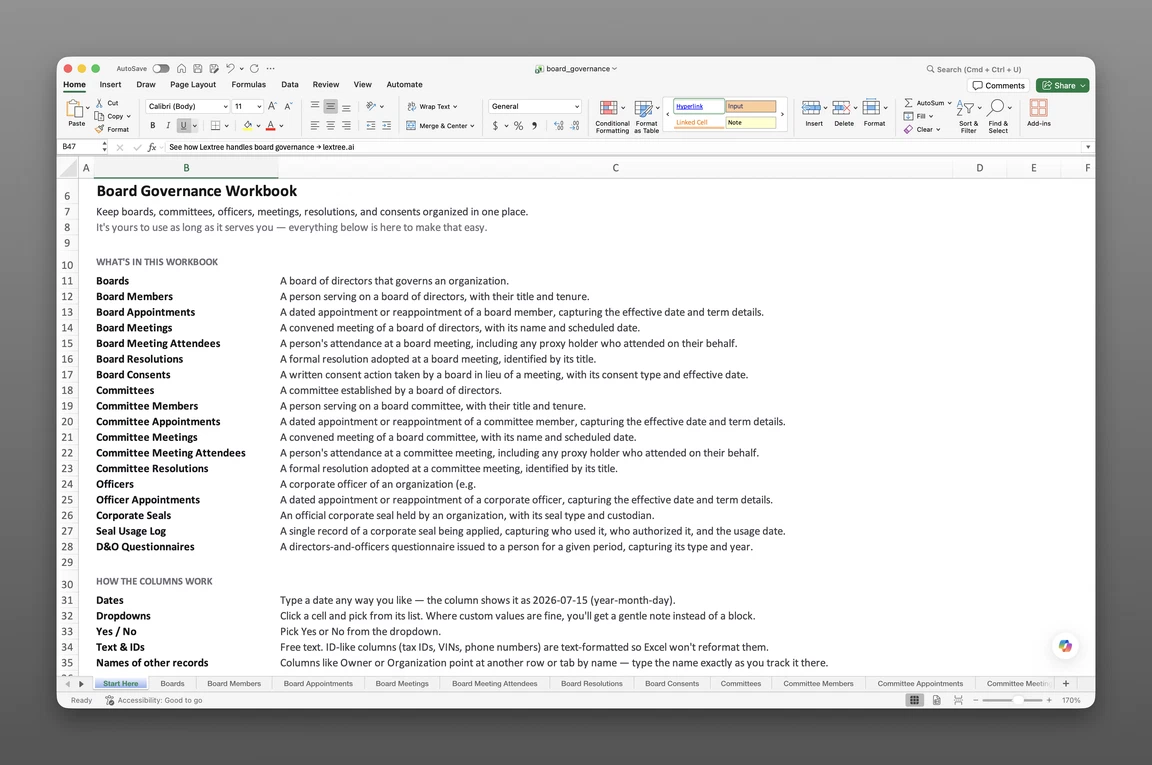
Inside the board of directors spreadsheet template
- Start Here
How the workbook works — column conventions, dropdown lists, and three habits that keep the file usable a year from now.
- Boards
One row per governance body — board type (Directors, Managers, Trustees, Supervisory, Management, or Advisory), authorized seats, standard term, whether the board is classified (staggered), meeting frequency, notice and quorum requirements, and whether written consent or remote participation is permitted.
- Board Members
Everyone who has served on a board — title, director type (Executive, Non-executive, Independent non-executive), seat basis, director class, and original and current term dates on the same row.
- Board Meetings
Every board meeting held — meeting type (Regular, Special, Annual, Organizational), format (In person, Virtual, Hybrid), notice date, and whether it was held with quorum present and minutes approved.
- Officers
Corporate officers — office held, the entity each officer serves, and original and current term dates on the same row.
- D&O Questionnaires
Annual disclosure tracking for directors and officers — questionnaire type, recipient, year, role scope, and status against the due date.
Get the template
Enter your email and we’ll send the board of directors spreadsheet template to your inbox. Free — no credit card, no call, no follow-up sequence you didn’t ask for.
- Tracked fields across the five data sheets
- 63
- Pre-built dropdown lists
- 15
- Worksheets, ready to fill in
- 6
What a board of directors spreadsheet tracks
A bank’s compliance team asks for your current board and officers, with proof of when each was appointed. You know the names — the dates, resolutions, and signing authority live in someone’s inbox, not in one place. This board of directors spreadsheet template — a board register — turns that scatter into one standing record of who governs an entity.
It captures directors and officers, along with the terms and meetings that prove they hold authority. It’s what you produce when a bank, auditor, or acquirer’s counsel asks who’s authorized to act for this company — and whether you can prove it.
It comes up more often than founders expect — opening a bank account, closing a financing round, responding to a subpoena, or renewing a D&O policy. Each moment asks for the same facts: current directors and officers, their terms, and the resolutions that put them in place.
Most teams assemble those facts from disconnected emails, PDFs, and memory. A board register exists so that work is already done.
Directors and officers
A board register tracks governance at two layers, and conflating them is where most homegrown trackers go wrong. Directors sit on the board itself and hold fiduciary duties to the entity as a whole.
Officers — CEO, CFO, Secretary, and similar roles — run day-to-day operations under authority the board delegates to them. One person can hold both roles at once, and each layer needs its own term history: a director’s board term and an officer’s title term don’t run on the same clock.
The Board Members sheet is the roster: one row per person, with title, director type, seat basis, director class, and original and current term dates already on that row — no separate appointment sheet to keep in sync. It doesn’t ship with email or phone columns. The workbook’s column conventions let you add your own — a contact column or two — without disturbing the structure the rest of the workbook depends on.
This workbook covers boards and officers directly. Board-level committees — Audit, Compensation, Nominating — are a deeper layer of governance detail that Lextree tracks once you’re past a spreadsheet; they aren’t a sheet in this file.
Register versus minute book
A board register and a minute book answer different questions. A corporate minute book stores minutes of what happened at a meeting — the discussion, in narrative form.
A board register stores the state that meeting produced instead — who was appointed, what was resolved. When outside counsel asks who held a title on a given date, the register answers directly. A minute book means rereading a decade of narrative to find the same fact.
Neither is a state filing. A resolution appointing an officer is an internal governance act, while a state filing naming that officer is a separate, external record.
Some actions require that filing; others don’t, and the resolution always comes first. The distinction matters enough to cover in detail below.
What’s inside the workbook
This board of directors spreadsheet template ships as one Excel workbook with 6 visible worksheets — a Start Here guide plus 5 data sheets carrying 63 fields between them. A hidden Options sheet powers 15 dropdown lists, so board type, director type, meeting type, and the rest stay consistent from row to row.
Start Here walks through column conventions and three habits that keep the file usable a year from now. Keep the header row intact, use one record per row, and add new rows rather than rearranging existing ones.
The 5 data sheets, in the order they appear:
- Boards
- Board Members
- Board Meetings
- Officers
- D&O Questionnaires
Boards and members
Boards (15 fields) defines the governance body itself: governed organization, board name, board type (Directors, Managers, Trustees, Supervisory, Management, or Advisory), authorized seats, standard term, whether the board is classified — staggered so only part of it turns over each cycle — meeting frequency, notice and quorum requirements, and whether written consent or remote participation is permitted. A Status: Event / Status: Date / Status: Description trio marks whether the board is currently Established or has been Dissolved.
Board Members (13 fields) links a person to that board with title, director type (Executive, Non-executive, or Independent non-executive), seat basis (Ordinary seat, Investor designee, Founder or family designee, Ex officio, or Employee representative), director class for a staggered board (Class I, II, or III), and original and current term dates on the same row — no separate appointment sheet to reconcile. Term expiration dates drive succession planning; a lapsed term sitting unnoticed on this one row is a governance gap, not a paperwork one.
Officers (10 fields) mirrors that structure for corporate officers: office held (Chair of the board, CEO, President, CFO, COO, General counsel, Secretary, Treasurer, Controller, VP, and several assistant and managing-director titles), the entity each officer serves, a Status: Event/Date/Description trio, and original and current term dates.
Meetings and disclosures
Board Meetings (12 fields) records every meeting held: meeting name, scheduled date, meeting type (Regular, Special, Annual, or Organizational), format (In person, Virtual, or Hybrid), location, notice date, and three flags on the row itself — whether it was held, whether quorum was present, and whether minutes were approved. Quorum matters here specifically: a decision made without it is vulnerable to challenge later, by anyone with standing to contest it.
D&O Questionnaires rounds out the sheet set (13 fields): questionnaire type (Annual, Initial, Update, or Special), recipient, year, role scope (all director and officer roles, director roles only, or officer roles only), a Status: Event/Date/Description trio (Sent, Completed, or Waived), due date, sent date, completed date, and whether changes or conflicts were reported.
Board-level committees, board resolutions, and written consents in lieu of a meeting aren’t sheets in this workbook — the Start Here guide notes those live as a deeper record set in the full module once a board’s structure outgrows a spreadsheet. See written consent vs. meeting minutes for what each record holds and how to file both so an action can be found either way.
Building and using it in Excel
A corporate secretary building a board of directors tracking spreadsheet from scratch usually follows the same sequence.
Set up boards and members
Start in Boards, adding one row per governance body. Then populate Board Members and Officers — one person, one row, even if that person holds more than one role.
Resist the urge to combine a director-and-officer into a single row with a combined title. The two roles have separate terms and separate term history.
Track terms directly on the row
Fill in original term start date when someone joins, and current term end date as it’s set or renewed. Sort Board Members or Officers by current term end date and expiring terms rise to the top.
That’s the mechanism most organizations use to catch a lapsing directorship before it lapses. The same discipline applies to D&O Questionnaires: update status as responses come in, checked against the due date rather than the deadline itself.
Prove quorum, log meetings
Add a row in Board Meetings every time the board convenes, and check the quorum-present and minutes-approved flags once each is confirmed. Use this sheet as a board meeting tracker in Excel — filter and sort by date or meeting type in seconds.
Whichever way a term or an appointment changes, never delete a superseded row. End-date it and add the new one instead. The register still shows what used to be true.
Or skip the setup — the template above has all of this built in.
Board of directors spreadsheet vs. minute book
An auditor’s document request usually breaks into three separate questions: who governs, what was decided, and who owns what. Reaching for the wrong document wastes the time this template is meant to save.
This board register template records who governs and whether meetings were properly held — who was appointed, whether a given meeting had quorum, whether its minutes were approved. It pairs with, rather than replaces, a separate agenda or minutes template that captures the discussion and decisions themselves.
| Document | Answers | Owned by |
|---|---|---|
| Board register (this template) | Who governs the entity, with what authority, right now and historically | Legal, corporate secretary, compliance |
| Corporate minute book | What was discussed and decided at a specific meeting | Corporate secretary, outside counsel |
| Stock or ownership ledger | Who owns the entity and in what proportion | Finance, cap table administrator |
A board resolution and the filing it sometimes triggers are easy to conflate. A resolution is the board’s own authorization — appointing an officer, approving a transaction, amending a bylaw. Any resulting state filing is a separate record, made by a different authority, that follows the resolution rather than replacing it.
When a spreadsheet stops scaling
A board of directors spreadsheet template like this one handles most organizations well for a long stretch. Where it strains is specific and predictable: there’s no point-in-time view. Answering “who sat on the board on March 31” means checking dates by hand across several rows, because a spreadsheet only shows current state.
Nothing fires automatically when a term nears expiration or a D&O questionnaire deadline approaches, so someone has to remember to check. Once a term or meeting row gets overwritten instead of superseded, its prior state is gone — no version history recovers it. Multi-entity organizations feel a fourth strain: nothing stops someone from editing another entity’s rows, or separates who can see one entity’s record from another’s.
None of that means the spreadsheet was the wrong starting point — it means recognizing when its job is done. This workbook’s column headers match Lextree’s CSV import templates, so it imports directly into board governance record keeping software — no re-keying, no remapping. From there, boards, officers, committees, resolutions, and consents live in the Governance module with real version history and term-expiration reminders. Access control is scoped to each entity. See how Lextree keeps board and committee term records — each appointment term, its appointing action, and any early departure held as its own entry.
Frequently asked questions
What should a board of directors register include? A board register covers every board, who serves on it with title and term dates, every meeting held with quorum and minutes status, officers and their terms, and D&O questionnaire status.
How do I track board of directors and officers in Excel? Seed Boards, Board Members, and Officers first — one person, one row, with original and current term dates on that same row. Sort by current term end date to surface expiring terms. Record meetings as they happen.
How do I keep a board register up to date? Update it the moment something changes — a new appointment, a meeting held, a term ending. Don’t wait for a fixed schedule. Add a new row for each event instead of overwriting the last one.
What is the difference between a board resolution and a filing? A resolution is the board’s internal authorization to take an action. A state filing is a separate, external record — required for some resolutions (like an amendment) and not others. The resolution always comes first.
Can I track board committees and their members in the template? Not in this workbook — Boards, Board Members, Board Meetings, Officers, and D&O Questionnaires cover the board and officer layer. Committees, board consents, and their own meeting and membership records are tracked as a deeper layer once you’re in the full module.
Is a written consent the same as a board meeting? No. A written consent is a decision made without convening a meeting — every director signs instead of voting in session. This workbook doesn’t track consents directly; both a consent and a meeting can produce the same governance outcome, but only meetings get a row here.
Does the template work in Google Sheets? Yes — upload or open it in Google Sheets and the column layout and dropdown lists carry over. The file is built and tested in Excel, so that’s where it works best, but Google Sheets is a fine place to use it too.
Does this work for a nonprofit board of directors? Yes. Board type covers Directors, Managers, Trustees, Supervisory, Management, and Advisory boards, so the same structure works for corporations, nonprofits, and LLCs with formal boards.
Is the template really free? Yes. Enter your email below and the workbook is sent immediately — no credit card, no sales call.
The workbook is free. Take it.
Six worksheets, already built — just add your boards, members, and officers.