Business Certification Tracker Template
Free business certification tracker template for Excel — track ISO, SOC 2, MBE/WBE renewals, surveillance, verification links, and accreditations. Sent to your email.
1 Excel workbook · 3 worksheets — free, no credit card.
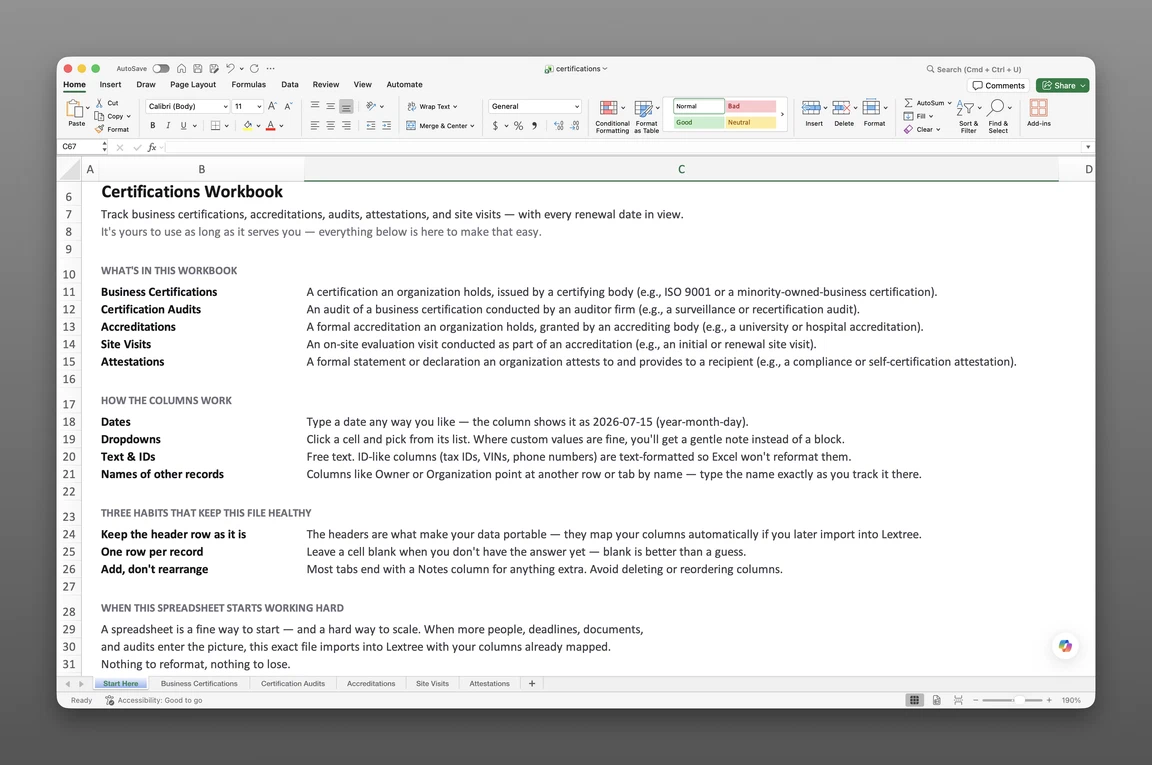
Inside the business certification tracker template
- Start Here
How the workbook works — column conventions, dropdown lists, and the habit of adding a row instead of overwriting one.
- Business Certifications
One row per certification — certifying body, certification category, standard or framework, certificate number, scope, verification link, reasons held, first-certified date, issue and expiration dates, certification cycle, surveillance audit frequency, and a Status: Event, Status: Date, and Status: Description timeline.
- Accreditations
One row per accreditation — accrediting body, accreditation category, standard or criteria, accreditation number, scope, verification link, reasons held, first-accredited date, current award date, expiration date, accreditation cycle, next report due, and its own status timeline.
Get the template
Enter your email and we’ll send the business certification tracker template to your inbox. Free — no credit card, no call, no follow-up sequence you didn’t ask for.
- Tracked fields across the two data sheets
- 39
- Pre-built dropdown lists
- 7
- Worksheets, ready to fill in
- 3
What is a business certification tracker?
A business certification tracker template is a single Excel workbook that records every certification and accreditation an organization holds — ISO, SOC 2, MBE/WBE, and industry accreditations — with its certifying body, standard, certification or reaccreditation cycle, and a status timeline that shows where each one stands today.
This covers certifications and accreditations the organization itself holds. Think of the ISO standard, the SOC 2 report, and the MBE/WBE designation. It doesn’t cover the individual records kept for people on staff.
This is a record, not an automated system, with no formulas or built-in alerts until a team sets its own reminders. A surveillance audit date arrives before anyone circles it on a calendar. A customer’s certificate-verification request sends someone hunting through old inboxes for the last confirmation sent.
What’s inside the Excel workbook
This business certification tracker template ships as one Excel workbook, three sheets deep. A Start Here tab leads, followed by two data sheets: Business Certifications and Accreditations.
Together, the two data sheets hold 39 fields behind 7 dropdown lists. The workbook opens in Google Sheets as well as Excel.
- Start Here — column conventions and the habit of adding a row instead of overwriting one
- Business Certifications — 20 fields
- Accreditations — 19 fields
| Sheet | What it tracks |
|---|---|
| Business Certifications | Certifying body, certification category, standard or framework, certificate number, scope, verification link, reasons held, first-certified date, issue and expiration dates, certification cycle, surveillance audit frequency |
| Accreditations | Accrediting body, accreditation category, standard or criteria, accreditation number, scope, verification link, reasons held, first-accredited date, current award date, expiration date, accreditation cycle, next report due |
Certifications and their status
Business Certifications, 20 fields, holds certifying body, certification category, standard or framework, certificate number, scope of certification, and an accredited-certificate flag. A verification link, both the display text and the URL, points straight at the certifying body’s public register instead of a screenshot buried in a folder. Reasons held captures why the organization holds the certification in plain language, alongside first-certified date, certificate issue date, certificate expiration date, certification cycle, and surveillance audit frequency.
A Status: Event, Status: Date, and Status: Description triple runs across every row, so a certification’s history reads as a timeline rather than a single static date: Certified, Recertified, Certificate maintained, Suspended, Reinstated, Withdrawn, Expired, or Certificate scope changed. Certification category spans quality management, information security, privacy and data protection, environmental and sustainability, health and safety, food safety, product and safety marking, supplier diversity and ownership, social responsibility and ethics, business continuity and resilience, IT service management, and industry sector standards, so an ISO 9001 certificate and an MBE designation share the same row structure.
Certification cycle and surveillance audit frequency run as two separate clocks. Certification cycle spans annual, two-year, three-year, five-year, or no fixed cycle; surveillance audit frequency runs annual, semi-annual, quarterly, or none. A three-year ISO recertification and an annual surveillance visit stay on their own columns, so neither date overwrites the other.
Accreditations and their status
Accreditations, 19 fields, mirrors that structure for institutional accreditation: accrediting body, accreditation category, standard or criteria, accreditation number or ID, scope of accreditation, verification link, and reasons held. First-accredited date, current award date, accreditation expiration date, accreditation cycle, and next report due round out the row.
Accreditation category covers healthcare providers, higher education institutions, academic programs, laboratories (testing, calibration, or medical), inspection bodies, certification bodies, human and social services, public safety, cultural institutions, and professional services. Its own Status: Event value runs wider than a certification’s: Accredited, Reaccredited, Monitoring or conditions imposed, Warning issued, Placed on probation, Show cause ordered, Suspended, Denied or withdrawn, Expired, or Candidacy granted, so a healthcare accreditor’s escalation path shows up as a status change, not a note in a margin.
Accreditation cycle runs from one year up through ten years, or no fixed term at all, since accreditation terms vary far more by sector than certification cycles do.
How to track certification renewals
Renewal history is what separates a certification renewal tracker template from a single expiration-date column. This section shows how to track ISO and SOC certification renewals in Excel with this workbook.
To track certification renewals in Excel:
- Add a row per certification on Business Certifications. Every ISO, SOC 2, or industry certification gets its own row with certifying body, standard, and current expiration date.
- Log certification cycle and surveillance audit frequency as separate fields. A three-year recertification cycle and an annual surveillance visit need their own columns, not one shared date.
- Update the Status: Event value as each certification moves through its lifecycle. Certified, Recertified, Suspended, and Withdrawn each mark a different moment, not a single generic “active” flag.
- Add every accreditation on its own row on Accreditations. Accrediting body, accreditation category, and current award date go on every row before the term runs out.
- Keep a verification link on every row. The certifying or accrediting body’s public register answers a customer’s or auditor’s question directly, without a call back to the certifying body.
- Sort Business Certifications and Accreditations by expiration date. The closest recertification, reaccreditation, or next-report deadline rises to the top.
Recertification and surveillance
A three-year ISO recertification cycle and an annual surveillance visit are not the same clock, even though both apply to the same certificate. Certification cycle and surveillance audit frequency sit as separate fields on Business Certifications, so neither date overwrites the other. A certification that lapses between surveillance visits looks identical to one that’s current, until someone checks both dates side by side.
Status timeline and verification
Business Certifications and Accreditations function as a certification status tracker precisely because a status change, not just a date, gets its own row in the same record. A Status: Event value of Suspended or Withdrawn, with its own date and description, records what happened, not just that something happened. A Reasons held field then keeps the “why we hold this” answer next to the certificate itself, which matters most the day someone outside the organization asks for it.
Built for certified organizations
Quality managers, compliance officers, and operations leaders at ISO- and SOC 2-certified organizations feel a scattered certification record first. MBE/WBE-certified businesses and accredited testing labs carry the same problem across a different set of standards. An MBE/WBE recertification period lapses as quietly as an ISO surveillance date.
Most free trackers online take one of two shapes: a name-and-date roster of people, or an ISO checklist that tracks implementation with no renewal date. This one holds the organization’s own certifications and accreditations, with a status timeline and a verification link behind each one. A deeper audit trail, corrective-action tracking, and an outbound attestation log for SOC 2 letters and security questionnaires live in Lextree’s certifications module, not in this workbook.
Once these renewals need reminders that fire on their own, that’s certification and credential expiration tracking.
When a spreadsheet stops working
This tracker covers a growing certification and accreditation portfolio before it hits real edges. There’s no version history, so an overwritten expiration date erases its own past.
Nothing fires when a surveillance visit or a recertification date arrives: that gap surfaces as a lapsed certification at the next audit. Add your own conditional-formatting rule to flag either date, in Excel: Home > Conditional Formatting > Highlight Cells Rules > A Date Occurring.
From workbook to software
This template’s column headers match Lextree’s import templates, so it loads directly into certification tracking software: no re-keying, no remapping. Access control, real alerts, full audit trails, and multi-user editing start on the other side of that import.
That handoff matters most once a portfolio spans several standards and several accrediting bodies, one surveillance visit away from an uncaught gap. Software takes that portfolio and keys it to the entities already tracked elsewhere in Lextree.
Renewals that surface themselves
From there, dates drive reminders instead of waiting for someone to open the workbook. A recertification surfaces itself weeks before the date arrives, and a status change routes to whoever owns that certification.
A compliance officer stops opening the workbook every Monday to check what’s coming due, because the system already flagged it.
Frequently asked questions
What is a business certification tracker template? A business certification tracker template is a single Excel workbook that records every certification and accreditation an organization holds — ISO, SOC 2, MBE/WBE, and industry accreditations — with its certifying body, standard, certification or reaccreditation cycle, and the status timeline that shows where each one stands.
Is this for tracking employee certifications? No. This tracks certifications and accreditations the organization itself holds — ISO, SOC 2, MBE/WBE, and industry accreditations — not employee certifications or the individual records kept for people on staff.
Is this certification management software? No. This is an Excel workbook, a record maintained by hand — not certification management software. It holds no automated alerts, workflow routing, or access control; those live in software built for that purpose.
How do I track ISO and SOC certification renewals in Excel? Update the Status: Event value on Business Certifications each time a certification moves — Certified, Recertified, Suspended, or Withdrawn. Sort Business Certifications by expiration date to see what’s coming due first.
Does it track surveillance audits? Surveillance audit frequency and certification cycle sit on Business Certifications as separate fields, and a Status: Event value records each certification decision as it happens. A full audit-by-audit history with findings and corrective actions lives in Lextree’s certifications module, not in this workbook.
Can it track institutional accreditations? Yes. Accreditations carries accrediting body, accreditation category, standard or criteria, and accreditation cycle, with its own Status: Event value covering monitoring, probation, and show-cause outcomes. Individual site-visit logs live in Lextree’s certifications module.
Does it track outbound SOC 2 letters or security questionnaire responses? No, not in this workbook. Business Certifications tracks the certificate itself, including a verification link to the certifying body’s public register. An outbound attestation log for SOC 2 letters and questionnaire responses lives in Lextree’s certifications module.
Can it track MBE/WBE and diversity certifications? Yes. MBE/WBE and other diversity certifications live on Business Certifications alongside ISO and SOC 2, which makes this a spreadsheet for tracking MBE/WBE certification renewals. Certification category covers supplier diversity and ownership alongside quality management, information security, privacy and data protection, and a dozen other standards, so a diversity designation shares the same row structure as any other certification.
What’s the difference between certification cycle and surveillance audit frequency? Certification cycle is the interval before full recertification — often three years for ISO standards, though the dropdown also covers annual, two-year, five-year, and no-fixed-cycle options. Surveillance audit frequency is the interval between the surveillance audits that keep a certificate active between full recertifications, often annual.
Does the tracker send renewal reminders? No. The workbook holds raw dates only, with no built-in alerts. Add your own conditional-formatting rule to flag a surveillance or recertification date, or move to software that fires reminders on its own.
Is it free, and does it work in Google Sheets? Yes. Enter your email below and the workbook is sent to your inbox — no credit card, no sales call. It opens in Google Sheets as well as Excel, dropdowns included.
Is there a free certification tracker template for Excel? Yes — this one. It’s a free workbook with 3 worksheets and 39 fields, covering the certifications and accreditations an organization holds — sent to your email, and it opens in Google Sheets as well as Excel.
The template is free. Take it.
Three worksheets, already built — just add your certifications and accreditations.