Business License and Permit Tracker Template
Free business license and permit tracker template for Excel — track business licenses, permits, and professional licenses with every renewal and expiration date. Sent to your email.
1 Excel workbook · 4 worksheets — free, no credit card.
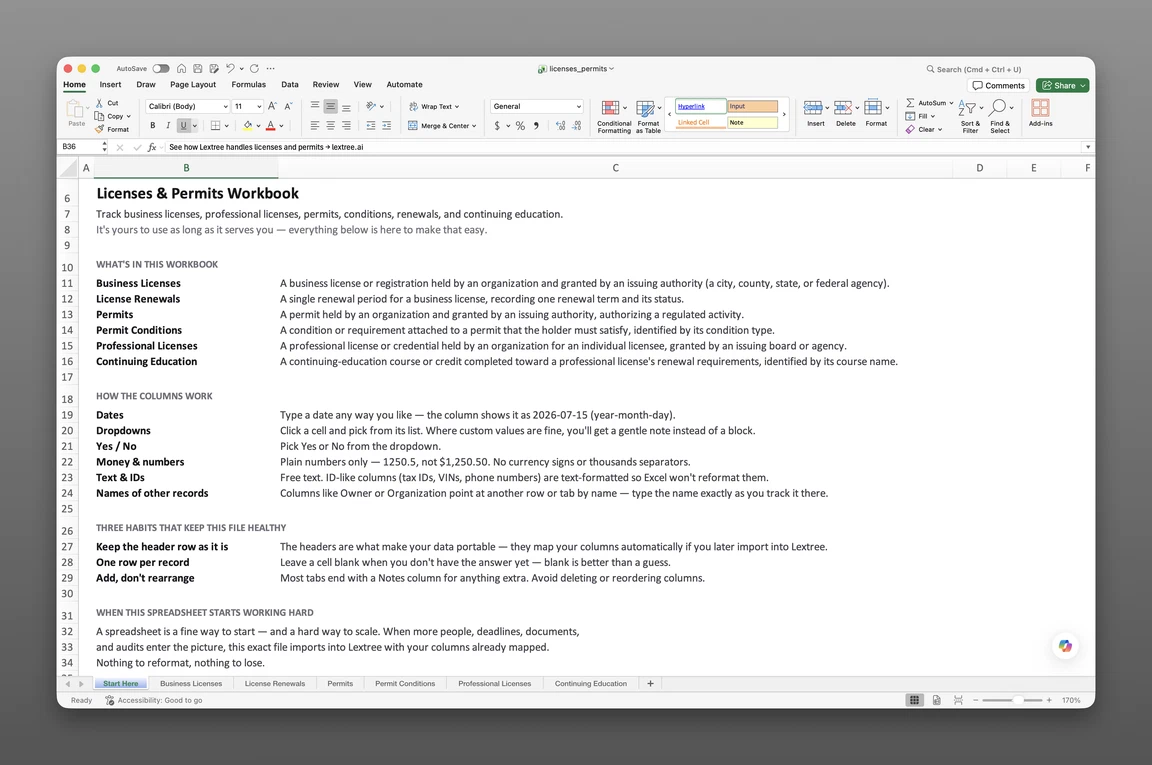
Inside the business license and permit tracker template
- Start Here
How the workbook works — column conventions, dropdown lists, and the habit of adding a row instead of overwriting one.
- Business Licenses
One row per license — issuing authority, qualifying person, license type, authority level (National, State/Provincial, County/Regional, Municipal, and more), jurisdiction, licensed activity and location, renewal frequency, who handles the renewal, current effective and expiration dates, and a Status: Event / Status: Date / Status: Description timeline.
- Permits
Permit type (Operating, Building or Construction, Environmental, Health, Fire Safety, Zoning, Signage, Special Event, Right-of-Way, Hazardous Materials), authority level, jurisdiction, permitted activity and location, renewal frequency, current effective and expiration dates, and a status timeline.
- Professional Licenses
License type (Attorney, Accountant, Physician, Nurse, Engineer, Architect, Real Estate Agent, and many more), licensee, issuing authority, issue and expiration dates, last renewal date, renewal frequency, in-good-standing flag, verified date, and verification method.
Get the template
Enter your email and we’ll send the business license and permit tracker template to your inbox. Free — no credit card, no call, no follow-up sequence you didn’t ask for.
- Tracked fields across the three data sheets
- 55
- Pre-built dropdown lists
- 13
- Worksheets, ready to fill in
- 4
What is a license and permit tracker?
A business license and permit tracker template is a single record of every government-issued license and permit an organization holds — its issuing authority, jurisdiction, authorized activity, and renewal or expiration dates — with the authority level and renewal cadence recorded for each one.
This covers government-issued business licenses, permits, and state-board professional licenses — not software license management or IT seat tracking. A license expiration tracker template for city, county, state, and federal authorities looks nothing like one built for software seats. This one tracks the government side only.
This is a record, not an automated system. It holds raw dates — no formulas, no built-in alerts — until you set reminders yourself. A city inspector asks for a current license, or a professional license quietly slides past its renewal frequency, and nothing catches either one.
What’s inside the Excel workbook
This business license and permit tracker template ships as one Excel workbook, four sheets deep. A Start Here tab leads, followed by three data sheets covering business licenses, permits, and professional licenses. Together they hold 55 fields behind 13 pre-built dropdown lists, and the workbook opens in Google Sheets as well as Excel.
| Sheet | What it tracks |
|---|---|
| Business Licenses | Issuing authority, qualifying person, license type, authority level, jurisdiction, licensed activity and location, renewal frequency, renewal handled by, current effective and expiration dates |
| Permits | Permit type (Operating, Building, Environmental, Health, Fire Safety, Zoning, Signage, Special Event, Right-of-Way, Hazardous Materials), authority level, jurisdiction, permitted activity and location, renewal frequency, current effective and expiration dates |
| Professional Licenses | License type (Attorney, Accountant, Physician, Nurse, Engineer, Architect, and more), issue/expiration dates, last renewal date, renewal frequency, in good standing, verified date, verification method |
Business licenses and renewal cadence
Business Licenses — 19 fields — forms the registry core of this business license renewal tracker template. It carries issuing authority, qualifying person, license type, authority level (National, State or Provincial, County or Regional, Municipal or Local, Special District, or Supranational), jurisdiction, and current effective and expiration dates.
Renewal frequency and renewal handled by (Internal, Filing Agent, Outside Counsel, Accountant or Tax Adviser) sit on the same row, so who’s responsible for the next renewal is never a separate lookup. A Status: Event / Status: Date / Status: Description timeline runs Application Submitted through Issued, Renewed, Reinstated, Expired, Suspended, Revoked, or Surrendered — each change gets its own dated row.
Business Licenses also carries licensed activity and licensed location, so a license reads correctly against the site it authorizes. A restaurant group with five addresses keeps each location’s licenses distinct instead of merged into one row.
Permits and authority levels
Permits — 17 fields — is the depth of this permit tracking spreadsheet template. It covers permit type (Operating, Building or Construction, Environmental, Health, Fire Safety, Zoning or Land-Use, Signage, Special Event or Temporary, Right-of-Way, Hazardous Materials), authority level, jurisdiction, and permitted activity and location.
Renewal frequency and current effective and expiration dates sit on the same row, alongside its own status timeline. A special-event permit and a building permit run on entirely different renewal cadences — Semi-Annual versus Non-Renewable, for instance — and each one carries its own frequency rather than a shared assumption.
Professional licenses and verification
Professional Licenses — 19 fields — gives this professional license tracking spreadsheet its individual-licensee layer. It carries license type (Attorney, Accountant, Physician, Nurse, Pharmacist, Engineer, Architect, Real Estate Agent, Insurance Broker, and more), issuing authority, and issue and expiration dates.
Last renewal date and renewal frequency sit alongside an in-good-standing flag, a verified date, and a verification method — Online License Lookup, Primary-Source Written Confirmation, Third-Party Verification Service, Copy of License, or Licensee Attestation. That verification detail sits alongside good standing, so a status check skips the call to the state board. An attorney’s bar status and a CPA’s license both live on the same sheet, in the same format.
How to track license renewals
Renewal discipline is the difference between a lapsed license nobody caught and one that stays current. This section shows how to track business license renewals in Excel with this workbook.
To track license and permit renewals in Excel:
- Add a row per license on Business Licenses. Every city, county, state, or federal license gets its own row with jurisdiction, authority level, and current expiration date.
- Set a renewal frequency and who handles it. Renewal frequency and renewal handled by go on the same row as the license, so the next cycle is never a guess.
- Update the status timeline when a license renews. Log a new Status: Event, Status: Date, and Status: Description row rather than overwriting the license’s prior status.
- Give every permit its authority level and renewal frequency. Permits carries the same fields as Business Licenses, keyed to permitted activity and location.
- Record verification detail as professional licenses are checked. Verified date and verification method go on Professional Licenses each time good standing is confirmed.
- Sort Business Licenses and Permits by expiration date. The closest renewal on either sheet rises to the top.
Status rows over overwrites
Recording a status change as a new row beats overwriting a single status cell. A license that lapsed for two months and then renewed keeps both events on record instead of the lapse quietly disappearing. Overwriting a cell erases the exact evidence an auditor or inspector might ask for.
This matters most for a license that renews every year or two, where years of history would otherwise vanish into a single cell. The sheet grows longer, but the record grows more complete, not less.
Reminders you set up
This is a license renewal reminder spreadsheet in the most honest sense: it holds raw dates and nothing more. Add your own conditional-formatting rule to any date column for a visual cue — in Excel: Home > Conditional Formatting > Highlight Cells Rules > A Date Occurring. Software that fires an actual reminder is the next step, not this workbook.
A compliance team that prefers software over formulas can skip the formatting step entirely. Either way, the underlying dates in this workbook are what any reminder system — spreadsheet or software — would need first.
Built for multi-location operations
Ops managers, compliance managers, controllers, and office managers at multi-location businesses feel a scattered license record first. Restaurants, healthcare groups, construction firms, and professional-services firms each hold a stack of city, county, and state licenses that don’t renew on the same calendar. A multi-state business license tracker has to hold every jurisdiction’s licenses, permits, and deadlines in one file — not one spreadsheet per location.
Free trackers online typically hold one flat table — a license, a date, done. This one keeps authority level, renewal frequency, and verification detail in the same keyed file, tied to the entity and location that hold each license.
License and permit renewals are one piece of a larger deadline surface — tax filings, entity annual reports, insurance renewals, all on their own clocks. This tracker’s neighbor is regulatory filing management, which covers that full calendar across every agency an organization answers to.
When a spreadsheet stops working
This tracker covers a growing license and permit portfolio before it hits real edges. There’s no version history, so an overwritten expiration date erases its own past. Nothing fires when a renewal date arrives — that gap surfaces as a lapsed license during an inspection.
From workbook to software
This template’s column headers match Lextree’s import templates, so it loads directly into license and permit tracking software — no re-keying, no remapping. Access control, real alerts, and multi-user editing start on the other side of that import, and that’s also where permit conditions and continuing-education hours pick up as linked records beyond what this workbook holds.
That handoff matters most once a portfolio outgrows a single spreadsheet owner — several offices, several license types, one inspection away from an uncaught gap. Software takes that portfolio and keys it to the entities and locations already tracked elsewhere in Lextree.
Renewals that surface themselves
From there, dates drive reminders instead of waiting for someone to open the sheet. A license renewal surfaces itself weeks before the expiration date arrives, and a professional license’s verification status stays current without a call to the state board.
A compliance manager stops opening the workbook every Monday to check what’s coming due, because the system already flagged it.
Frequently asked questions
What is a business license and permit tracker template? A business license and permit tracker template is a single Excel workbook that records every government-issued license and permit an organization holds — issuing authority, jurisdiction, authorized activity, and renewal or expiration dates — with the authority level and renewal cadence recorded for each one.
Is this for software licenses? No. This tracks government-issued business licenses, permits, and state-board professional licenses — not software license management or IT asset inventories. If you’re tracking software seats or SaaS contracts, this isn’t the right template.
Does this track employee training or internal HR requirements? No. This tracks government-issued licenses and permits, plus state-issued professional licenses with their renewal and verification status — not employee training or internal HR requirements. Those live in a different system entirely.
How do I track business license renewals in Excel? Business Licenses carries a renewal frequency, who handles the renewal, and the current effective and expiration dates for every license. Sort by expiration date to see what’s coming due first, and log a new status row when a license renews rather than overwriting the prior status.
How do you keep track of business licenses and permits? Give every license and every permit its own row, with issuing authority, jurisdiction, and expiration date recorded alongside it. Update the status timeline — event, date, description — each time it renews, then sort by expiration date so the next one due rises to the top.
What’s the difference between a license and a permit? A license grants ongoing authority to operate or to practice a profession, typically renewed on a fixed cycle. A permit authorizes a specific activity or location — issued by an authority at the same range of levels, from national down to a special district.
Does it track permit conditions and inspections? No — Permit Conditions isn’t part of this workbook. Permits carries permit type, authority level, and current effective and expiration dates, but ongoing conditions like inspection schedules and reporting requirements live in license and permit tracking software as linked records, not on this sheet.
Can it track professional licenses and continuing education hours? Partly. Professional Licenses tracks license type, in-good-standing status, verified date, verification method, last renewal date, and renewal frequency — but there’s no dedicated continuing education sheet or CE-hours field. License and permit tracking software tracks CE hours as a linked record.
Can it track licenses across multiple states? Yes. Business Licenses carries jurisdiction country and subdivision on every row, so a license in one state sits alongside a license in another without any duplication of the sheet itself.
Does the tracker send renewal reminders? No. The workbook holds raw dates only, with no built-in alerts. Add your own conditional-formatting rule to flag upcoming dates, or move to software that fires reminders on its own.
What’s the best way to track license expiration dates? Give expiration dates their own column on every record and sort by that column on a regular schedule. Add your own conditional-formatting rule for a visual cue, or move to software when you need reminders that fire on their own.
What should a license and permit tracker include? A complete tracker covers business licenses and permits with their authority level and renewal frequency, and professional licenses with verification status — all keyed to the entity and location that hold them. Most free templates online cover only the first piece.
Is it free, and does it work in Google Sheets? Yes. Enter your email below and the workbook is sent to your inbox — no credit card, no sales call. It opens in Google Sheets as well as Excel, dropdowns included.
Is there a free business license and permit tracker template for Excel? Yes — this one. It’s a free workbook with 4 worksheets and 55 fields, sent to your email, and it opens in Google Sheets as well as Excel.
The template is free. Take it.
Four worksheets, already built — just add your licenses, permits, and professional licenses.