Commercial Property Register Template for Excel
A free commercial property register template for Excel — track properties, leases, and property financing. Sent to your email.
1 Excel workbook · 4 worksheets — free, no credit card.
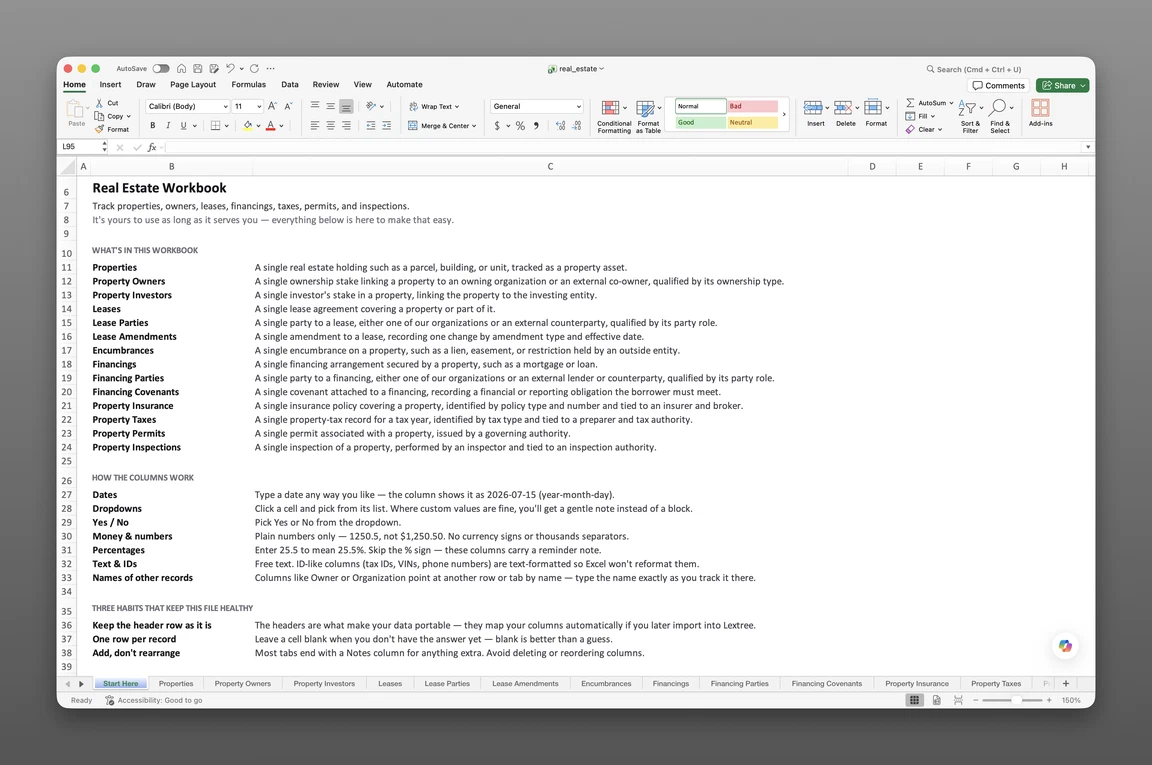
Inside the commercial property register template
- Start Here
How the workbook works — column conventions, dropdown lists, and the habit of adding a row instead of overwriting one.
- Properties
One row per property — full address, parcel number, legal description, zoning, property type, occupancy, portfolio, building area, lot size, year built, acquisition date, purchase price, current value, and disposition.
- Property Leases
Every lease on every property — our role, expense structure, premises, rentable area, base rent, rent frequency, escalation type, renewal options and option terms, and commencement, expiration, and termination dates.
- Property Financings
Every financing secured by a property — lender, financing type, a link to the credit facility behind it, recourse, interest rate, rate type, index, spread, amortization, prepayment terms, and maturity date.
Get the template
Enter your email and we’ll send the commercial property register template to your inbox. Free — no credit card, no call, no follow-up sequence you didn’t ask for.
- Tracked fields across the three data sheets
- 83
- Pre-built dropdown lists
- 15
- Worksheets, ready to fill in
- 4
What a commercial property register is
A commercial property register is a centralized record of every property a company owns or leases — its physical details, its leases, and the financing secured against it — kept current in one place, so a lease option, a loan maturity, or a disposition date never depends on which folder someone happens to open first.
A lease option window closes, and no one remembers which lease PDF buried the notice date. A refinancing lender asks for a property’s current financing terms, and the answer sits in three different files. This commercial property register template for Excel keeps that record in one place before either moment arrives.
This is a record of a corporate property portfolio, not an income or investment model. It holds no cash-flow projections. A register proves what a company holds, what it leases, and what’s financed against it — not what a property earns.
What’s inside the Excel workbook
This real estate portfolio spreadsheet template ships as one Excel workbook, four sheets deep. A Start Here tab leads, followed by three data sheets covering properties, leases, and financing. Together they hold 83 fields behind 15 pre-built dropdown lists, and the workbook opens in Google Sheets as well as Excel.
| Sheet | What it tracks |
|---|---|
| Properties | Address, property type, occupancy, portfolio, building area, lot size, year built, acquisition, valuation, disposition |
| Property Leases | Our role, expense structure, premises, rentable area, base rent, rent frequency, escalation type, options, term dates |
| Property Financings | Lender, financing type, credit facility link, recourse, interest rate, rate type, index, amortization, maturity |
Properties, acquisition to disposition
Properties — 29 fields — is the master list every other sheet keys back to. It holds a full address (line 1, line 2, city, state or province, postal code, country, county or district), parcel number, legal description, and zoning, alongside property type — Office, Medical office, Retail, Industrial / manufacturing, Warehouse / distribution, Multifamily, Single-family residential, Mixed-use, Hospitality, Self-storage, Land, or Agricultural.
Occupancy — Owner-occupied, Owner-occupied and leased, Leased, Partially leased, Vacant, or Under development — sits next to building area, lot size, year built, and number of units. A Portfolio field groups properties for your own reporting, without linking a property to the legal entity that owns it.
Acquisition date, purchase price, current value, and valuation date carry the property’s basic financial picture. Disposition type — Sale, Transfer, Foreclosure or deed in lieu, Condemnation or eminent domain, Exchange, or Gift — closes out a row without deleting it, alongside disposition date and sale price.
Property Leases, one row per agreement
Property Leases — 27 fields — holds our role (Landlord, Tenant, Sublandlord, or Subtenant), expense structure (Gross, Modified gross, Single net, Double net, Triple net NNN, or Absolute net), and premises. Rentable area, permitted use, and rent commencement date sit alongside base rent, rent frequency (Monthly, Quarterly, Semi-annual, or Annual), percentage rent, and escalation type (Fixed amount, Fixed percentage, CPI-indexed, Stepped schedule, Fair market reset, or None).
Options and Option terms record whether a lease carries a renewal or extension option and what it says, so the terms that used to live in a separate amendment sheet now sit on the lease row itself. Auto-renews, notice deadline, security deposit, and additional rent estimate round out the sheet, alongside commencement, expiration, and termination dates.
Property Financings, tied to the loan itself
Property Financings — 27 fields — covers financing type (Permanent mortgage loan, Construction loan, Bridge loan, Mezzanine loan, Line of credit, Seller financing, or Bond financing), lender, loan number, original principal, and outstanding balance. Recourse (Full recourse, Non-recourse, Non-recourse with carve-outs, or Limited recourse), interest rate, rate type (Fixed, Floating, or Hybrid), and index (SOFR, Prime, Bank base rate, US Treasury, EURIBOR, or SONIA) sit alongside spread, amortization, and interest-only terms.
Prepayment terms — Open (no penalty), Step-down penalty, Yield maintenance, Defeasance, or Lockout then open — and extension options round out the loan terms. A Credit facility field can link the row to the same facility already tracked in a treasury workbook, so a mortgage financed under a broader credit line doesn’t need re-entering.
Every sheet also carries a Status: Event, Status: Date, and Status: Description — a lightweight status timeline. Properties logs Acquired, Sold, Transferred, Foreclosed, Condemned, Exchanged, Gifted, or Disposed; Property Leases logs Commenced, Renewed, Holdover, Expired, Terminated, or Superseded; Property Financings logs Originated, Extended, Amended, Defaulted, Cured, Foreclosed or deed in lieu, Settled or forgiven, Refinanced, or Paid off — each against the date it happened, instead of overwriting the field that says what’s current.
How to build your property register
To build a commercial property register in Excel:
- Add a row per property in Properties. Address, property type, and occupancy go on every row before anything else.
- Log every lease as its own row in Property Leases. Premises, base rent, and term dates key back to the property that carries them.
- Log every financing as its own row in Property Financings. Loan number, recourse, and maturity date key back to the property securing the debt.
- Use the status fields instead of overwriting a row. A lease renewal or a loan refinancing becomes a new Status: Event and Status: Date, not an edit that erases what came before.
- Group properties with Portfolio. That’s the field to filter by if you manage several buildings as one investment or reporting unit.
- Sort by expiration or maturity. That’s the fastest way to see what’s coming due first across the whole portfolio.
One row per record
Each row in Properties should represent exactly one property. Leases and financings each key back to that property on their own sheet. Flattening a lease or a loan into a notes column loses exactly what this register exists to hold.
Dates, options, and expirations
Sort or filter Property Leases by expiration, or Property Financings by maturity — each view brings the next deadline in that category to the top. Add your own conditional-formatting rule to any date column for a visual cue between sorts.
In Excel: Home > Conditional Formatting > Highlight Cells Rules > A Date Occurring. The workbook ships with raw dates only. It carries no formulas or built-in alerts, and nothing here fires a reminder until you set one up. For the method behind the options column, see tracking each renewal option’s notice deadline and decision owner.
Built for corporate real estate portfolios
Corporate real estate managers, controllers, general counsel, and facility or operations directors feel a scattered property record first. This happens most often at organizations that both own and lease space. They’re the ones asked to prove property and financing status the moment an auditor or a buyer calls.
Free templates online typically stop at a single-tab rent-collection sheet, or a fixed-asset sheet built for depreciation schedules. This workbook runs the opposite way. It’s a corporate real estate tracking spreadsheet with three keyed sheets covering a property’s full lifecycle, from acquisition through leasing and financing.
Portfolio groups properties for your own reporting — several buildings held as one investment, or one region’s holdings — without needing a spreadsheet per grouping. That’s the register wedge free rent-tracking templates and fixed-asset sheets never attempt, even without a direct link to the owning legal entity.
When a spreadsheet stops working
This property compliance spreadsheet template covers a growing property portfolio before it runs into real edges. There’s no version history, so an overwritten maturity date loses its past. With more than one person editing the file, nothing controls who can see which property’s financing or lease records.
Nothing fires an alert when a lease option or a financing maturity comes due. That gap can run for months. It usually surfaces during an audit, a refinancing, or a lease renewal.
From register to system
This template’s column headers match Lextree’s import templates, so it loads directly into commercial property management software — no re-keying, no remapping.
Deadlines that surface themselves
From there, dates drive reminders instead of waiting for someone to open the sheet. A lease option or a financing maturity chases itself through real estate compliance tracking instead of surfacing at the next audit or renewal.
Frequently asked questions
What is a commercial property register? A centralized record of every property a company owns or leases — its physical details, leases, and financing — kept current in one place.
What’s the difference between a property register and a property management spreadsheet? A property management spreadsheet usually tracks one operational thread, often rent or maintenance, on a single tab. A property register keys leases and financing back to the same property record, so a lease renewal and a loan maturity both stay visible from the same row.
Is this a rental income, ROI, or cash-flow spreadsheet? No. This is a record of a corporate property portfolio, not an income or investment model. It holds no rent roll, no cash-flow projections, and no tenant screening — those belong in a different kind of workbook entirely.
Does this track loan or debt covenants? No. Property Financings holds the loan’s own terms — recourse, rate type, index, amortization, and maturity — not covenant test results. Covenant compliance now lives with the lending relationship itself, in Lextree’s treasury tracking.
Is this a fixed-asset or depreciation register? Not quite. Properties carries acquisition date, purchase price, current value, and valuation date, but it holds no depreciation method, useful life, or net book value. A depreciation schedule is still a separate artifact, built for fixed-asset accounting.
Can I track property leases and financing in Excel? Yes. Property Leases and Property Financings are separate sheets, each keyed back to the same Properties row. A lease renewal option and a loan’s maturity date both stay visible without crowding one column. The workbook opens in Google Sheets as well as Excel.
Does it track property insurance separately? No, not anymore — this template narrowed to properties, leases, and financing. Insurance policies and coverage requirements now live in Lextree’s insurance tracking instead of a dedicated sheet here.
Can one register link a property to the entity that owns it? Not directly. This template no longer carries an owner or legal-entity field on Properties — Portfolio groups properties for your own reporting instead. A property tied to the legal entity holding title belongs in entity-level tracking, not this workbook.
Does it track property financing terms like rate and maturity? Yes. Property Financings covers financing type, recourse, interest rate, rate type, index, spread, amortization, interest-only period, prepayment terms, origination date, and maturity date, and can link to a credit facility you already track separately instead of re-entering the same loan twice.
Who is this template for? Corporate real estate managers, controllers, general counsel, and facility or operations directors at organizations with more than one property, whether owned, leased, or both.
Is the template free, and does it work in Google Sheets? Yes. Enter your email below and the workbook is sent to your inbox — no credit card, no sales call. It opens in Google Sheets as well as Excel, dropdowns included.
The template is free. Take it.
Three data sheets, already built — just add your properties, leases, and financings.