Company Policy Register Template for Excel Download
A free company policy register template for Excel — track policy status, review dates, and which entities have adopted each policy. Sent to your email.
1 Excel workbook · 3 worksheets — free, no credit card.
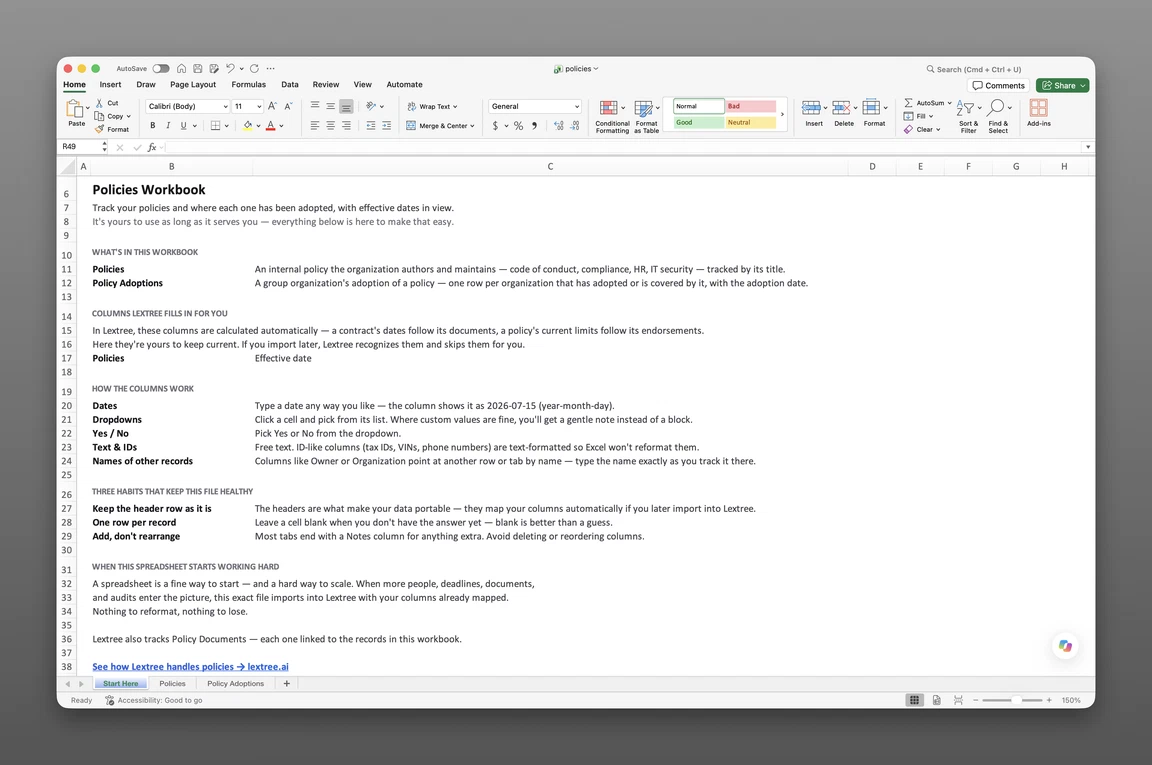
Inside the company policy register template
- Start Here
How the workbook works — column conventions, dropdown lists, and the habit of adding a row instead of overwriting one.
- Policies
One row per policy — name, category, a status of Adopted, Restated, or Retired with its own date and plain-language description, effective date, retired date, next review date, last reviewed date, whether acknowledgment is required, and where the acknowledgment evidence lives.
- Policy Adoptions
One row per entity that adopted the policy, with the date it did — the record of exactly where a policy applies across a group.
Get the template
Enter your email and we’ll send the company policy register template to your inbox. Free — no credit card, no call, no follow-up sequence you didn’t ask for.
- Tracked fields across the two data sheets
- 16
- Pre-built dropdown lists
- 2
- Worksheets, ready to fill in
- 3
What a company policy register is
An acquirer’s counsel asks whether the German subsidiary was actually covered by the expense policy on the date in question, and whether the version in force back then was the original or the restated one. The answer sits somewhere in a shared drive full of PDFs named “final,” “final_v2,” and “final_v2_reviewed,” with no record of which one actually governed and no list of which entities were even covered. The code of conduct is worse — three copies float around with no effective date on any of them, and nobody can say whether the Brazilian subsidiary ever formally adopted it at all.
A company policy register template for Excel fixes the shape of that problem before it becomes a scramble. It is a single workbook that tracks every internal policy’s status, review dates, and which entities have adopted it — one register instead of a shared drive full of PDFs. The qualifier matters: this is a company policy register, for internal policies like a code of conduct or an IT security policy — not an insurance policy register, and not a leave or PTO policy tracker.
The unique piece is the adoption row. Most policy templates stop at a status and a review date. This one adds a record of exactly which group entities adopted a given policy and when — the fact an auditor or acquirer actually asks for.
What’s inside the Excel workbook
This company policy register template ships as one Excel workbook, three sheets deep. A Start Here tab leads, followed by two data sheets covering the policy itself and its adoption:
| Sheet | What it tracks |
|---|---|
| Policies | Policy name, category, status (Adopted, Restated, or Retired) with its date and description, retired date, next review date, last reviewed date, effective date, acknowledgment required, acknowledgment reference, notes |
| Policy Adoptions | Policy, adopting organization, adopted date, notes |
That’s 16 tracked fields across the two data sheets, behind 2 pre-built dropdown lists covering status and category. No formulas, no sample rows — every dropdown is already built, so a status or category is a pick from a list, not a typo waiting to happen.
The policy record
Policies is the anchor sheet — one row per policy, whether it’s a code of conduct, a compliance policy, an HR policy, or an IT security policy. A status column tracks where the policy stands right now — Adopted, Restated, or Retired — next to the date that status took effect and a plain-language description of what changed. Effective date, retired date, next review date, and last reviewed date sit on the same row, so a lapsed review is visible at a glance instead of buried in a calendar someone forgot to check.
Status, not a version log
This register tracks one current status per policy, not a row for every past document. When a code of conduct gets restated, the status moves to Restated, the date updates, and the description says what changed — the prior status and date don’t get a row of their own. That’s a deliberate trade for a single-sheet register: a full version-by-version document history, with every prior draft on file, is what the Policies module in Lextree adds once a register outgrows a current-status field.
Entity adoption
Policy Adoptions is the sheet nobody else’s template has: one row per group entity that adopted the policy, with the date it did. A policy with no adoption rows reads as group-wide by default. A policy with three rows shows exactly which three subsidiaries adopted it, and when — the answer to the acquirer’s question, already on file.
Track policy versions and adoption
Building a usable register from these two sheets follows a short, repeatable sequence:
- Add one row per policy on the Policies sheet — name, category, effective date, and next review date, before anything else.
- Set the status to Adopted when the policy takes effect, with the date and a plain-language description.
- Move the status to Restated or Retired as the policy’s life cycle changes, updating the date and description each time — never leaving the old status in place once it’s no longer true.
- Add a row to Policy Adoptions for every entity that formally adopted the policy, with the adoption date.
- Never overwrite an adoption row — a correction gets a new row, not an edit to an old one. Set the next review date on every policy, so a reviewer opening the sheet six months from now can see what’s coming due without cross-checking a separate calendar.
That habit — a status that’s always current, and an adoption row that’s never edited — is what turns a folder of PDFs into a register. Six months later, “what’s this policy’s status, and who was covered” is a lookup across two sheets, not a search through file names.
When a spreadsheet stops working
This register covers a company with a handful of policies and a handful of entities comfortably. It strains once the count climbs — a group with fifty subsidiaries and a dozen group-wide policies means checking Policy Adoptions against an org chart by hand, and nothing in the workbook flags a review date before it’s already late.
Where acknowledgment lives
This register records adoption — which entities took up a policy and when. The Policies sheet also records whether acknowledgment is required and where that evidence lives: an LMS or an HR system, the system that stays the record for who actually signed. This register stays the record for the policy itself.
From workbook to software
This template’s column headers match Lextree’s import templates, so it loads directly into multi-entity policy tracking software — no re-keying, no remapping. Review-date reminders, an audit-ready version history, and adoption tied to the entities that already hold each other’s records move with it.
A policy register that’s outgrown Excel usually shows the strain first at a due diligence request or an audit that asks for proof across every subsidiary, not just the parent. Software doesn’t replace the never-overwrite discipline the workbook taught — it just stops that discipline from depending on one person remembering to add a row.
Frequently asked questions
What is a company policy register template? A company policy register template is a single Excel workbook that tracks every internal policy’s status, review dates, and which entities have adopted it — a policy library and an adoption record in one file, not a folder of PDFs with the newest one guessed by file name.
What should a company policy register include? A company policy register should include the policy itself — name, category, effective and retired dates, review cycle, its current status of adopted, restated, or retired with the date that status took effect — and which entities adopted the policy and when.
Is this the same as an insurance policy register? No. An insurance policy register tracks coverage, insureds, and certificates. This is a company policy register — internal policies like a code of conduct or an IT security policy — tracked by status and by which entities adopted them.
How do I track which entities adopted a policy in Excel? Add a row to Policy Adoptions for every organization that adopted the policy, with the date it did. An empty adoption list for a policy reads as group-wide; specific rows show exactly where adoption narrowed or a local approval was required.
How do I track a policy’s lifecycle in Excel? The Policies sheet carries a status of Adopted, Restated, or Retired, next to the date that status took effect and a plain-language description of what changed. A restated code of conduct moves to a new status and date on the same row — it doesn’t hold a separate row for every past version. Tracking each version as its own document is what the Policies module in Lextree adds once a register outgrows a single current-status field.
How do I track a policy’s review cycle in Excel? Every policy on the Policies sheet carries a next review date. Sort or filter that column to see what’s coming due across every policy at once, and log the new date each time a review happens — the workbook won’t send a reminder on its own, but the column turns “what’s overdue” into a five-second sort instead of a memory.
Does the company policy register template work in Google Sheets? Yes. The workbook opens in Google Sheets as well as Excel, dropdowns included.
Is the template really free? Yes. Enter your email below and the workbook is sent to your inbox — no credit card, no sales call.
The register is free. Take it.
Three worksheets, already built — just add your policies and adoptions.