Contract Register Template for Excel
A free contract register template for Excel — track parties, amendments, linked documents, renewals, and governing law by contract. Sent to your email.
1 Excel workbook · 5 worksheets — free, no credit card.
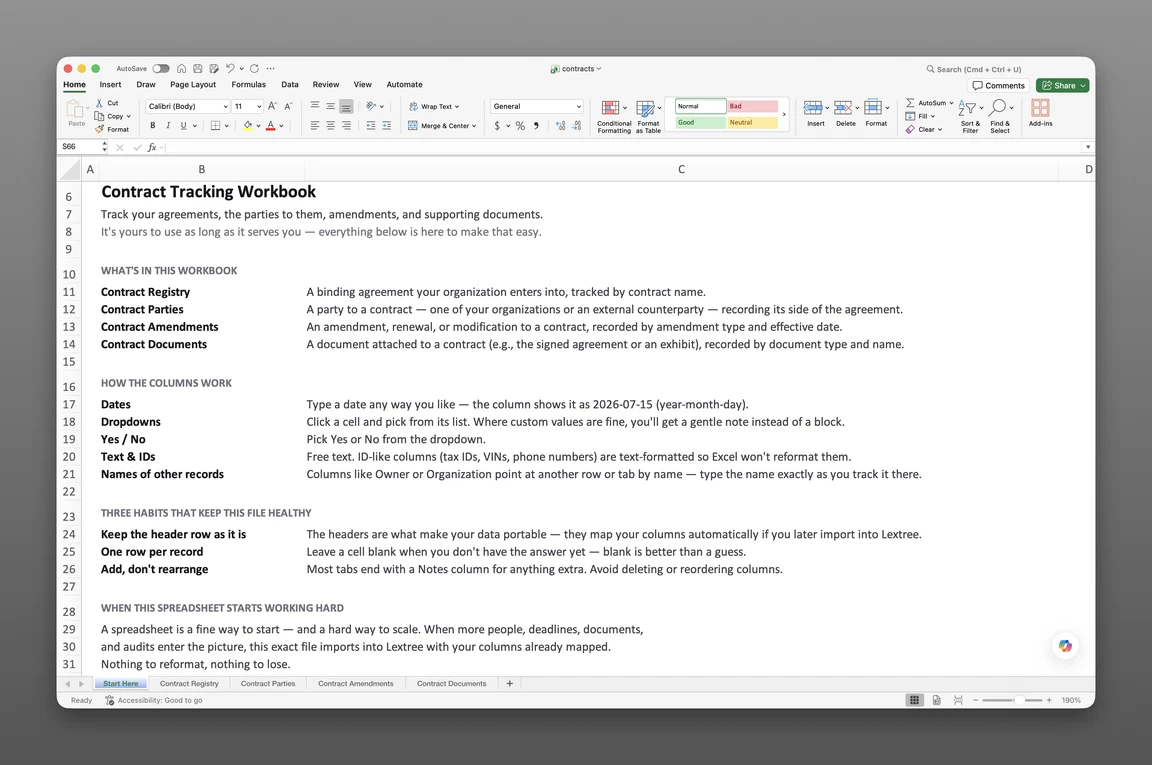
Inside the contract register template
- Start Here
How the workbook works — column conventions, dropdown lists, and the habit of adding a row instead of overwriting one.
- Contract Registry
One row per contract — name, status, type, category, description, contract value, effective and expiration dates, perpetual and auto-renewal flags, termination for convenience, governing law, and dispute resolution.
- Contract Parties
Every party to a contract on its own row — party role (our party or counterparty), the party's name, and a signing-entity flag.
- Contract Documents
Exhibits, statements of work, amendments, and side letters logged against the contract they belong to, with fields that can update the parent contract's effective or expiration date directly.
- Contract Obligations
The duties, rights, and restrictions a contract creates — obligor, obligation type, frequency, next due date, breach terms, and waiver terms, each with its own status timeline.
Get the template
Enter your email and we’ll send the contract register template to your inbox. Free — no credit card, no call, no follow-up sequence you didn’t ask for.
- Tracked fields across the four data sheets
- 51
- Pre-built dropdown lists
- 11
- Worksheets, ready to fill in
- 5
What a contract register is
A contract register is the single authoritative list of every active agreement an organization holds — parties, key dates, governing law, and renewal terms — kept current enough that no one reconstructs that picture from email and shared drives, months after the fact. An auto-renewing master services agreement passes its cancellation window unread, and the vendor relationship locks in for another year before anyone notices. This contract register template for Excel keeps that picture current before it happens again.
Most contract tracking spreadsheet templates are a flat list: contract name, one counterparty, an end date. A register records the relationships underneath that list — who signed on your side versus theirs, what each amendment changed, which documents belong where, and what the contract actually obligates each side to do. When a dispute surfaces later, “which subsidiary signed this?” already has an answer on file, instead of one someone has to dig for.
This is a register, not a negotiation workspace. It doesn’t manage legal review, and nothing fires an alert on its own — it’s a system of record, the place every contract fact lives. The next question about it, whether from a controller, an auditor, or a new hire, gets a fast answer.
What’s inside the Excel workbook
This contract register template ships as one Excel workbook, five sheets deep. A Start Here tab leads, followed by four data sheets covering the contract itself, its parties, its documents, and its obligations:
- Start Here — column conventions and the habit of adding a row instead of overwriting one
- Contract Registry — 18 fields
- Contract Parties — 5 fields
- Contract Documents — 10 fields
- Contract Obligations — 18 fields
That’s 51 tracked fields across the four data sheets. 11 pre-built dropdown lists cover contract type, contract category, dispute resolution, party role, document type, obligation nature, obligor, obligation type, and frequency, so a value never drifts into free text. The Registry and Obligations sheets also carry a Status: Event, Status: Date, and Status: Description column, a lightweight timeline of where each contract or obligation stands. That structure makes this a contract database template Excel and Google Sheets both open, so no team gets locked into one program.
| Sheet | Fields |
|---|---|
| Contract Registry (18) | Contract name, status, contract type, contract category, description, contract value, perpetual, auto-renewal, termination for convenience, governing law country, governing law subdivision, dispute resolution, effective date, expiration date, termination date, notes |
| Contract Parties (5) | Contract, party role, party, signing entity, notes |
| Contract Documents (10) | Contract, document type, effective date, document name, description, document expiration, document value, sets contract effective date to, sets contract expiration to, notes |
| Contract Obligations (18) | Contract, title, status, nature, obligor, obligation type, description, clause reference, frequency, response time, threshold, next due or deadline, breach terms, waiver terms, survives termination, notes |
Registry and governing law
Contract Registry carries 18 fields: contract name, status, type, category, description, contract value, and three flags: perpetual, auto-renewal, and termination for convenience. An evergreen contract never hides behind a blank expiration date. The perpetual flag says so plainly, with auto-renewal recorded right beside it, and a Status: Event value (Executed, Renewed, Expired, Terminated, or Superseded) shows where the contract stands today.
Governing law splits into country and subdivision, structured rather than typed free-hand, with dispute resolution (Litigation, Arbitration, or Mediation) recorded alongside. Contract type spans NDA, Master Services Agreement, Service Agreement, License Agreement, lease, Purchase Agreement, and Employment Agreement. Category sorts by Customer, Vendor, Partner, Intercompany, or Government.
Parties and signing entities
Contract Parties, 5 fields, keeps the party list short and specific: contract, party role (Our party or Counterparty), the party’s name, and a signing-entity flag marking who actually executed the agreement.
That distinction answers the first question a dispute or audit raises: which subsidiary is on the hook, not just which vendor sits opposite. A notes column holds whatever context doesn’t fit anywhere else on the row.
Documents and obligations
Contract Documents, 10 fields, logs exhibits, statements of work, amendments, and other paperwork against the contract they belong to. Document type covers Original Agreement, Amendment, Addendum, Restatement, Extension, Change Order, SOW, Side Letter, Notice, or Termination, each with its own effective date, expiration date, and value. Two fields, sets contract effective date to and sets contract expiration to, let a document like an amendment or restatement update the parent contract’s dates directly, so an executed amendment is the reason the Registry’s expiration date changed, not a separate note explaining it.
Contract Obligations, 18 fields, is new: the duties, rights, and restrictions a contract actually creates, not just its dates. Nature marks each row as a Duty, a Right, or a Restriction; obligor marks who owes it (Our party, Counterparty, Both, or a Third party). Obligation type spans reporting and deliverables, payment, insurance, service levels, audit and records, notification, compliance, personnel, data protection, renewal and termination, and restrictive covenants. Frequency, response time, threshold, next due or deadline, breach terms, waiver terms, and a survives-termination flag round it out, with its own Status: Event value (Satisfied, Breached, Cured, Exercised, Lapsed, Waived, or Expired) showing where each obligation stands.
How to use the template
A dispute lands, and the first question is simple: what does the contract actually say, and who signed it? Answering that from an inbox search or a shared drive takes an afternoon; answering it from a register takes a lookup. Building a contract register from these four sheets follows a short, repeatable sequence.
- Log one row per contract in the Registry. Contract name, type, category, and key dates go on every row before anything else gets added.
- Add every party on its own row in Contract Parties. Record party role, and flag whichever party signed.
- Log every document against the contract it supports. Give an amendment its own Contract Documents row, and use the sets-contract-dates fields when it changes the contract’s term.
- Extract obligations as the contract is negotiated or reviewed. Each duty, right, or restriction gets its own Contract Obligations row, with obligor and next due date tracked separately.
- Never overwrite the original expiration date. Log an amendment document instead, so the history stays intact.
One row per contract
Registry rows should map one-to-one with agreements; parties, documents, and obligations live on their own sheets, each keyed back to that contract. Overwriting the original expiration date erases exactly the history a register exists to keep. Log an amendment document instead, and let the Registry reflect the current term.
Tracking renewals and expirations
As a contract renewal tracker template, the Registry sorts by expiration date to show what’s coming due. Read the auto-renewal flag alongside it so an evergreen contract’s notice window doesn’t slide by unmarked. The template holds raw dates only; whoever owns the contract still has to open the sheet and check it. For one contract’s date, right now, our contract notice period calculator does that counting live and shows its work.
Our guide to understanding your renewal notice window covers the date you must act by, which isn’t the same date the term itself ends.
Built for multiple entities
A single-company contract list assumes one signing party throughout: clean and workable, right up until a second entity joins the portfolio. Filtering Contract Parties by signing entity turns that single list into a per-subsidiary view. It shows which agreements a given entity signed, not just which vendor sits on the other side.
Governing law is recorded as country plus subdivision, not free text. That structure lets a cross-border portfolio sort by jurisdiction instead of getting reconstructed by hand later. Most contract management spreadsheet templates assume one signing party and one jurisdiction; this register assumes a corporate family across countries and states.
Contract managers, paralegals, corporate counsel, and legal ops teams feel that gap first. It’s the moment a spreadsheet built for one company has to answer for ten. A due diligence request during a financing round or acquisition arrives entity by entity, and this register already sorts that way, obligations included.
When a spreadsheet stops working
This register takes most organizations a long way, but it has real edges. There’s no version history or point-in-time snapshot, so an overwritten date loses its past, and reconstructing an earlier register means doing it by hand. With more than one person editing the workbook, nothing controls who can see which contracts, and nothing fires a renewal or obligation reminder on its own.
None of that means the spreadsheet was the wrong place to start. This template’s column headers match Lextree’s import templates, so it loads directly into contract tracking software: no re-keying, no remapping. From there, renewal dates and standing obligations drive reminders instead of waiting for someone to open the sheet, as part of contract management across the entire entity group.
Frequently asked questions
What is a contract register? The single authoritative list of every active agreement an organization holds — parties, key dates, governing law, and renewal terms — kept current enough that no one reconstructs that picture from email and shared drives after the fact.
What should a contract register include? At minimum: contract name, type, category, effective and expiration dates, and renewal terms. A complete register also tracks every party and which one signed, every amendment and supporting document against the contract it belongs to, and the obligations, duties, rights, and restrictions the contract actually creates.
Who is this contract register template for? Contract managers, paralegals, corporate counsel, and legal ops teams, particularly at organizations with multiple entities. A single-company contract list assumes one signing party throughout; this register is built for a corporate family, where subsidiaries sign in different countries and states.
What’s the difference between a contract register and a contract tracker? A generic tracker is a flat list: contract name, one counterparty, an end date. A register records the relationships underneath that list — who signed on your side versus theirs, what each amendment actually changed, and which documents belong to which agreement.
How do I track contract renewal and expiration dates in Excel? Sort or filter the Contract Registry by expiration date, and read the auto-renewal flag alongside it so an evergreen contract’s notice window doesn’t slide by unmarked. The template holds raw dates only — it doesn’t fire a reminder on its own.
Can I track contract amendments in the spreadsheet? Yes. Log an amendment as its own row in Contract Documents, with document type set to Amendment. Two fields, sets contract effective date to and sets contract expiration to, update the parent contract’s dates directly, so the Registry’s current term reflects the last executed amendment, not the date on the original signature page.
How do I record all the parties to a contract? Contract Parties has one row per party — party role (Our party or Counterparty) and a signing-entity flag marking who actually executed the agreement, not just who’s named in it.
How do I link contract documents in Excel? Contract Documents has one row per document — exhibits, statements of work, amendments, and side letters — logged against the contract they belong to, each with its own effective and expiration dates.
Is this a contract management system? No. This is a register — a system of record. It doesn’t manage negotiations or legal review, and nothing here fires an alert on its own. It holds raw dates and facts.
Does the contract register template work in Google Sheets? Yes. The workbook opens in Google Sheets as well as Excel, dropdowns included.
Is the template really free? Yes. Enter your email below and the workbook is sent to your inbox — no credit card, no sales call.
The register is free. Take it.
Five worksheets, already built — just add your contracts, parties, and obligations.