Environmental Compliance Tracking Spreadsheet Template
A free environmental compliance tracking spreadsheet template — sites, standing obligations, inspections, and incidents tracked in one place. Sent to your email.
1 Excel workbook · 5 worksheets — free, no credit card.
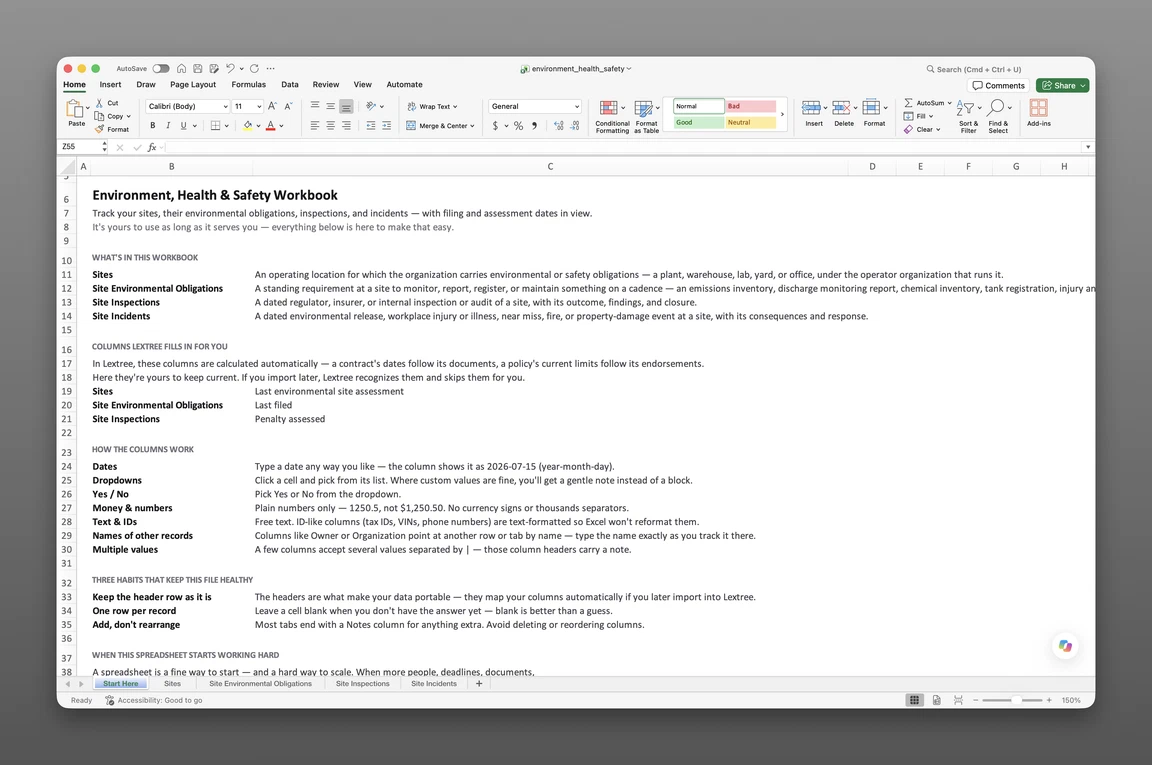
Inside the environmental compliance tracking template
- Start Here
How the workbook works — column conventions, dropdown lists, and the habit of adding a row instead of overwriting one.
- Sites
One row per operating location — operator, address, regulator site ID, hazardous materials on site, regulated activities, a status of Operations began or Operations ceased with its own date, and the last environmental site assessment.
- Site Environmental Obligations
Every standing requirement to monitor, report, register, or maintain something on a recurring cadence, with the permit it ties back to, its source, responsible party, frequency, and next-due date.
- Site Inspections
Every dated inspection or audit of a site, with its scope, whether it was announced, the outcome, and whether a penalty was assessed.
- Site Incidents
A release, injury, near miss, fire, or property damage, with severity, persons injured, whether it's reportable to a regulator, and whether remediation is required.
Get the template
Enter your email and we’ll send the environmental compliance tracking template to your inbox. Free — no credit card, no call, no follow-up sequence you didn’t ask for.
- Tracked fields across the four data sheets
- 78
- Pre-built dropdown lists
- 13
- Worksheets, ready to fill in
- 5
The question every site can’t answer
A state environmental inspector arrives at one of six operating sites and asks for three things: the permit, what it currently requires the site to monitor or report, and the outcome of the last inspection. Someone can usually produce the permit. The other two live somewhere less reliable — a flat spreadsheet that mixes obligations, inspection notes, and incident history into one tab per site, last updated by whoever held the job before.
That single sheet holds up for a while. It stops holding up the moment a second site opens, or a third, each with its own regulator, its own reporting calendar, and its own inspection history that shouldn’t be confused with the others’. A discharge monitoring report renewed after a permit modification two years ago gets remembered by one person, not written down anywhere a colleague can check.
This environmental compliance tracking spreadsheet template replaces that single flat tab with a site-anchored register: one record per site, with its obligations, inspections, and incidents each tracked on their own sheet and linked back to where they happened.
What’s inside the Excel workbook
This template ships as one Excel workbook, five sheets deep — a Start Here tab, followed by four data sheets: the site itself, its standing obligations, its inspections, and its incidents.
| Sheet | Fields |
|---|---|
| Sites | 21 |
| Site Environmental Obligations | 19 |
| Site Inspections | 17 |
| Site Incidents | 21 |
That’s 78 tracked fields across the four data sheets, with 13 pre-built dropdown lists so a site type, obligation type, or incident severity never drifts into free text.
Sites and standing obligations
Sites anchors everything else — operator, address, regulator site ID, operations, hazardous materials on site, regulated activities, a status of Operations began or Operations ceased with its own date and description, and the date of the last environmental site assessment. Site Environmental Obligations logs each standing requirement to monitor, report, register, or maintain something on a recurring cadence — the permit it ties back to, its authority, responsible party, frequency, next-due date, and the date it was last filed.
Inspections and incidents
Site Inspections holds the inspection record itself — type, date, inspector, scope, whether it was announced, the outcome (from no findings through an enforcement action opened), whether the report was received, whether it’s closed, and any penalty assessed. Site Incidents covers a release, injury, near miss, fire, or property damage — what happened, its severity, persons injured, whether it’s reportable to a regulator, and whether remediation is required, all on the same row as a status of Occurred or Closed.
How to use the template
Building this register from four sheets follows a short, repeatable sequence, always starting from the site the work belongs to.
- Log every operating site first. Operator, address, regulator ID, and what happens there go on Sites before anything else gets added.
- Declare each standing obligation once. Authority, frequency, and next-due date go on Site Environmental Obligations, with the permit it ties back to noted on the same row.
- Record inspections as they happen. Scope, whether it was announced, and the outcome go on the same row, updated as the inspection closes out.
- Log incidents as they occur. Severity, whether it’s reportable to a regulator, and whether remediation is required go on Site Incidents; move the status to Closed once it’s resolved.
- Keep the Last filed date and next-due date current on every obligation, so a lapsed filing is visible at a glance instead of buried in a calendar someone forgot to check.
Log the site first
Every other sheet in this workbook keys back to a site, so a record added out of order — an inspection with no matching Sites row — breaks the link the whole register depends on. Getting the site record right first, including which operator runs it, makes every sheet that follows a lookup instead of a re-entry.
Obligations, not permits
This workbook tracks what a site is obligated to monitor, report, or maintain — not the permits that authorize its activity in the first place. A field on Site Environmental Obligations notes the permit an obligation ties back to, but the permit record itself, its conditions, and its renewal date belong in a dedicated license and permit tracker. Keeping that line clean means neither sheet ends up guessing at data the other one owns.
Built for multi-site operators
A spreadsheet built for one location assumes one regulator, one inspection history, one incident log — workable until a second site joins the portfolio and its obligations, inspections, and incidents start bleeding into the first site’s tab. Filtering any sheet in this workbook by site turns that tangle into a per-location view: exactly what a given plant, warehouse, or lab owes, has been inspected on, and has reported, without another site’s history in the way.
EHS managers and environmental compliance coordinators overseeing more than one facility feel that gap first — the moment a regional office asks “what does the Ohio site owe this quarter” and the honest answer requires opening three different files. A site-anchored register answers that question by filtering, not by reconstructing.
When a spreadsheet stops working
This template goes a long way, but it has real edges. There’s no version history, so an overwritten next-due date or inspection outcome loses its past, and nothing here calculates a due date automatically or fires a reminder on its own — every deadline still depends on someone opening the sheet. With more than one person editing the workbook, nothing controls who can see which site’s incident history, and there’s no sheet for tracking a multi-year remediation project once one is underway.
None of that means the spreadsheet was the wrong place to start. This template’s column headers match Lextree’s import templates, so it loads directly into the Environment, Health & Safety module — no re-keying, no remapping. From there, next-due dates and inspection follow-ups drive reminders, and a remediation obligation gets its own record with milestones and cost tracking, instead of waiting for someone to open the file.
Frequently asked questions
What is environmental compliance tracking? Keeping a current record, for every operating site, of what it’s obligated to monitor or report, what’s been inspected, what’s happened there, and what remediation is underway — so the answer to a regulator’s question is a lookup, not a search through old emails.
What should an environmental compliance tracker include? At minimum: a record per operating site, the standing obligations tied to it with next-due dates, dated inspections with their outcomes, and incidents with severity and whether they’re reportable to a regulator.
Who is this environmental compliance tracking template for? EHS managers, environmental compliance coordinators, and site or facilities managers at organizations running more than one operating location. A single flat sheet works for one site; this workbook is built for a portfolio of them, each with its own regulator and obligations.
How is this different from a safety inspection checklist? A checklist walks one inspection. This workbook is a standing register — obligations that recur regardless of whether an inspection happens, and inspections and incidents that connect back to the site that owns them, each with its own current status.
How do I track standing obligation due dates in Excel? Log the obligation once on Site Environmental Obligations with the permit it ties back to, its authority, frequency, and next-due date. A Last filed date on the same row shows when it was last satisfied — this workbook tracks the standing requirement and its current status, not a separate row for every report ever filed against it.
How do I track an inspection’s outcome in Excel? Site Inspections records the outcome directly on its row — No findings, Findings with no enforcement, a notice of violation or citation issued, or an enforcement action opened — next to whether the report was received, whether the inspection is closed, and any penalty assessed.
How do I track environmental incidents in Excel? Site Incidents records what happened, its type, severity, persons injured, whether it’s reportable to a regulator, and whether remediation is required, all on one row. It’s the incident-level record; a full remediation project with its own milestones and cost tracking is what Lextree’s Environment, Health & Safety module adds.
Does this workbook track remediation projects? Not as their own sheet. Site Incidents flags whether remediation is required, but tracking a multi-year cleanup’s phase, cost, and milestones over time is what Lextree’s Environment, Health & Safety module adds once a site has an active remediation to manage.
Does this template track environmental permits? No — permits and their conditions belong in a license and permit tracker. This workbook tracks the standing obligations tied to operating a site, with a field to note the permit a given obligation ties back to.
Does the environmental compliance tracking template work in Google Sheets? Yes. The workbook opens in Google Sheets as well as Excel, dropdowns included.
Is the template really free? Yes. Enter your email below and the workbook is sent to your inbox — no credit card, no sales call.
The tracker is free. Take it.
Five worksheets, already built — just add your sites, obligations, and inspections.