Financial Statement Register Template — Excel Workbook
Free financial statement register template for Excel — track statements by entity, period, scope, assurance level, and audit opinion. Sent to your email.
1 Excel workbook · 2 worksheets — free, no credit card.
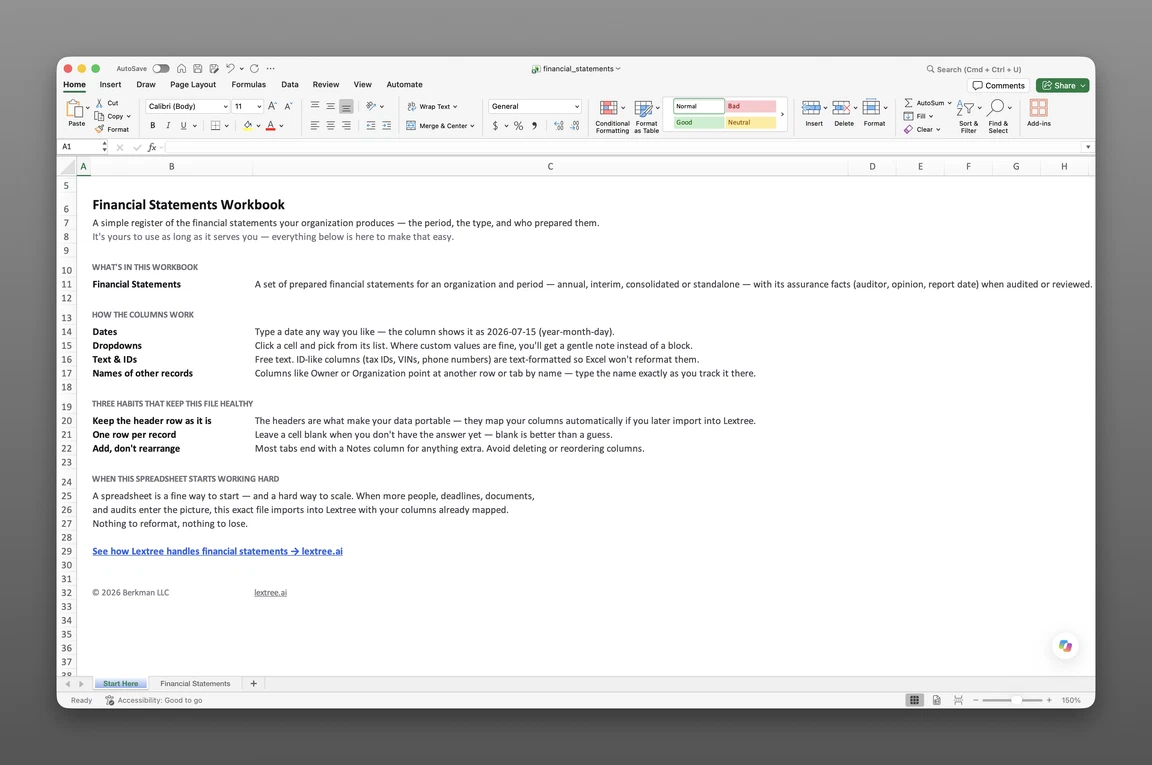
Inside the financial statement register template
- Start Here
How the workbook works — column conventions, dropdown lists, and the habit of adding a row instead of overwriting one.
- Financial Statements
One row per statement — organization, period, scope, auditor, assurance level, period end date, approved-on date, auditor's report date, audit opinion, notes.
Get the template
Enter your email and we’ll send the financial statement register template to your inbox. Free — no credit card, no call, no follow-up sequence you didn’t ask for.
- Tracked fields on the statement register
- 10
- Pre-built dropdown lists
- 3
- Worksheets, ready to fill in
- 2
What the Statement Register Tracks
A lender’s covenant compliance request lands on a Friday afternoon: three years of audited financial statements for each of nine subsidiaries, plus a note on which auditor signed each opinion. The controller remembers assembling six of them for last year’s renewal. The other three are somewhere — a PDF an auditor emailed in 2023, a scanned signature page in a shared drive nobody has opened since, a consolidated set that might or might not be the final version. Two hours of searching finds five. The sixth turns up as an attachment on a thread with the wrong subsidiary’s name in the subject line.
An acquirer’s data-room checklist asks the same question a different way: audited statements for every entity in scope, every period, with the assurance level and opinion named on each one. Nine subsidiaries times three years is twenty-seven statement sets, and a diligence team doesn’t wait while someone reconstructs which set was consolidated and which was standalone. This financial statement register template for Excel exists so that search never has to happen again — one row per statement, per entity, per period, with the scope, assurance level, auditor, and opinion already on record.
One record, every assurance level
Audited, reviewed, compiled, and unaudited sets sit in the same sheet, distinguished by one field instead of four separate habits for filing each kind. A subsidiary too small to warrant a full audit still gets a row — assurance level just reads “Unaudited” instead of sitting blank, so an empty cell never gets mistaken for a missing statement. A CFO overseeing a mix of audited and unaudited subsidiaries reads the whole portfolio from one filtered view instead of keeping two separate lists.
Standalone and consolidated, kept separate
The same entity and period can produce two statement sets: a standalone filing and a consolidated one that rolls up several subsidiaries. Scope is its own field, so “FY2025 (standalone)” and “FY2025 (consolidated)” become two distinct rows, not one entry someone has to remember to qualify out loud when a lender asks which one they’re looking at. Handing over the wrong one, even briefly, reads as sloppy record-keeping rather than an honest mix-up.
What’s Inside the Excel Workbook
This financial statement register template ships as one Excel file, two sheets deep — a Start Here tab and one data sheet, Financial Statements. Ten fields cover every fact a lender, auditor, or acquirer asks for first:
- Identity: Organization, Period, Scope
- Assurance: Auditor, Assurance level, Audit opinion, Auditor’s report date
- Timing & notes: Period end date, Approved on, Notes
Three dropdown lists — scope, assurance level, and audit opinion — keep every row consistent, so “Consolidated” never drifts into “Consol.” on one row and “all subs” on the next. That consistency matters most on the audit opinion column, where “Unqualified” and “clean opinion” describing the same result on two different rows would defeat the point of a dropdown in the first place. The workbook opens in Google Sheets as well as Excel, dropdowns included, and it holds the finished, approved artifact: this sheet records that a statement exists, who signed off on it, and when. It records statements that already exist; it does not compute them — the organization’s accounting system or preparer still produces the figures.
Keep the Statement Register Current
A statement register earns its name by adding a row for every new period, never by overwriting last year’s entry with this year’s numbers. That habit is what keeps three years of history intact for a covenant renewal, instead of leaving only whatever happens to be on file today.
One Row Per Statement
Each organization-period-scope combination gets its own row, added fresh once a statement is finished and approved — never typed over an earlier one. A reissued or restated statement gets a new row too, so the original stays on record next to the correction instead of disappearing underneath it. The temptation to just update last year’s row is strongest right when it matters most — in the middle of a deadline-driven renewal or diligence request.
Record the auditor’s opinion
The audit opinion field is where “audited” stops being a label and starts being proof. Unqualified (clean), qualified, adverse, or disclaimer of opinion — logged next to the auditor’s report date — turns “our statements are audited” into an answer a lender or acquirer can check in one column instead of asking for the report itself. A disclaimer or adverse opinion carries the same weight on the record as an unqualified one; the field exists to make every outcome visible, not just the clean ones.
When the Spreadsheet Stops Scaling
This register has no version history and no permission model. Anyone with the file can edit any entity’s row, and an overwritten opinion or report date leaves no trace of what it replaced. Nine subsidiaries fit comfortably in one sheet; ninety, spread across a dozen audit cycles and reporting calendars, is where a flat file starts working against the person maintaining it.
the Financial Statements module is where those records live permanently instead of in a file someone might resend with the wrong version attached. Each statement links to the entity and period it covers, so the next covenant request or data-room checklist is a query against the record — not a Friday-afternoon search through an inbox.
None of that makes the spreadsheet the wrong place to start. Ten fields and three dropdowns cover what most finance teams need until statement volume outgrows one person’s ability to keep every row current by hand.
Frequently asked questions
What is a financial statement register? A record of every prepared financial statement an organization holds — audited, reviewed, compiled, or unaudited — logged by entity, period, and scope, with the assurance level, auditor, and opinion on file for each one. It’s a register of finished statements, not a tool for producing them.
What does this spreadsheet track? One row per statement: organization, period, scope, auditor, assurance level, period end date, approved-on date, auditor’s report date, audit opinion, and notes. Ten fields on one data sheet — no formulas, no sample rows to overwrite.
Does it track audited and unaudited statements together? Yes. Assurance level is a single dropdown — Audited, Reviewed, Compiled, or Unaudited — so every statement set sits in the same sheet regardless of how much independent assurance it carries.
What’s the difference between a standalone and consolidated statement record? Scope is its own field. A standalone set for one entity and a consolidated set rolling up several subsidiaries for the same period get two separate rows, distinguished by scope instead of a note someone has to remember to add.
Does the spreadsheet prepare financial statements? No. It doesn’t produce the underlying numbers — an accounting system or preparer still does that. This sheet records that a statement exists, who provided assurance on it, and when the auditor’s report was dated.
How do I record the audit opinion? Audit opinion is its own dropdown — Unqualified (clean), Qualified, Adverse, or Disclaimer of opinion — sitting next to the auditor’s report date, so the opinion type is never buried in a notes column or a separate document.
Does it distinguish interim and annual statements? Yes, through the period field. An interim set and an annual set for the same entity are different periods on different rows, not two versions of the same record.
Who is this template for? CFOs, controllers, and finance teams managing statements across multiple entities — anywhere a lender’s covenant request or an acquirer’s diligence checklist asks for statements by entity and period faster than email can produce them.
Does it work in Google Sheets? Yes. The workbook opens in Google Sheets as well as Excel, dropdowns included.
Is it free? Yes. Enter your email below and the workbook is sent to your inbox — no credit card, no sales call.
The register is free. Take it.
Two worksheets, already built — just add your statements.