Fixed Asset Register Template for Excel
A free fixed asset register template for Excel — track titled assets, titling and ownership status, valuation, and disposition history in one workbook.
1 Excel workbook · 2 worksheets — free, no credit card.
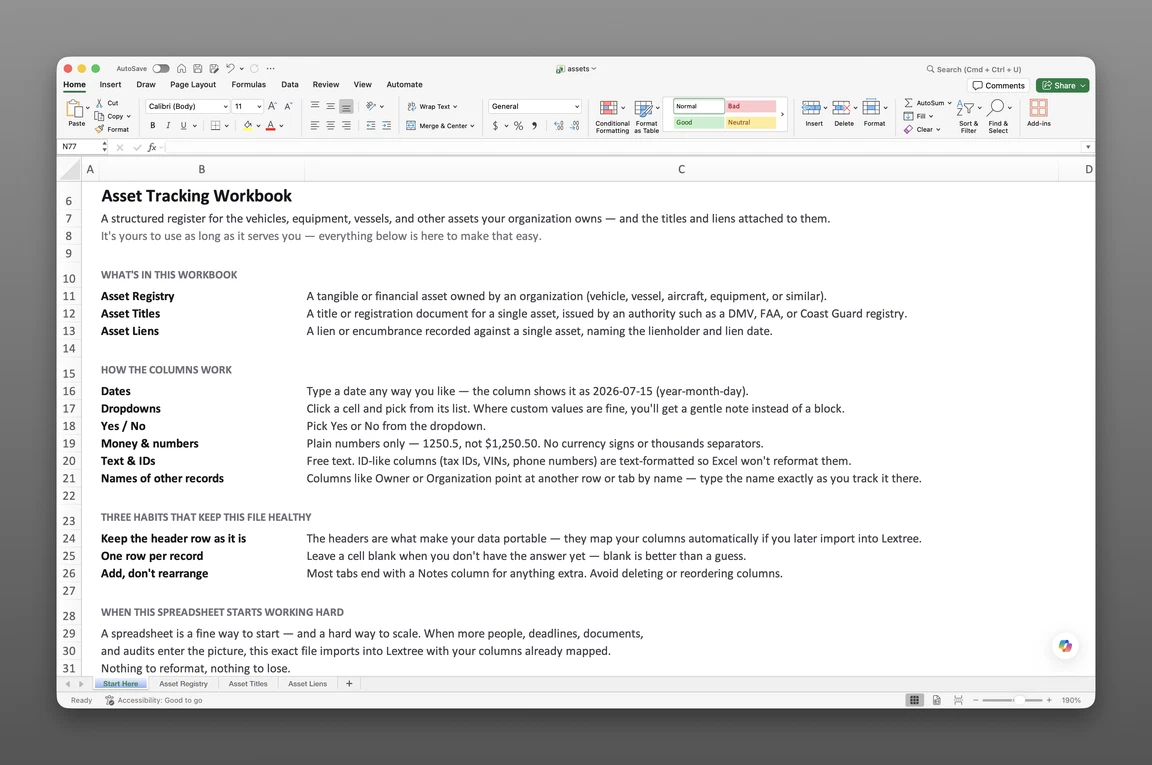
Inside the fixed asset register template
- Start Here
How the workbook works — column conventions, dropdown lists, and three habits that keep the file audit-ready.
- Asset Registry
One row per titled asset — owner, asset type, VIN or serial number, titling jurisdiction and title brand, acquisition date and cost, current valuation, a Status: Event/Date/Description lifecycle trio, and disposition when it leaves.
Get the template
Enter your email and we’ll send the fixed asset register template to your inbox. Free — no credit card, no call, no follow-up sequence you didn’t ask for.
- Tracked fields on the Asset Registry sheet
- 34
- Pre-built dropdown lists
- 8
- Worksheets, ready to fill in
- 2
What a fixed asset register is (and what this template tracks)
A fixed asset register is a record of an organization’s titled tangible assets: what it owns, proof of ownership, any encumbrances, and disposition history. Lenders ask for it before financing equipment, insurers before binding a fleet policy, and due diligence teams before closing an acquisition.
This asset register template covers titled tangible assets specifically: vehicles, aircraft, vessels, heavy equipment, and trailers — anything with a certificate of title, bill of sale, or manufacturer’s statement of origin behind it. That’s narrower than “everything the company owns.” A register built for audits and financing has to answer three questions per asset — Do we own it? Is it encumbered? What happened to it? — that a general inventory list can’t. If you need book value and depreciation math, that’s a depreciation schedule — a different document; the comparison below shows the difference.
What’s inside the Excel template
The workbook has two worksheets — Start Here and Asset Registry — plus a hidden sheet powering the 8 dropdown lists you won’t see or need.
Start Here covers how the file works: what goes in each column, and three habits — one identifier per asset, one row per record, log-don’t-delete on disposition — that keep the register usable a year from now.
Asset Registry is the only data sheet, and it now carries 34 fields on a single row per titled asset rather than spreading title and lien detail across separate tabs. Owning entity, asset type (Vehicle, Aircraft, Vessel, Heavy Equipment, or Trailer), description, source (acquired from, disposed to), and the VIN or serial number, asset tag, make, model, and model year make each row unique. Ownership type (Owned, Financed, Capital Lease, Operating Lease, Rented, or Borrowed), titling jurisdiction (country and subdivision), and title brand (Clean, Salvage, Rebuilt, Flood, Lemon, or Not titled) capture how the asset is held and what its title actually says. A Status: Event / Status: Date / Status: Description trio gives each row a lightweight lifecycle marker — Acquired, Sold, Transferred, Traded In, Scrapped, Stolen, or Disposed — without opening a separate history sheet.
Acquisition date, type, cost, and condition at acquisition (New, Used, Refurbished, or Salvage) establish how the organization came to own it. Placed-in-service date, garaging or berth location, and a usage meter (Odometer in miles or kilometers, Hobbs hours, engine hours, cycles, or none) track where and how hard the asset works. Insured value, estimated market value, and the date that value was set sit next to the row rather than in a separate valuation sheet, and current registration expiration gives a renewal date to watch. Disposition date, type, amount, and usage at disposition close the loop — without deleting the row that proves the asset existed.
There’s no depreciation math here — this is an ownership register, not an accounting schedule. Pair it with your existing accounting system for book value.
How to create a fixed asset register in Excel
Building one from scratch takes five steps:
- One row, one unique identifier per asset. Use the VIN or serial number, not the description — descriptions drift, identifiers don’t.
- Record the owning entity and acquisition details — which legal entity holds title, when it was acquired, and at what cost.
- Record titling jurisdiction and title brand on the same row. Where an asset is titled and whether that title is Clean, Salvage, Rebuilt, or Flood matters as much as who owns it.
- Track valuation and registration renewal dates, not just acquisition cost. Insured value, estimated market value, and current registration expiration go stale fast if no one revisits them.
- Log disposition without deleting the row. Record how and when it leaves, and keep the history.
Or skip the setup — the template above has all five built in.
How to use the template
Recording owners and asset types
Start with owning entity, asset type, VIN or serial number, and acquisition cost and date — the fields every other part of the row builds on.
Recording titling and status together
Fill in titling jurisdiction and title brand when the asset is acquired, and update the Status: Event and Status: Date columns whenever something changes — Acquired to Sold, Transferred, or Disposed. That trio gives a quick read on where a row stands without opening a separate history sheet.
Tracking valuation and registration renewal
Keep insured value, estimated market value, and current registration expiration current rather than set-and-forget. A registration that lapsed unnoticed is a common, avoidable gap.
Logging disposition without losing history
When an asset is sold, transferred, or scrapped, fill in disposition date, type, and amount on its existing row — don’t delete it. Audit and financing lookback windows often run seven years or more, and a register with only current holdings can’t say what the company owned three years back.
Fixed asset register vs. depreciation schedule vs. IT asset inventory
These get confused because they all have “asset” in the name. They answer different questions.
| Document | Answers | Owned by |
|---|---|---|
| Fixed asset register | Do we own it, is it encumbered, what happened to it | Legal, compliance, finance |
| Depreciation schedule | What’s the current book value | Accounting / ERP |
| IT asset inventory | What devices do we have, where are they, who’s using them | IT / ITAM tooling |
A depreciation schedule and this register can describe the same physical asset and never touch — one tracks book value, the other tracks ownership. An IT asset inventory or fleet maintenance log tracks operational detail (location, condition, assigned user) that a fixed asset register deliberately leaves out. Need all three? Normal — just don’t expect one document to do the other two jobs.
When a spreadsheet stops working
This asset tracking spreadsheet takes most organizations a long way, often years. But it strains in specific ways. Excel has no version history, so overwriting title brand or status instead of logging the change loses the prior state. There’s no point-in-time snapshot for an auditor asking “what did we own on March 31,” and nothing flags a registration that’s about to expire until someone goes looking for it. Once more than one person or entity is involved, no one controls who edits which rows. And lien and title-document detail — beyond the title brand and jurisdiction captured here — isn’t something this workbook tracks at all; that’s linked-record territory once you’re past a single spreadsheet.
That doesn’t mean abandoning the spreadsheet. It means knowing when its job is done. This data sheet uses the same column headers as Lextree’s CSV import templates, so the file imports directly into titled asset tracking software, columns already mapped, no re-keying. From there, records live in a system with real version history, entity-level access control, and audit trails — see asset management for compliance for the bigger picture.
Frequently asked questions
What is a fixed asset register? A record of an organization’s titled tangible assets — what it owns, proof of ownership, any liens, and what happened to it. Used for audits, financing, insurance, and due diligence.
What should a fixed asset register include? At minimum: a unique identifier (VIN or serial number), owning entity, acquisition details, title document and issuing authority, lien status, and disposition once an asset leaves.
Is a fixed asset register the same as a depreciation schedule? No — a depreciation schedule tracks book value, while a fixed asset register tracks ownership, title, and encumbrances. Most organizations maintain both.
How do I track liens and titles in the template? Titling jurisdiction and title brand (Clean, Salvage, Rebuilt, Flood, Lemon, or Not titled) live as columns directly on the Asset Registry row — no separate sheet to keep in sync. Lien tracking isn’t part of this workbook; Lextree tracks liens as linked records once you’re in the full module.
Can I use it for vehicles, aircraft, and heavy equipment? Yes. The asset type dropdown covers Vehicle, Aircraft, Vessel, Heavy Equipment, and Trailer — any titled asset, regardless of issuing authority.
Do I delete an asset when it’s sold? No. Fill in disposition date, type, and amount on its existing row — that retained history is what an auditor or acquirer’s due diligence team wants to see.
Is the template really free? Yes. Enter your email below and the workbook is sent immediately — no credit card, no sales call.
The spreadsheet is free. Take it.
No sample data to clear out, no formulas to break. Just the columns you need, already built.