Nonprofit Grant Tracking Spreadsheet Template
Free nonprofit grant tracking spreadsheet template for Excel — track grants received and made, match requirements, and reporting deadlines. Sent to your email.
1 Excel workbook · 4 worksheets — free, no credit card.
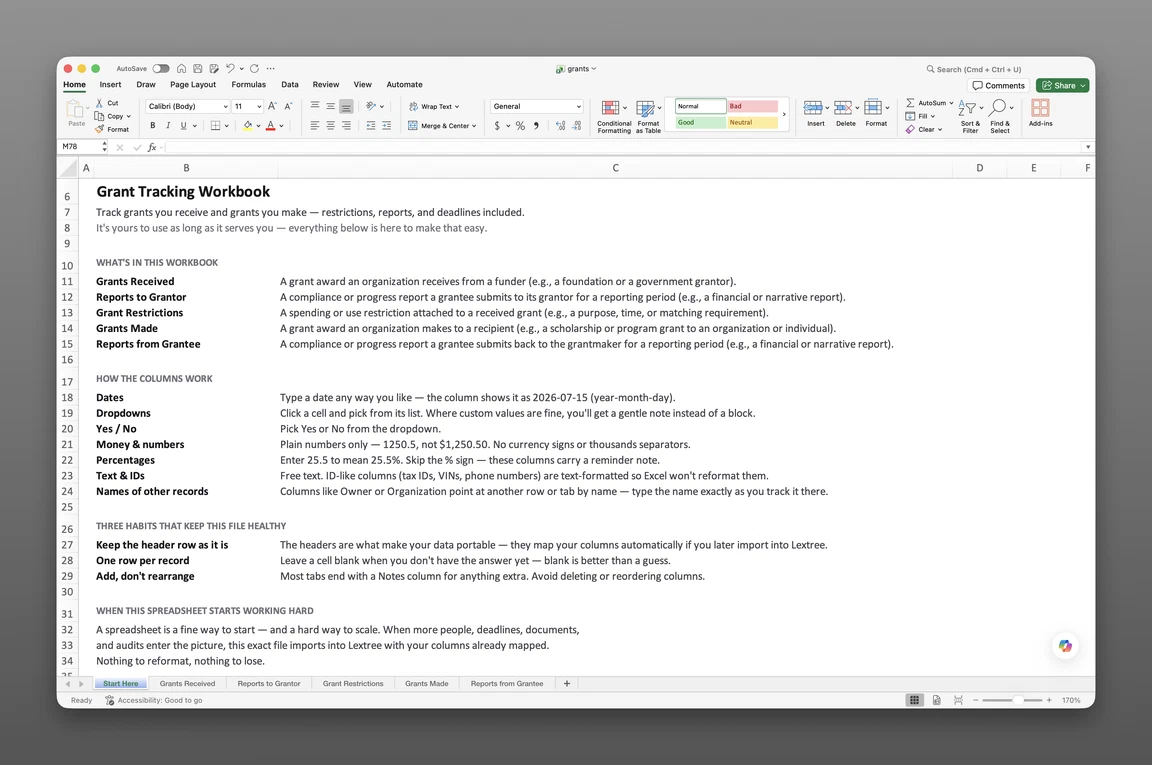
Inside the nonprofit grant tracking spreadsheet template
- Start Here
How the workbook works — column conventions, dropdown lists, and the habit of adding a row instead of overwriting one.
- Grants Received
One row per award — grantor and grantor type (Private Foundation, Community Foundation, Corporate Foundation, national/state/local government, and more), program area, award/start/end/close-out dates, renewal deadline, award amount vs. amount received, a restricted flag, disposition of unspent funds, indirect cost rate, match requirement and amount, and a Status: Event / Status: Date / Status: Description timeline.
- Grants Made
One row per grantee — grantee type (registered charity, private foundation, government body, educational institution, fiscally sponsored project, individual, and more), approval forum, due diligence level (Standard, Enhanced Review, Equivalency Determination, Expenditure Responsibility), charitable status verified on, payment schedule, amount disbursed, and its own status timeline.
- Reports to Grantor
The outbound register — report type, reporting period start/end, due date, submission date and method, confirmation number, revision-requested and revision-due dates, accepted date, and the grant it reports back on.
Get the template
Enter your email and we’ll send the nonprofit grant tracking spreadsheet template to your inbox. Free — no credit card, no call, no follow-up sequence you didn’t ask for.
- Tracked fields across the three data sheets
- 79
- Pre-built dropdown lists
- 15
- Worksheets, ready to fill in
- 4
What a grant tracking spreadsheet is
A nonprofit grant tracking spreadsheet template is a single Excel workbook that records every grant an organization receives — award terms, match requirements, and reporting deadlines — and every grant it makes, keyed to the same grantee and due-diligence detail. This nonprofit grant tracker template covers both directions in one workbook.
Most free trackers online cover only the money coming in — award terms and reporting deadlines owed to a grantor. This one adds the money going out: grantee due diligence, charitable-status verification, and the reports owed back.
This is a record, not software, with no formulas or automated alerts until a team builds its own. A close-out report comes due before anyone circles it on a calendar. A restricted award gets spent, but nothing on the workbook proves it was spent the way the grantor required.
What’s inside the Excel workbook
The workbook ships as one Excel file, four sheets deep. A Start Here tab leads, followed by three data sheets covering grants received, grants made, and outbound reporting.
Together, the three data sheets hold 79 fields behind 15 dropdown lists — most free trackers stop at grants received; this one adds grants made. This grant management template for Excel opens in Google Sheets as well as Excel.
| Sheet | What it tracks |
|---|---|
| Grants Received | Grantor and grantor type (Private Foundation, Community Foundation, Corporate Foundation, government at every level), program area, award/start/end/close-out dates, renewal deadline, award amount vs. amount received, restricted flag, disposition of unspent funds, indirect cost rate, match requirement/amount |
| Grants Made | Grantee and grantee type (registered charity, private foundation, government body, educational institution, fiscally sponsored project, individual), approval forum, due diligence level, charitable status verified on, payment schedule, amount disbursed, close-out date |
| Reports to Grantor | Report type, reporting period start/end, due date, submission date and method, confirmation number, revision-requested/due dates, accepted date |
Grants received and match terms
Grants Received — 32 fields — holds grantor and grantor type: Private Foundation, Community Foundation, Corporate Foundation, or a national, state, or local government body. Program area and award, start, end, and close-out dates round out the row.
Award amount and amount received run as two separate clocks, so a grant with staggered drawdowns never looks fully funded before it is. A restricted flag on the row pairs with disposition of unspent funds — Fully Spent, Returned to Grantor, Carried Forward, or Reallocated — plus match requirement and match amount, so a cost-share obligation never gets separated from the award it belongs to.
Grants made and grantee diligence
Grants Made — 28 fields — is the sheet nobody ships free. It holds grantee and grantee type: registered or public charity, private foundation, government body, educational institution, fiscally sponsored project, non-charitable organization, or individual. Approval forum names who signed off — Board, Grants Committee, Staff Under Delegated Authority, or Donor Recommendation.
Due diligence level — Standard, Enhanced Review, Equivalency Determination, or Expenditure Responsibility — sits on the same row as charitable status verified on, payment schedule, amount disbursed, and close-out date. Multi-year and unspent-funds-returned round out the row.
That vocabulary — due diligence level, charitable status verification, grantee types split by legal form — makes this a grantmaking tracker template built for the funder’s side. It’s not a relabeled award list.
Reports to grantors
Reports to Grantor — 19 fields — ties every outbound report back to the grant it belongs to. It tracks report type (Narrative, Financial, Narrative and Financial, Audited Financial Statements, Evaluation, or Compliance Certification), reporting period start and end, due date, submission date and method, and confirmation number.
A revision-requested date and revision-due date appear if the grantor sends the report back; an accepted date closes the loop. Both Grants Received and Grants Made, along with Reports to Grantor, carry a Status: Event / Status: Date / Status: Description timeline, so a grant’s move from Awarded to Closed Out has its own dated row.
How to track reporting deadlines
A grant reporting spreadsheet template earns its name by keeping every due date, submission, and confirmation number on its own row. Nothing stays buried in email. This section shows how to track grant reporting deadlines in Excel with this workbook.
To track grant reporting deadlines in Excel:
- Add a row per award on Grants Received. Every foundation, government, or corporate grant gets its own row with grantor, award date, and end date.
- Flag restricted awards and record their match terms. A restricted flag, disposition of unspent funds, and match requirement all sit on the same row as the award.
- Log every grantor report with a confirmation number. Due date, submission date, and confirmation number on Reports to Grantor keep each outbound report provable.
- Record grantee due diligence as it’s completed. Due diligence level and charitable status verified on go on Grants Made before funds go out.
- Record close-out and renewal dates as they’re set. Close-out date, renewal deadline, and renewal eligible each get their own field, not one shared date.
- Sort Grants Received by the nearest due date. The report or renewal deadline coming up soonest rises to the top.
Restricted funds and matching
A restricted flag and its disposition-of-unspent-funds field keep a spend condition provable long after the award letter is filed away. Matching required, matching amount, and the indirect cost rate the grantor allows all sit on the same row as the award, so a cost-share obligation never gets separated from the grant it belongs to.
Together these fields turn Grants Received into a grantor reporting requirements template, not just a list of dollar amounts.
Renewal and close-out dates
Renewal deadline and renewal eligible sit apart from the award’s end date on Grants Received; multi-year sits apart from the end date on Grants Made. A three-year award renews on a different clock than the one that marks when it simply ends.
Close-out date sits apart from both. A multi-year renewal never hides behind an end date that only tells half the story.
Built for grantmakers and grantees
Nonprofit finance directors, grants managers, and foundation program officers feel a scattered grant record first. A community foundation often works both sides in the same fiscal year. It receives grants from a state agency and makes grants to a dozen local nonprofits.
A finance director watches the grants-received side for renewal deadlines and match compliance. A program officer watches the grants-made side for due diligence and close-out reports. This workbook keeps both in the same four sheets, instead of splitting them across two separate tools.
Match and reporting compliance don’t stop at the grant record. They meet the organization’s annual filing calendar, which is nonprofit compliance.
When a spreadsheet stops working
This tracker covers a growing portfolio of grants received and made before it hits real edges. There’s no version history, so an overwritten close-out date erases its own past.
Nothing fires when a grantor report or a renewal deadline comes due — that gap surfaces as a missed deadline at the worst possible time. Add your own conditional-formatting rule to flag either date — in Excel: Home > Conditional Formatting > Highlight Cells Rules > A Date Occurring.
From workbook to software
This template’s column headers match Lextree’s import templates, so it loads directly into grant tracking software — no re-keying, no remapping. Access control, real alerts, and multi-user editing start on the other side of that import, and that’s also where restriction-type detail and inbound grantee reporting pick up as linked records beyond what this workbook holds.
That handoff matters most once a portfolio spans dozens of grants on both sides, one missed verification away from an audit finding. Software keys that portfolio to the entities already tracked elsewhere in Lextree.
Deadlines that surface themselves
From there, Lextree turns dates into reminders, instead of waiting for someone to open the workbook. A grantor report chases its owner on schedule, and a renewal deadline surfaces itself before its date arrives.
A grants manager stops opening the workbook every Monday to check what’s coming due, because the system already flagged it.
Frequently asked questions
What is a nonprofit grant tracking spreadsheet template? A nonprofit grant tracking spreadsheet template is a single Excel workbook that records every grant an organization receives and every grant it makes — grantor and grantee, award and reporting dates, and the match, disposition, and due-diligence terms attached to each. It functions as a grant compliance tracking spreadsheet for nonprofits working on both sides of the grant relationship.
Does it track both grants received and grants made? Yes. Grants Received covers the money coming in, with a restricted flag, match requirement, and disposition of unspent funds on every award. Grants Made covers the money going out, with grantee due diligence level and charitable-status verification built in.
Is there a grant tracking spreadsheet for grantmakers and foundations? Yes. The Grants Made sheet carries grantee type, charitable status verified on, due diligence level, payment schedules, and close-out dates — the funder side most free trackers skip entirely. A foundation or grantmaking nonprofit gets the same row-level structure grantees expect, built for the side that writes the check.
Is this fund accounting software? No. This tracks grants, awards, and reporting dates — not a general ledger or bookkeeping system. Fund accounting stays in your accounting software.
Is this for grant writing or grant applications? No. This tracks grants after the award is made — reporting, match terms, and grantee diligence — not grant writing, proposal drafting, or an application pipeline of prospects.
How do I track grant reporting deadlines in Excel? Log every grantor report on Reports to Grantor with a due date, submission date, and confirmation number, then sort Grants Received by the nearest close-out or renewal deadline.
Does it track restricted grant funds? Lightly. Grants Received carries a restricted flag, a disposition of unspent funds field (Fully Spent, Returned to Grantor, Carried Forward, Reallocated), and match requirement and amount — but there’s no separate restriction-type or verification-method sheet. Grant tracking software tracks restriction compliance as its own linked record.
Can it track grantee due diligence and charitable-status verification? Yes, in simplified form. Grants Made carries grantee type, charitable status verified on, and a due diligence level — Standard, Enhanced Review, Equivalency Determination, or Expenditure Responsibility — that names the compliance approach directly rather than splitting it across separate fields.
Does it handle multi-year and renewal grants? Yes. Grants Received carries a renewal deadline and a renewal eligible flag; Grants Made carries a multi-year flag. Track year-over-year renewals through the award, start, and end dates on each sheet.
Does it track matching or cost-share requirements? Yes. Match requirement (None, Cash, In-Kind, Cash or In-Kind) and match amount sit on the same row as the award, alongside the indirect cost rate the grantor allows.
Does the tracker send deadline reminders? No. The workbook holds raw dates only, with no built-in alerts. Add your own conditional-formatting rule to flag a due date, or move to software that fires reminders on its own.
Is it free, and does it work in Google Sheets? Yes. Enter your email below and the workbook is sent to your inbox — no credit card, no sales call. It opens in Google Sheets as well as Excel, dropdowns included.
Is there a free grant management template for Excel? Yes — this one. It’s a free workbook with 4 worksheets and 79 fields, covering grants received and grants made — sent to your email, and it opens in Google Sheets as well as Excel.
The template is free. Take it.
Four worksheets, already built — just add your grants, awards, and reports.