Insurance Policy Register Template for Excel
A free insurance policy register template for Excel — track policies, coverage terms, cancellations, and certificates issued. Sent to your email.
1 Excel workbook · 3 worksheets — free, no credit card.
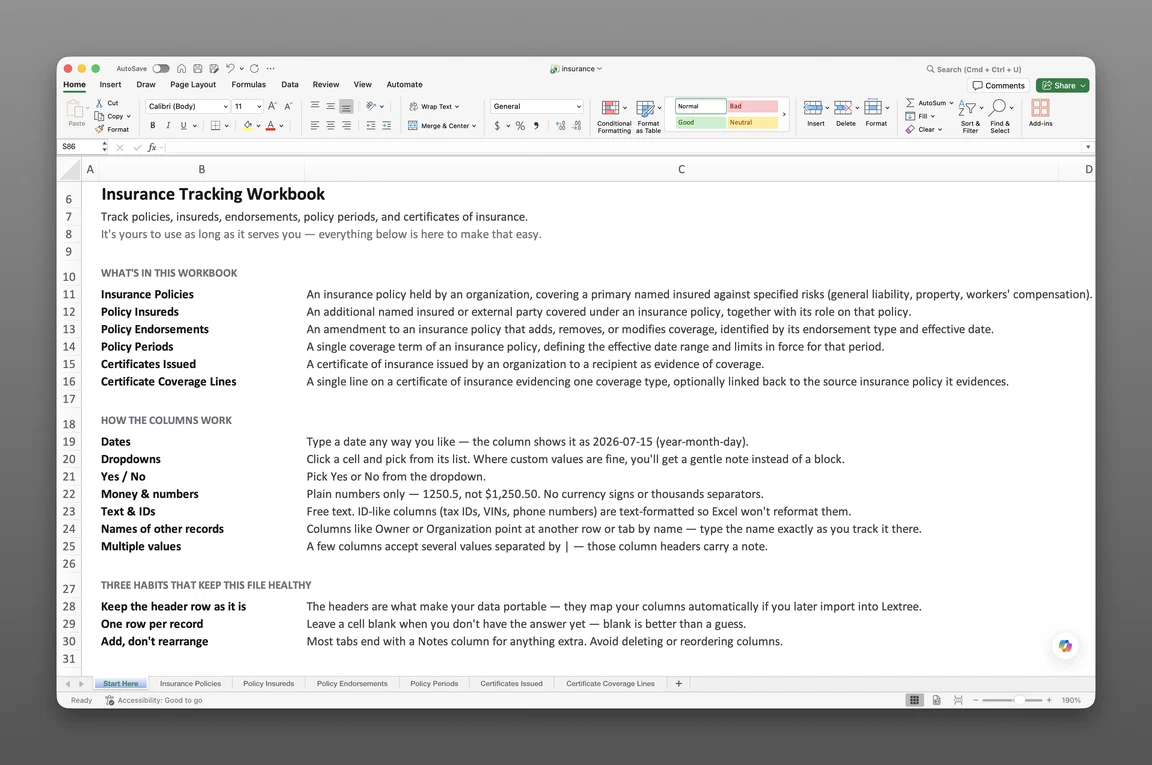
Inside the insurance policy register template
- Start Here
How the workbook works — column conventions, dropdown lists, and the habit of adding a row instead of overwriting one.
- Insurance Policies
One row per policy — insurer, broker, policy type, our relationship to the policy, coverage territory, retroactive date, cancellation and termination detail, and current limits, deductible, retention, and premium.
- Insurance Certificates
The full issuance log — issuer, recipient, certificate type, requiring instrument, issue date, effective and expiration dates, and holder status and provisions.
Get the template
Enter your email and we’ll send the insurance policy register template to your inbox. Free — no credit card, no call, no follow-up sequence you didn’t ask for.
- Tracked fields across the two data sheets
- 40
- Pre-built dropdown lists
- 9
- Worksheets, ready to fill in
- 3
What an insurance policy register is
An insurance policy register is the single authoritative list of every policy an organization holds — insurer, coverage, limits, effective and expiration dates, the organization’s relationship to each policy, and the certificates issued against them. A lender asks for proof of coverage three days before closing, and the answer must come from a current record, not a broker’s inbox. This insurance policy register template for Excel keeps that record ready before the request arrives.
Most insurance policy tracking spreadsheets on the market are flat lists built for a single policy, not a multi-entity portfolio. A register records what a flat list skips: the organization’s actual relationship to each policy, named insured, additional insured, loss payee, or certificate holder only, why a policy was cancelled or didn’t renew, and every certificate issued against it. That structure is what turns a spreadsheet into a system of record.
This register tracks the organization’s own policies and the certificates it issues — not claims, not premium calculations, not coverage owed under someone else’s contract. It’s the place every policy fact lives, kept current enough to answer a request instead of reconstructing one under deadline. The next request, whether from a lender, a landlord, or an auditor, gets a lookup instead of a scramble.
What’s inside the Excel workbook
This insurance policy register template ships as one Excel workbook, three sheets deep. A Start Here tab leads, followed by two data sheets: the policies themselves, and the certificates issued against them. Together they hold 40 tracked fields, organized behind 9 pre-built dropdown lists, and the workbook opens in Google Sheets as well as Excel.
- Start Here — column conventions and the habit of adding a row instead of overwriting one
- Insurance Policies — 26 fields
- Insurance Certificates — 14 fields
| Sheet | What it answers |
|---|---|
| Insurance Policies | Insurer, broker, policy type, our relationship, coverage territory, retroactive date, cancellation and termination detail, current limits and deductible |
| Insurance Certificates | Issuer, recipient, certificate type, requiring instrument, issue date, effective and expiration dates, holder status and provisions |
Policies and current terms
Insurance Policies, 26 fields, carries insurer, broker, policy number, policy name, and policy type, plus coverage basis (Occurrence or Claims-Made), retroactive date, coverage description, and coverage territory. Our relationship marks whether the organization is the named insured on its own policy, or sits on a third party’s policy as an additional insured, a loss payee or mortgagee, or a certificate holder only. Current effective date, current expiration date, and current per-occurrence limit, aggregate limit, deductible, retention, and premium round out the row, along with a Status: Event value (Incepted, Renewed, Expired, Cancelled, or Non-renewed) and, when a policy ends early, cancellation date, terminated by, and termination reason.
Policy type covers twenty options, from General / Public Liability and Professional Liability (E&O) through Directors & Officers (D&O), Cyber Liability, Environmental / Pollution Liability, Marine, Aviation, Trade Credit, and Surety Bond. A dropdown list keeps every entry standardized instead of free text.
Certificates issued log
Insurance Certificates, 14 fields, is a certificate of insurance issuance log template: issuer, certificate type, recipient and recipient name, issue date, certificate number, and effective and expiration dates. Sent date, holder status and provisions, and request provenance, requiring instrument, request reference, and request date, round out the record.
Certificate type covers a Certificate of Liability Insurance, Evidence of Property Insurance, a Workers Compensation / Employers’ Liability Certificate, a Certificate of Currency, and a cover note or broker confirmation. Requiring instrument runs a customer contract, a vendor or subcontract, a lease, a loan or financing agreement, a licence, permit, or regulator, a bid or prequalification, or no written requirement at all. Every certificate shows why someone asked for it, and what it’s tied to.
How to use the template
A landlord’s certificate request lands three days before a lease closes, and the fastest path to an answer runs through a register that’s already current. Digging through broker emails at that point costs a day the closing schedule doesn’t have. Building a register from these two sheets follows a short, repeatable sequence.
- Log one row per policy in Insurance Policies. Insurer, policy type, our relationship, and current limits go on every row before anything else.
- Record how the organization relates to the policy, not just that it exists. Named insured, additional insured, loss payee, or certificate holder only: pick the one that’s actually true.
- Update the current fields at every renewal. Current effective date, expiration date, and limits move forward together, so the row always reflects today’s terms.
- Log a cancellation or non-renewal the day it happens. Terminated by and termination reason capture why a policy ended early, not just that it did.
- Log every certificate issued in Insurance Certificates. Recipient, certificate type, requiring instrument, and issue date go on every row.
For example, a holding company’s General Liability policy names a subsidiary as an additional insured. Our relationship on that policy’s row reads “Third party’s policy: we are an additional insured,” tying the subsidiary’s coverage back to the parent’s policy without a separate insureds sheet to maintain.
When the subsidiary’s landlord asks for proof of coverage under its lease, Insurance Certificates logs the certificate with requiring instrument set to the lease, tied back to that same GL policy through the certificate record itself.
One row per record
Insurance Policies rows should map one-to-one with policies, and certificates key back to the policy they draw from on their own sheet. Flattening a relationship or a termination reason into a notes column loses exactly the detail a register exists to keep.
Tracking renewals and expirations
Sort Insurance Policies by current expiration date, and read the Status: Event value alongside it. Update the current limit and premium fields at each renewal rather than leaving last year’s numbers in place. This insurance policy log template for Excel holds today’s terms, not a period-by-period archive; an organization that needs the full renewal history alongside today’s terms gets that from insurance policy tracking software instead, or starts with a renewal comparison of the expiring and renewal terms at each renewal.
Built for multiple entities
Primary Insured and our relationship sit on every row in Insurance Policies, not just the policy number. A holding company insuring ten subsidiaries under one master policy must know which entity carries which coverage, and in what capacity, not that a policy exists somewhere. A single flat list can’t answer that; a register with an entity field and a relationship field on every row can.
Coverage territory and policy type are both structured fields, so the portfolio sorts by jurisdiction and coverage type when a due diligence request arrives. A cross-border group answers “which entity carries GL coverage in which territory” with a filter, not a call to the broker. That same filter separates a subsidiary’s certificates from the parent’s during an acquisition review.
Risk managers, controllers, corporate counsel, and operations managers at multi-entity organizations feel this gap first. A spreadsheet built for one company has to answer for ten, often while a certificate request names one specific subsidiary. A register with entity and relationship on every row is ready for that question before anyone asks.
When a spreadsheet stops working
This register covers a long list of policies before it runs into real edges. There’s no version history, so an overwritten limit loses its past, and reconstructing it means doing so by hand. There’s no period-by-period renewal archive either, only the current terms on each policy’s row — to compare one period’s terms against the next, you’re pulling old versions by hand. With more than one person editing the workbook, nothing controls who can see which policies, and nothing fires an alert on its own.
This template’s column headers match Lextree’s import templates, so it loads directly into insurance policy tracking software: no re-keying, no remapping. From there, every renewal keeps its own record instead of overwriting the last one, and expiration and certificate dates drive reminders instead of waiting for someone to open the sheet.
Certificates you collect from vendors and contractors are a different job — see certificate of insurance tracking software for that side of the work.
Frequently asked questions
What is an insurance policy register? The single authoritative list of every policy an organization holds — insurer, coverage, limits, effective and expiration dates, the organization’s relationship to each policy, and the certificates issued against them.
What should an insurance policy register include? At minimum: primary insured, insurer, policy type, coverage limits, and effective and expiration dates. A complete register also tracks the organization’s relationship to each policy (named insured, additional insured, loss payee, or certificate holder), cancellation or termination detail when a policy ends early, and every certificate issued — recipient, requiring instrument, and issue date — against the policy it certifies.
What’s the difference between an insurance policy register and an insurance policy list? A list holds one row per policy and goes stale the moment a relationship changes or a policy is cancelled early. A register keys the relationship, termination detail, and issued certificates back to each policy, so the current picture and why a policy ended both survive.
Who is this insurance policy register template for? Risk managers, controllers, corporate counsel, and operations managers, particularly at organizations with multiple entities. A single-policy tracker assumes one insured throughout; this register is built for a corporate family, where a holding company insures subsidiaries under one master policy.
Can I track policies for multiple companies or subsidiaries? Yes. Primary Insured sits on every row in Insurance Policies, and our relationship carries across the corporate family, so a holding company and its subsidiaries share one register instead of one spreadsheet apiece.
How do I track insurance policy renewals and expirations in Excel? Sort or filter Insurance Policies by current expiration date, and read the Status: Event value alongside it. Update the current limit and premium fields at each renewal. The template holds today’s terms only, not a period-by-period archive, and it doesn’t fire a reminder on its own.
Can I track why a policy was cancelled or didn’t renew? Yes. Insurance Policies carries cancellation date, terminated by (Insured, Insurer, or Mutual agreement), and termination reason, so a policy that ended early carries its own explanation instead of just going blank in the record.
How do I log certificates of insurance we issue? Insurance Certificates has one row per certificate — issuer, recipient, certificate type, issue date, and requiring instrument, whether that’s a customer contract, a lease, or a loan agreement.
Does this track certificates we issue, or certificates we collect from vendors? Issuance only. This template logs certificates your organization issues to landlords, lenders, and customers who ask for proof of coverage. Certificates you collect from vendors and contractors are a different job — see certificate of insurance tracking software for the collection side.
Is this claims management software? No. This is a register — a system of record for policies and the certificates issued against them. It doesn’t manage claims or calculate premiums, and nothing here fires an alert on its own.
Is the template really free, and does it work in Google Sheets? Yes. Enter your email below and the workbook is sent to your inbox — no credit card, no sales call. It opens in Google Sheets as well as Excel, dropdowns included.
The register is free. Take it.
Three worksheets, already built — just add your policies and certificates.