Intellectual Property Register Template for Excel
Free intellectual property register template for Excel — track patents, trademarks, copyrights, domains, licenses, and trade secrets. Sent to your email.
1 Excel workbook · 8 worksheets — free, no credit card.
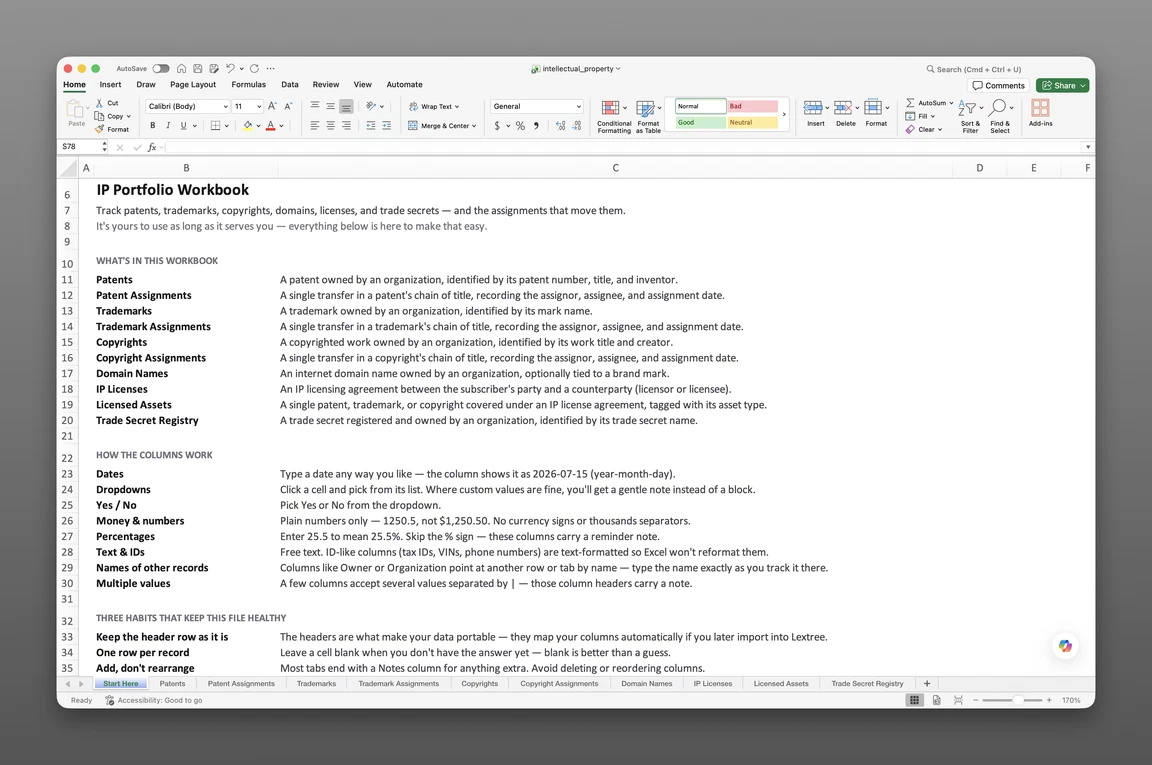
Inside the intellectual property register template
- Start Here
How the workbook works — column conventions, dropdown lists, and the habit of adding a row instead of overwriting one.
- Patents
One row per patent — patent type (Utility, Design, Plant, Utility Model, Provisional), patent office, application, filing, and priority dates, grant and expiration dates, next fee due date, who pays it, and a Status: Event / Status: Date / Status: Description timeline running Filed through Granted, Lapsed, Reinstated, Abandoned, or Expired.
- Trademarks
Mark type (Word, Design, Combined, 3D/Shape, Color, Sound, Motion, Trade Dress), Nice classification and goods and services, use status, first use date, next renewal date, and its own status timeline from Filed through Registered, Renewed, Cancelled, Abandoned, or Expired.
- Copyrights
Registered works by type, including Software/Source Code and Sound Recording, with work-made-for-hire flag, creation and publication dates, and registration status.
- Domain Names
Associated trademark, registrar, registrant of record, auto-renew and transfer-lock flags, WHOIS privacy, purpose (Primary Website, Brand Protection, Marketing Campaign, and four more), and a status timeline for every domain in the portfolio.
- IP Licenses
Our role, license type (including Technology/Know-How and Franchise), territory, field of use, exclusivity, royalty rate, royalty structure, minimum royalty, reporting period, and sublicensing and audit rights.
- Trade Secret Registry
Category, business value, access restricted to, protective measures, and disclosure risk for every documented trade secret, with an identification date and next review date.
- Invention Disclosures
The pre-patent pipeline — contributors, disclosure received date, first public disclosure, and a status timeline running from Received through Patent Application Filed, Kept as Trade Secret, Published Defensively, or No Action.
Get the template
Enter your email and we’ll send the intellectual property register template to your inbox. Free — no credit card, no call, no follow-up sequence you didn’t ask for.
- Tracked fields across the seven data sheets
- 114
- Pre-built dropdown lists
- 24
- Worksheets, ready to fill in
- 8
What is an intellectual property register?
An intellectual property register is a single record of every IP asset an organization owns — patents, trademarks, copyrights, domains, licenses, and trade secrets — with its registration details, filing and renewal dates, and the licensing terms attached to each.
A trademark’s renewal date closes with no one having calendared it. A promising invention sits in an engineer’s notebook for a year with no record of who disclosed what, or when. This intellectual property register template for Excel keeps that record in one place before either moment arrives.
This is a record of title, not an automated system. It carries raw dates — next fee due dates, next renewal dates, review dates — with no formulas and no built-in alerts.
What’s inside the Excel workbook
This intellectual property register template ships as one Excel workbook, 8 sheets deep. A Start Here tab leads, followed by 7 data sheets covering registered rights, licenses, domains, trade secrets, and the pre-patent pipeline. Together they hold 114 fields behind 24 pre-built dropdown lists, and the workbook opens in Google Sheets as well as Excel.
| Sheet | What it tracks |
|---|---|
| Patents | Type (Utility, Design, Plant, Utility Model, Provisional), office, application/filing/priority dates, grant/expiration dates, next fee due, fees paid by |
| Trademarks | Mark type (Word, Design, Combined, Sound, and more), Nice classification, goods and services, use status, first use date, next renewal date |
| Copyrights | Work type (including Software, Sound Recording), work-made-for-hire, registration number, publication date |
| Domain Names | Associated trademark, registrar, registrant of record, auto-renew, transfer lock, WHOIS privacy, purpose |
| IP Licenses | Our role, license type (including Technology/Know-How, Franchise), territory, exclusivity, royalty rate/structure/minimum/period, sublicensing |
| Trade Secret Registry | Category, business value, access restricted to, protective measures, disclosure risk |
| Invention Disclosures | Contributors, disclosure received date, first public disclosure, status from Received through Patent Application Filed |
Registered rights and renewal dates
Patents, Trademarks, and Copyrights form the registered-rights core of this patent tracking template for Excel. Patents — 20 fields — carries a next fee due date and who pays it (Internal, Outside Counsel, Annuity Service Provider, Licensee, Co-Owner) for every patent, alongside application, filing, priority, grant, and expiration dates.
Trademarks — 18 fields — carries a next renewal date for every mark, plus use status and the first use date a renewal filing depends on. Copyrights — 10 fields — records work type, work-made-for-hire, registration number, and publication date, including Software and Sound Recording as first-class types.
Every one of these sheets, along with IP Licenses, Domain Names, and Trade Secret Registry, carries a Status: Event / Status: Date / Status: Description trio, so a patent’s move from Filed to Granted — or a mark’s move to Abandoned — has its own dated row instead of overwriting the last known status.
Licenses, domains, and trade secrets
IP Licenses — 24 fields — is this workbook’s ip license tracking spreadsheet. It records exclusivity (Exclusive, Sole, Non-Exclusive), royalty rate, royalty structure (Net Sales, Gross Revenue, Per Unit, Fixed Periodic Fee, Milestone Payments), minimum royalty, reporting period, and sublicensing and audit rights.
Domain Names — 17 fields — tracks every domain in the portfolio, holding registrar, registrant of record, auto-renew status, transfer lock, WHOIS privacy, purpose, and any associated trademark.
Trade Secret Registry — 15 fields — holds every documented trade secret by category: Formula/Recipe, Manufacturing Process, Method/Technique, Source Code/Algorithm, Customer or Supplier List, Pricing/Financial Data, Business Plan/Strategy, Design/Specification, or Research Data. Each row also carries business value (High, Medium, Low), access restricted to, protective measures, and disclosure risk (High, Medium, Low).
The pre-patent pipeline
Invention Disclosures — 10 fields — is new to this workbook, and it fills a real gap: it holds every disclosure before it’s decided whether the invention becomes a patent, a trade secret, or nothing at all. Contributors, the date a disclosure was received, and any first public disclosure sit alongside a status that runs Received, Patent Application Filed, Kept as Trade Secret, Published Defensively, or No Action.
A patent row can point back to the disclosure it came from, so the record of an invention doesn’t start over the day outside counsel files.
How to build an IP register
To build an intellectual property register in Excel:
- Add a row per asset on its type sheet. Every patent, trademark, copyright, domain, license, and trade secret gets its own row on the sheet that matches its type.
- Record registration or serial numbers, jurisdiction, and key dates. These fields are what turn a list of assets into a searchable register.
- Log every status change as a new row on the Status trio. Filed, Granted, Renewed, or Abandoned — each change gets its own event, date, and description rather than overwriting the last one.
- Put licenses on IP Licenses, with role, territory, and royalty terms. Exclusivity and royalty structure belong on the same row as the counterparty.
- Document trade secrets with their access restrictions. Business value and protective measures belong on the same row as the restriction itself.
- Log new inventions on Invention Disclosures before they’re patented. Contributors and the disclosure date go on their own row, ahead of any filing decision.
- Sort Patents by next fee due date, and Trademarks by next renewal date. That single sort surfaces the closest deadline first on either sheet.
One row per asset
Each row on a type sheet should represent exactly one asset. Each status change should get its own row in the Status trio rather than overwriting the field that came before it. Flattening a mark’s history into a notes cell loses exactly what this register exists to hold.
Renewal and fee dates
Sort or filter Patents by next fee due date. Or use Trademarks, a standalone trademark tracking spreadsheet template, filtered by next renewal date. The nearest deadline in either sheet rises to the top — most of what it takes to track patent and trademark renewals in Excel.
A patent’s fee schedule and a mark’s renewal date run on different clocks, so a shared sort keeps both visible at once. Add your own conditional-formatting rule to either date column for a visual cue between sorts. In Excel: Home > Conditional Formatting > Highlight Cells Rules > A Date Occurring.
The same approach makes IP Licenses double as a copyright and IP license renewal tracker: sort its reporting period field the same way.
The workbook ships with raw dates only. It carries no formulas or built-in alerts, and nothing here fires a reminder until you set one up.
Built for IP and legal teams
IP counsel, general counsel, legal ops, and finance or tech-transfer managers at technology companies feel a fragmented IP record first. Multi-entity organizations feel it too — they’re the ones asked to produce the full portfolio the moment diligence counsel calls.
Free trackers online typically stop at a single patents, trademarks, or copyrights table. This ip portfolio spreadsheet template runs the opposite way. It carries the full portfolio surface — domains, licenses, trade secrets, and the invention pipeline behind every registered right.
Every asset keys to its holding entity. A group with several subsidiaries shares one register instead of a spreadsheet per entity.
When a spreadsheet stops working
This register covers a growing IP portfolio before it runs into real edges. There’s no version history, so an overwritten renewal date erases its own past. With more than one person editing the file, nothing restricts who can see a sensitive trade secret’s row.
Nothing fires an alert when a renewal date or a fee due date comes due. That gap can run for months. It usually surfaces during a diligence request or as a lapsed right nobody caught in time.
From workbook to system
This template’s column headers match Lextree’s import templates, so it loads directly into intellectual property management software — no re-keying, no remapping. That’s also where patent assignments, trademark assignments, and copyright assignments live as linked records once a portfolio needs a real chain of title.
Renewals that surface themselves
From there, dates drive reminders instead of waiting for someone to open the sheet. IP counsel at technology companies use them so a renewal deadline chases itself instead of surfacing at the next diligence request.
Frequently asked questions
What is an intellectual property register? An intellectual property register is a single record of every IP asset an organization owns — patents, trademarks, copyrights, domains, licenses, and trade secrets — with its registration details, filing and renewal dates, and the licensing terms attached to each.
What should an IP register include? A complete register covers registered rights — patents, trademarks, copyrights — with their filing, grant, and renewal dates. It also covers domain names, IP licenses with royalty terms, a trade secret registry with access restrictions, and the invention disclosures that come before a patent is ever filed. Most free trackers only cover the first piece.
Is this IP docketing software? No. This is a record of title in Excel, not a docketing engine. It holds raw dates — next fee due dates, next renewal dates, review dates — with no automated docketing and no reminders built in.
Does this cover invention disclosures? Lightly. Invention Disclosures gives the pre-patent pipeline its own row — contributors, the date a disclosure was received, and whether a public disclosure already happened. It’s not a patent-prosecution workflow; prosecution still happens with outside counsel before an asset reaches Patents.
How do I track patent and trademark renewals in Excel? Patents carries a next fee due date and who pays it for every patent. Trademarks carries a next renewal date for every mark. Sort either sheet by its date column to see what’s coming due first.
Does the template track a chain of title or assignment history? No — assignment and chain-of-title sheets aren’t part of this workbook. Patents, Trademarks, Copyrights, and Domain Names each hold a single owner field for current ownership only. Intellectual property management software tracks the full assignment history as linked records beyond what a spreadsheet can hold.
Can I track trademark renewal deadlines? Yes. Trademarks carries a next renewal date on every row, alongside first use date and use status (In Use, Not Yet in Use, Use Discontinued).
Does it track IP licenses and royalties? Yes — IP Licenses records license type, territory, and exclusivity (Exclusive, Sole, Non-Exclusive). It also carries royalty rate, royalty structure (Net Sales, Gross Revenue, Per Unit, Fixed Periodic Fee, Milestone Payments), minimum royalty, reporting period, and sublicensing and audit rights.
Can I track domain names and trade secrets? Yes. Domain Names holds registrar, auto-renew status, privacy protection, and any associated trademark for every domain. Trade Secret Registry holds category, business value, access restrictions, protective measures, and disclosure risk for every documented secret.
Who is this template for? IP counsel, general counsel, legal ops, and finance or tech-transfer managers at technology companies and multi-entity organizations turn to this template. They’re the people asked to produce a full portfolio at diligence.
Is the template free, and does it work in Google Sheets? Yes. Enter your email below and the workbook is sent to your inbox — no credit card, no sales call. It opens in Google Sheets as well as Excel, dropdowns included.
Is there a free IP register template for Excel? Yes — this one. It’s a free workbook with 8 worksheets and 114 fields, sent to your email, and it opens in Google Sheets as well as Excel.
The template is free. Take it.
Eight worksheets, already built — just add your patents, trademarks, and licenses.