In-House Litigation Matter Tracker Template for Excel
A free litigation matter tracker template for Excel — track parties, current exposure, litigation holds, and insurance links by matter. Sent to your email.
1 Excel workbook · 4 worksheets — free, no credit card.
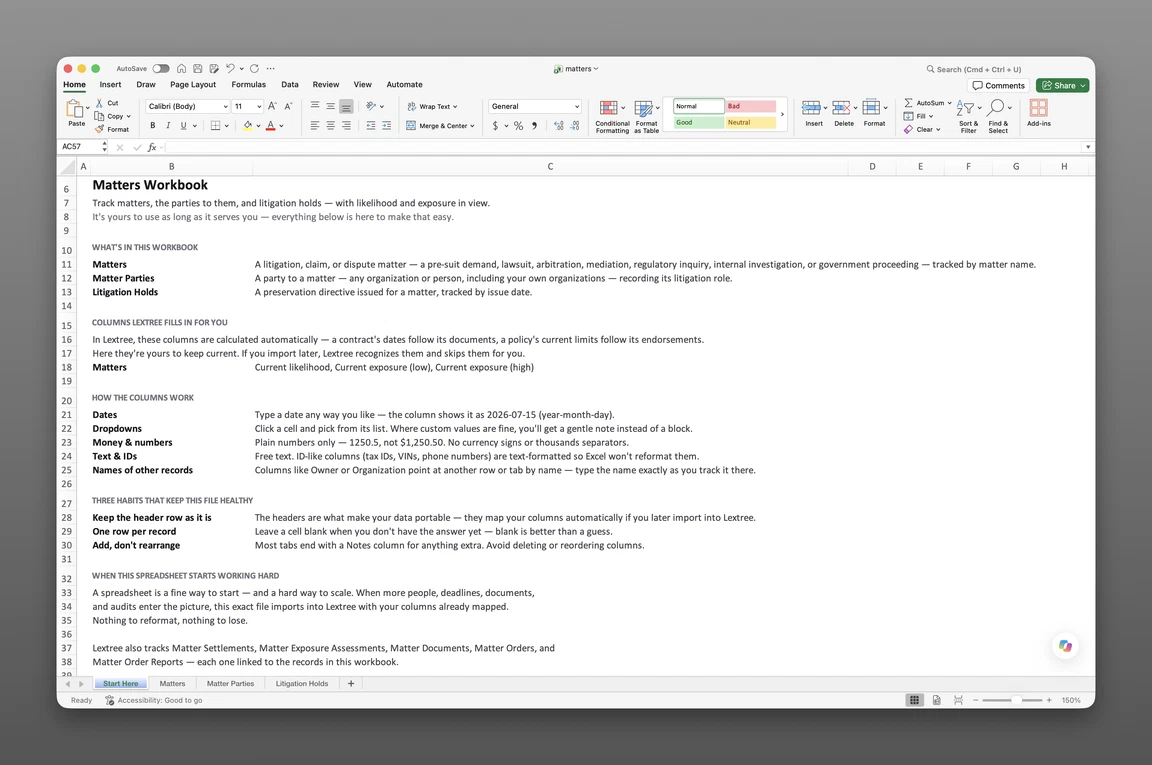
Inside the litigation matter tracker template
- Start Here
How the workbook works — column conventions, dropdown lists, and the habit of adding a row instead of overwriting one.
- Matters
One row per matter — name, type, your organization's role, forum and jurisdiction, a status of Opened, Filed, or Closed with its own date and description, current stage and outcome, current likelihood and exposure range, and links back to the contract, property, or insurance policy it touches.
- Matter Parties
Every party to a matter on its own row — party role and the party itself, tied back to the matter.
- Litigation Holds
One row per hold — issued date, a status of Issued or Released with its own date and description, scope of what's covered, released date, and a next review date so a hold doesn't go stale unnoticed.
Get the template
Enter your email and we’ll send the litigation matter tracker template to your inbox. Free — no credit card, no call, no follow-up sequence you didn’t ask for.
- Tracked fields across the three data sheets
- 44
- Pre-built dropdown lists
- 8
- Worksheets, ready to fill in
- 4
What a litigation matter tracker is
A D&O insurance renewal application asks for every open matter with a claim large enough to need board sign-off, as of the application date, plus the policy that would respond to each one. The general counsel’s answer lives in three places: a folder of PDFs from outside counsel, a monthly status email, and a spreadsheet someone updates when they remember to. None of the three agree on what the current exposure figure actually is, or which policy covers which matter. This litigation matter tracker template for Excel keeps both answers in one place before the next renewal or board meeting asks again.
Most litigation tracking spreadsheet templates are a flat list: matter name, one exposure number, a closed date. That structure erases what a legal department needs on file day to day — who the parties are and what role each one plays, whether a litigation hold reached everyone it should have and is still being reviewed, and which insurance policy is even in the picture. This register keeps those facts in their own places instead of squeezing them into one row.
The result is a corporate litigation tracker excel workbook that records where matters stand, what they might cost right now, and what they obligate the organization to preserve, while the actual legal work stays with outside counsel.
What’s inside the Excel workbook
This litigation matter tracker template ships as one Excel workbook, four sheets deep — a Start Here tab, then three data sheets covering matters, parties, and litigation holds:
- Start Here — column conventions and the row-not-overwrite habit
- Matters — 31 fields
- Matter Parties — 4 fields
- Litigation Holds — 9 fields
That’s 44 tracked fields across the three data sheets. Eight pre-built dropdown lists cover matter type, our role, forum type, stage, outcome, and party role, among others, so a value never drifts into free text.
| Sheet | Fields |
|---|---|
| Matters (31) | Matter name, counsel, forum, contract, property, insurance policy (insurer, policy type, policy number), status (event, date, description), matter type, our role, description, amount claimed, relief sought, forum type, case or reference number, counsel reference, jurisdiction country, jurisdiction subdivision, filed date, insurer notified, opened date, closed date, stage, outcome, current likelihood, current exposure (low), current exposure (high), notes |
| Matter Parties (4) | Matter, party role, party, notes |
| Litigation Holds (9) | Matter, issued date, status (event, date, description), scope, released date, next review date, notes |
Matters, jurisdiction, and insurance
Matters carries 31 fields — name, counsel, forum, jurisdiction, current stage and outcome, plus links back to the contract, property, or insurance policy involved. Three of those fields name the insurer, the policy type, and the policy number, next to a date the insurer was notified, so the coverage question sits on the same row as the matter it might offset.
Jurisdiction splits into country and subdivision, structured rather than typed free-hand. Matter type spans claim or demand, lawsuit, arbitration, mediation, regulatory inquiry, government investigation, internal investigation, and administrative proceeding.
Status, stage, and outcome
A status of Opened, Filed, or Closed sits on every Matters row, next to its own date and a plain-language description of what happened — a lightweight event log, not a full history of every filing. It works alongside two other fields that answer different questions: Stage (Threatened, Pending, Stayed, or On appeal) tracks where the matter sits procedurally, and Outcome (Settled, Dismissed, Judgment in our favor, and the rest) records how it ended. Current likelihood and a current exposure range — low and high — round out the row, kept as the single figure that’s true right now rather than a dated series of past estimates.
Parties and holds
Matter Parties gives every party to a matter its own row — plaintiff, defendant, claimant, respondent, petitioner, investigating authority, or subject of investigation — including your own organization when it’s a party. Litigation Holds treats every hold as its own record: issued date, a status of Issued or Released with its own date and description, scope of what’s covered, released date, and a next review date, so an open hold doesn’t go unnoticed after the matter looks closed.
How to use the template
A regulatory inquiry lands, and the first question is simple: which entity, and what’s the exposure. An inbox search takes a day; a register takes a lookup. Building a litigation matter tracker from these three sheets follows a short, repeatable sequence.
- Log one row per matter in the Matters sheet. Name, type, forum, and jurisdiction go on every row first.
- Add every party on its own row in Matter Parties. Record the role each one plays — plaintiff, defendant, or another party role — including your own organization when it’s a party.
- Attach the insurance policy as soon as one is in the picture. Insurer, policy type, and policy number go on the Matters row, along with the date the insurer was notified.
- Issue litigation holds the day preservation duty triggers, and set a next review date. Move the status to Released, with its own date and description, only once the duty actually ends.
- Update current likelihood and exposure as the estimate changes, and move status, stage, and outcome forward as the matter progresses. Each is its own field, so a status change doesn’t overwrite the stage or outcome that’s still true.
One row per matter
Matters rows should map one-to-one with the underlying dispute; parties and litigation holds live on their own sheets, keyed back to that matter. A matter that escalates from inquiry to lawsuit is a type change on the existing row, not a second one to reconcile.
Keeping exposure current
Current likelihood and current exposure sit on the Matters row as the figures that are true today. Update them at every material change — a motion ruling, a settlement offer, a change in counsel’s assessment — rather than letting last quarter’s estimate sit unchanged after the facts have moved.
Built for a multi-entity legal department
A single-matter spreadsheet assumes one entity, one lawsuit — workable, right up until a second entity, a regulatory inquiry, and an internal investigation are all open at once. Adding your own organization to Matter Parties for every matter it’s involved in, with its role on that matter, turns one flat list into a per-subsidiary view — which matters a given entity is party to, not just which counterparty sits opposite.
Jurisdiction is recorded as country plus subdivision, not free text, so a portfolio spanning multiple states or countries sorts by jurisdiction instead of getting reconstructed by hand later. Most corporate litigation tracker excel builds assume a single entity; this register assumes a corporate family with matters open in more than one place at once.
In-house counsel and legal operations teams feel that gap first — the moment a spreadsheet built for one lawsuit has to answer for a dozen, right when a D&O renewal or a board update asks for exactly that answer.
When a spreadsheet stops working
This register takes most legal departments a long way, but it has real edges. There’s no version history, so an overwritten exposure figure or status update loses its past, and reconstructing an earlier estimate means doing it by hand. With more than one person editing the workbook, nothing controls who can see which matters, and nothing sends a reminder before a hold’s next review date comes due.
None of that means the spreadsheet was the wrong place to start. This template’s column headers match Lextree’s import templates, so it loads directly into Lextree’s Matters module — no re-keying, no remapping. From there, review-date reminders and a dated history of every exposure change move with it, connected to the same contracts, properties, and policies the matter already touches. For the module’s record structure — parties, settlements, exposure assessments, holds, documents, and orders — see the Matters module guide.
Frequently asked questions
What is a litigation matter tracker? A structured record of every legal matter an organization is involved in — lawsuits, arbitrations, regulatory inquiries, and internal investigations — with the parties, current exposure, and the litigation holds that can outlive the matter itself, kept current enough that “where do things stand” has an answer without a call to outside counsel.
What should a litigation matter tracker include? At minimum: matter name, type, forum, jurisdiction, and current stage. A complete tracker also records every party and their role, a current likelihood and exposure range, litigation holds with review dates, and the insurance policy that responds if one is involved.
Who is this litigation matter tracker template for? In-house counsel, corporate legal operations, and compliance teams tracking matters across a multi-entity organization — where a flat spreadsheet row per lawsuit stops answering which entity, which policy, and which reserve once more than a handful of matters are open at once.
What’s the difference between this and a basic litigation tracking spreadsheet? A basic spreadsheet is a flat list: matter name, one exposure figure, a closed date. This litigation matter tracker template splits parties onto their own sheet with a role for each one, gives every litigation hold its own review date, links a matter to the insurance policy that covers it, and carries a status of Opened, Filed, or Closed with its own date and description alongside the matter’s stage and outcome.
How do I track litigation holds in Excel? The Litigation Holds sheet holds one row per hold — issued date, a status of Issued or Released with its own date and description, scope of what’s covered, released date, and a next review date. It ties back to the matter that triggered it, so a hold that’s still open after the underlying matter looks closed is visible instead of forgotten.
How do I track litigation exposure in Excel? Current likelihood and a current exposure range — low and high — sit directly on the Matters row, updated as the estimate changes. This template tracks the exposure that’s true right now, not a dated history of every prior estimate; a full trail of how a reserve moved over time is what Lextree’s Matters module adds once a legal team needs to show that history.
How do I link a matter to the insurance policy that covers it? Three fields on the Matters row name the insurer, the policy type, and the policy number, alongside a date the insurer was notified. A matter with a policy attached shows the coverage in the same row as the exposure it might offset, instead of a separate note to check with the risk manager.
What does the Status field on a matter track? Status is a short lifecycle marker — Opened, Filed, or Closed — with its own date and a plain-language description of what happened. It sits next to Stage (Threatened, Pending, Stayed, or On appeal) and Outcome (Settled, Dismissed, and the rest), so the matter’s procedural posture, its lifecycle event, and how it ended are three separate facts instead of one status field asked to do all three jobs.
Can I track matters across multiple entities in Excel? Yes. Add your own organization as a party on Matter Parties for every matter it’s involved in, with its role — plaintiff, defendant, or another party role. Filtering Matter Parties by that entity turns one flat list into a per-subsidiary view — which matters a given entity is party to, not just which counterparty sits opposite.
Does this replace outside counsel or a law firm’s practice software? No. This is a register — a system of record for the corporate legal team. It doesn’t replace legal advice or run an outside firm’s practice; it holds the facts — parties, exposure, holds, and insurance links — in one place.
Is the template really free? Yes. Enter your email below and the workbook is sent to your inbox — no credit card, no sales call.
The register is free. Take it.
Four worksheets, already built — just add your matters, parties, and exposure.