Loan Covenant Tracking Template for Excel
Free loan covenant tracking template for Excel — track credit facilities, loans made, investments, security interests, and guarantees. Sent to your email.
1 Excel workbook · 8 worksheets — free, no credit card.
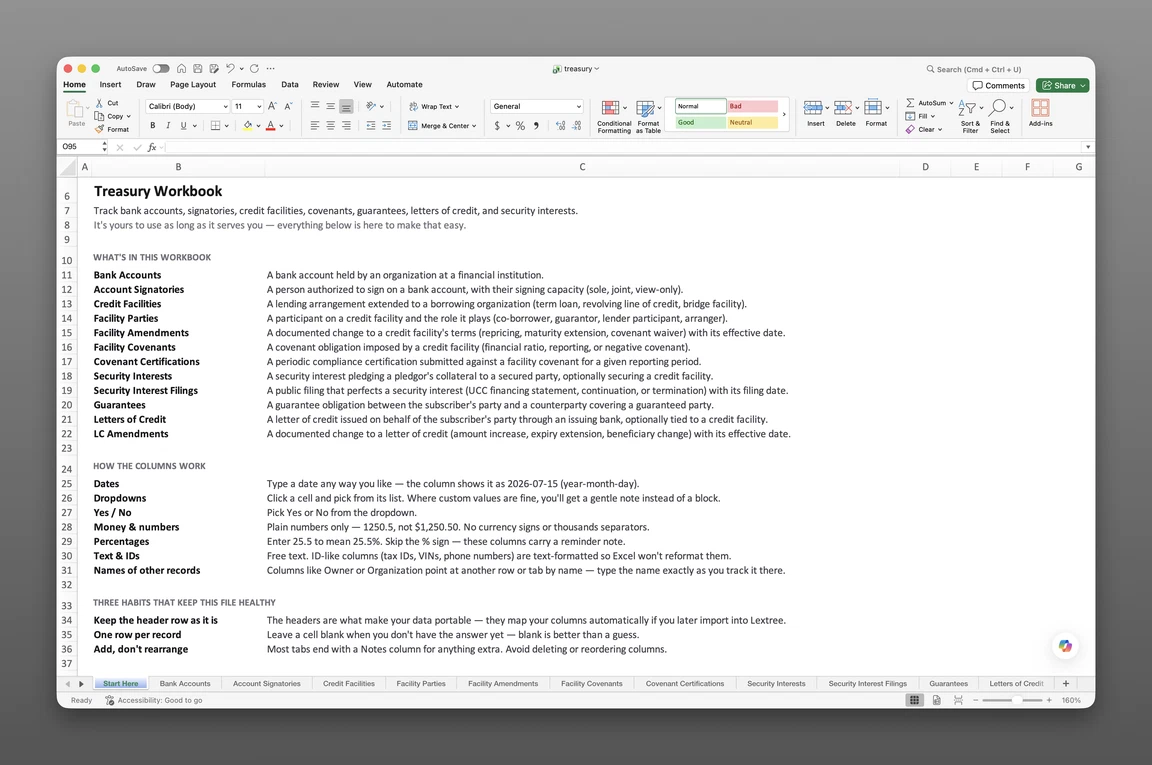
Inside the loan covenant tracking template
- Start Here
How the workbook works — column conventions, dropdown lists, and the habit of adding a row instead of overwriting one.
- Bank Accounts
One row per account — bank, account type, SWIFT/BIC and IBAN, signing rule, and dual-signature threshold.
- Credit Facilities
Every loan or revolver a company has borrowed — facility type, lender, agent, ranking, reference rate, current all-in rate, repayment profile, outstanding balance, and maturity date.
- Loans Made
Every loan the organization has extended instead of borrowed — intercompany loans, officer and employee loans, seller notes, and vendor financing — with ranking, security, reference rate, outstanding balance, and maturity.
- Investments
Marketable securities, fund interests, deposits, notes, and digital assets the organization holds — issuer or manager, custodian, valuation source, accounting classification, and carrying value.
- Letters of Credit
Standby and commercial letters of credit — issuing and advising banks, LC type, amount, fee rate, term basis, and expiration date, optionally tied to a credit facility.
- Guarantees
Corporate guarantees given or received — obligation covered, demand basis, maximum amount, term basis, and expiration date.
- Security Interests
Collateral pledged to secure financing — security type, secured party, collateral description, priority, and lapse date.
Get the template
Enter your email and we’ll send the loan covenant tracking template to your inbox. Free — no credit card, no call, no follow-up sequence you didn’t ask for.
- Tracked fields across the seven data sheets
- 159
- Pre-built dropdown lists
- 34
- Worksheets, ready to fill in
- 8
What loan covenant tracking is
Loan covenant tracking is the practice of recording a company’s credit facilities and certifying compliance against the covenants attached to them on a set schedule, so a lender’s certificate deadline never depends on someone remembering a spreadsheet buried three folders deep.
A covenant certificate comes due 45 days after quarter-end, and no one calendared it. A lender’s diligence team asks for every facility, security interest, and guarantee, and the answer sits scattered across a deal folder. This loan covenant tracking template for Excel keeps the facility record itself — the record covenant testing runs against — together before either moment arrives.
This is a record of a company’s debt and treasury position, not a covenant calculator. It carries no payment schedule, no amortization math, and, in this refresh, no dedicated covenant or certification sheet of its own. It proves what a company owes, has lent, holds, and has pledged against it — not what a facility will cost over time or whether a ratio currently passes.
What’s inside the Excel workbook
This corporate treasury spreadsheet template ships as one Excel workbook, eight sheets deep. A Start Here tab leads, followed by seven data sheets covering accounts, credit facilities, loans made, investments, security, guarantees, and letters of credit. Together they hold 159 fields behind 34 pre-built dropdown lists, and the workbook opens in Google Sheets as well as Excel.
| Sheet | What it tracks |
|---|---|
| Bank Accounts | Bank, account type, SWIFT/BIC, IBAN, signing rule, dual-signature threshold |
| Credit Facilities | Facility type, lender, agent, ranking, reference rate, repayment profile, outstanding balance, maturity |
| Loans Made | Loan type, borrower, ranking, security, reference rate, outstanding balance, maturity |
| Investments | Investment type, issuer or manager, custodian, valuation source, accounting classification, carrying value |
| Letters of Credit | Issuing and advising banks, LC type, amount, fee rate, term basis, expiration |
| Guarantees | Obligation covered, demand basis, maximum amount, term basis, expiration |
| Security Interests | Security type, secured party, collateral, priority, lapse date |
Bank accounts and credit facilities
Bank Accounts — 17 fields — is the master list of every deposit and operating account. It holds bank, SWIFT/BIC and IBAN, account type, and the signing rule (Single signature, Dual signature above threshold, or Dual signature always) that gates a wire above a set amount, plus fraud controls and a Status: Event of Opened, Frozen, or Closed.
Credit Facilities — 23 fields — holds real instrument types: Term loan, Revolving credit facility, Delayed-draw term loan, Bridge loan, Asset-based facility, Equipment financing, Mortgage loan, Construction loan, Mezzanine loan, Overdraft, Notes or private placement, or Intercompany loan. Each row carries a lender, an agent, a ranking from Super senior through Subordinated, a reference rate such as SOFR, EURIBOR, or SONIA, a repayment profile, and a maturity date.
The lender’s seat: Loans Made and Investments
Loans Made and Investments are the two sheets new to this refresh — the lender’s side of treasury that the old workbook never had a seat for. Loans Made — 30 fields — covers intercompany loans, loans to officers or employees, seller notes, and vendor financing, with the same ranking, reference rate, and repayment profile fields as Credit Facilities, plus whether a loan is impaired, in default, or written off.
Investments — 30 fields — covers marketable securities, fund interests, fixed-term deposits, notes and bonds held, and digital assets, each with a custodian, a valuation source such as Custodian statement, Fund administrator NAV, Market price, Independent valuation, or Cost, an accounting classification, and a carrying or fair value as of a given date.
Security, guarantees, and letters of credit
Security Interests — 15 fields — records the collateral pledged to secure financing: security type, secured party, collateral description, priority, and a lapse date on the same row — the field that quietly kills a perfected priority if it’s missed.
Guarantees — 21 fields — covers the obligation a guarantee protects, such as a loan, a lease, trade payables, or a performance bond, with a demand basis of On first demand or Conditional, a maximum amount, and a term basis. Letters of Credit — 23 fields — covers standby (financial and performance), commercial (documentary), and bank guarantee types, with issuing and advising banks, drawing features, and an optional link to the credit facility behind it.
Every sheet also carries a Status: Event, Status: Date, and Status: Description — a lightweight status timeline. Credit Facilities logs Originated, Amended, Defaulted, Cured, Refinanced, Settled or forgiven, or Closed against the date it happened, instead of overwriting the field that says what’s current.
How to track loan covenants in Excel
To track a company’s debt and treasury record in Excel:
- Add a row per account in Bank Accounts. Bank, account type, and signing rule go on every row before anything else.
- Add a row per facility in Credit Facilities. Lender, ranking, reference rate, and maturity go on every row.
- Log what the company has lent, not just borrowed, in Loans Made. An intercompany loan or a seller note gets the same ranking and reference-rate fields as a facility.
- Log holdings in Investments. A fund interest or a fixed-term deposit gets a valuation source and a carrying value, not just a balance.
- Record security interests and guarantees against the obligations they support. Each one keys back to the facility or entity it protects, with a lapse or expiration date of its own.
- Use the Notes field for anything a covenant test depends on. This workbook doesn’t have a dedicated covenant sheet, so a ratio requirement or a certification deadline belongs there, or in a system built to test it.
- Sort by maturity, expiration, or lapse date. That’s the fastest way to see what’s coming due first across the whole debt stack.
One row per instrument
Each row in Credit Facilities, Loans Made, or Investments should represent exactly one instrument. Security interests, guarantees, and letters of credit each key back to the facility or entity they belong to. Flattening a pledge into a notes cell loses exactly what this tracker exists to hold.
Maturity and lapse dates
Sort or filter Credit Facilities and Loans Made by maturity date, or Security Interests by lapse date. The next deadline in that category rises to the top.
A revolving facility’s maturity and a pledge’s lapse date land on different clocks, so a shared sort order keeps both visible. Add your own conditional-formatting rule to either date column for a visual cue between sorts.
In Excel: Home > Conditional Formatting > Highlight Cells Rules > A Date Occurring. The workbook ships with raw dates only. It carries no formulas or built-in alerts, and nothing here fires a reminder until you set one up.
Built for corporate treasury teams
CFOs, treasurers, controllers, and finance counsel at multi-entity organizations with bank debt feel a scattered treasury record first. They’re the ones asked to produce every facility, pledge, and guarantee the moment a lender or an auditor calls.
Free templates online typically stop at a single covenant-ratio table or a payment schedule. This workbook runs the opposite way, carrying the full debt-and-treasury stack — accounts, facilities, loans made, investments, security, guarantees, and letters of credit — even without a dedicated covenant sheet of its own. A lapsed security interest surfaces when a junior lender jumps priority long before a covenant test ever runs.
Bank Accounts and Credit Facilities each key to the holding entity, so a group with several subsidiaries shares one workbook instead of a spreadsheet per entity.
When a spreadsheet stops working
This tracker covers a growing debt stack before it runs into real edges. There’s no version history, so an overwritten facility balance erases its own past. With more than one person editing the file, nothing controls who sees which facility’s terms.
Nothing fires an alert when a maturity date or a security interest’s lapse date comes due. That gap can run for a full quarter. It usually surfaces during a lender audit or a refinancing.
A workbook also has no covenant engine and no workflow. Nobody gets routed a task when a covenant test comes up short, because there’s no covenant test in the file to begin with, and no one signs off on a waiver inside it either. Those steps happen in email threads and other systems that never make it back into the tracker.
From workbook to system
This template’s column headers match Lextree’s import templates, so it loads directly into treasury tracking software — no re-keying, no remapping. That’s also where scheduled covenant certifications live, for a facility in this workbook that needs them.
Deadlines that surface themselves
From there, dates drive reminders instead of waiting for someone to open the sheet. Finance leaders overseeing covenant compliance use them so a certification chases itself instead of appearing at the next lender audit.
Frequently asked questions
What is loan covenant tracking? Loan covenant tracking is the practice of recording a company’s credit facilities and certifying compliance against the covenants attached to them on a set schedule. This template records the credit facility itself, along with the loans, investments, security, and guarantees around it — the record covenant tracking runs on top of.
What are the three types of loan covenants? Affirmative covenants require the borrower to do something, negative covenants prohibit an action, and financial covenants set a threshold to maintain — a leverage ratio, an interest coverage ratio, or a minimum liquidity level, for example. This workbook doesn’t carry a dedicated covenant or certification sheet; covenant terms belong in a facility’s Notes field here, or in Lextree’s treasury module if you need scheduled certifications.
Is this a debt schedule or amortization calculator? No. This template records facilities, loans, and investments as they stand today. It computes no interest, no payment schedule, and no amortization — those live in a different kind of workbook entirely.
Does this track property or real-estate financing covenants? No. Property-secured financing belongs to a commercial property register, keyed to the property itself. This workbook holds the company-wide credit facility and debt record instead, without covenant fields of its own on either side.
Is this template for lenders or borrowers? This is a borrower-side tool, built for a company tracking its own facilities, loans, and guarantees — not a lender monitoring a portfolio of many borrowers. A lender managing that kind of portfolio needs a different tool entirely.
How do I track loan covenants in Excel? This workbook doesn’t have a dedicated covenant sheet, so covenant terms have to live in a facility’s Notes field or a tracker of your own. Credit Facilities carries the loan itself — reference rate, current all-in rate, repayment profile, and maturity date — as the record a covenant test runs against. Lextree’s treasury module keeps scheduled certifications live instead of manual entry.
How often are loan covenants tested? Most covenants are certified quarterly or annually. This workbook doesn’t carry a dedicated certification schedule — that cadence and its testing history now live in Lextree’s treasury module, built to track exactly that.
Can I track loans the company has made, and investments it holds? Yes. Loans Made and Investments are new sheets in this refresh. Loans Made covers intercompany loans, loans to officers or employees, seller notes, and vendor financing — the lender’s side of a loan instead of the borrower’s. Investments covers marketable securities, fund interests, fixed-term deposits, notes and bonds held, and digital assets.
What happens if a loan covenant is breached? This workbook doesn’t test covenant thresholds itself, but Credit Facilities logs the outcome: a Status: Event of Defaulted or Cured, with its own date and description, when a breach affects the facility’s standing. The covenant test and any waiver documentation still happen outside the file.
Can I track credit facility amendments in this spreadsheet? Not as a separate log. Facility Amendments was removed from this refresh; Credit Facilities instead carries a Status: Event of Amended with its own Status: Date and Status: Description, so a re-pricing or maturity extension gets a timeline entry, though the prior numeric terms aren’t preserved on a row of their own.
How do I track security interests and UCC filings? Security Interests records the collateral, secured party, priority, and a lapse date for each pledge, all on the same row — this refresh folded the separate UCC filing log into that lapse date instead of keeping a dedicated Security Interest Filings sheet.
Can I track letters of credit and guarantees? Yes. Letters of Credit covers standby (financial and performance), commercial (documentary), and bank guarantee types, with issuing and advising banks and drawing features, optionally tied to a credit facility. Guarantees tracks the obligation covered, demand basis, and maximum amount for guarantees given or received.
Can one workbook cover multiple entities’ bank accounts and facilities? Yes. Bank Accounts keys to the account Holder and Credit Facilities keys to the Primary Borrower, so a group with several subsidiaries shares one workbook instead of a spreadsheet per entity.
Who is this template for? CFOs, treasurers, controllers, and finance counsel at multi-entity organizations carrying bank debt, credit facilities, or letters of credit.
Is the template free, and does it work in Google Sheets? Yes. Enter your email below and the workbook is sent to your inbox — no credit card, no sales call. It opens in Google Sheets as well as Excel, dropdowns included.
The template is free. Take it.
Seven data sheets, already built — just add your accounts, facilities, and loans.