Stock Ledger and Share Register Template
Free stock ledger template for Excel — log every share issuance and transfer, and track who owns what by ownership and voting percent. Sent to your email.
1 Excel workbook · 4 worksheets — free, no credit card.
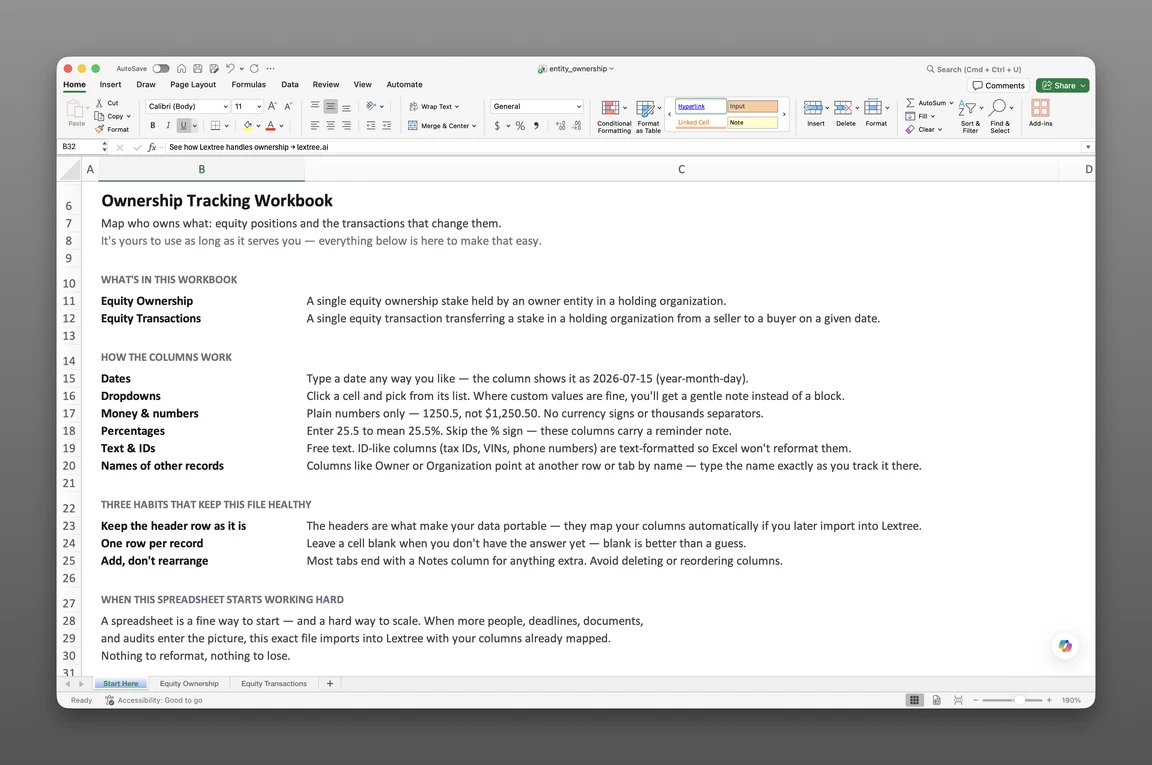
Inside the stock ledger and share register template
- Start Here
How the workbook works — column conventions, dropdown lists, and the habit of adding a row instead of overwriting one.
- Equity Ownership
One row per shareholder position — owner, holding, ownership and voting percent, units, holding capacity, control basis, pledge status, acquisition and disposition detail, cost basis, and notes.
- Equity Transactions
One row per issuance or transfer — holding, seller, buyer, transaction date, transaction type, equity class, units transferred, price per unit, total consideration, consideration type, pricing basis, counterparty relationship, and notes.
- Convertible Instruments
Convertible notes, SAFEs, warrants, ASAs, and KISS notes — instrument type, principal amount, valuation cap, discount, conversion trigger, and exit detail for anything that becomes equity but isn't yet.
Get the template
Enter your email and we’ll send the stock ledger and share register template to your inbox. Free — no credit card, no call, no follow-up sequence you didn’t ask for.
- Tracked fields across the three data sheets
- 78
- Pre-built dropdown lists
- 15
- Worksheets, ready to fill in
- 4
What a stock ledger is
A stock ledger template is a single Excel workbook that records who owns a company’s shares and logs every issuance and transfer between shareholders — an ownership snapshot plus an append-only transaction history in one file.
Corporation law expects a company to keep this kind of internal share record — who holds what, and how each share moved between holders. A stock ledger is that record, so a lender, buyer, or court later asking who owned what and when gets an answer already on file.
This is a stock ledger, not a cap table. There’s no option pool modeling, no vesting schedule, no 409A math, and no projected company valuation. It records who owns what, how it changed hands, and — now that Convertible Instruments is part of the workbook — the actual terms of any note, SAFE, or warrant outstanding. Nothing it can’t stand behind. For the fuller picture, including where an ownership chart fits, see cap table vs share register vs ownership chart.
What’s inside the Excel workbook
This share register template in Excel ships as one file, four sheets deep. A Start Here tab leads, followed by three data sheets — Equity Ownership, Equity Transactions, and Convertible Instruments — holding 78 fields behind 15 dropdown lists. No formulas, no sample rows, and it opens in Google Sheets as well as Excel, dropdowns included, so a shared workbook stays consistent no matter who opens it.
Here’s what the three data sheets track:
| Sheet | What it tracks |
|---|---|
| Equity Ownership | Owner, holding, ownership and voting percent, units, holding capacity, control basis, pledge status, acquisition and disposition detail, cost basis, notes |
| Equity Transactions | Holding, seller, buyer, transaction date, transaction type, equity class, units transferred, price per unit, total consideration, consideration type, pricing basis, counterparty relationship, notes |
| Convertible Instruments | Instrument type, issuer, holder, issue date, principal or purchase amount, valuation cap, discount, conversion or exercise trigger, converts into, exit detail, notes |
The ownership snapshot
Equity Ownership — 25 fields — is the current picture: who holds what, right now. Ownership percent and voting percent sit in separate columns, so economic share and control can diverge across share classes. Holding capacity distinguishes a legal-and-beneficial owner from one who holds only legal or only beneficial title through a nominee or trustee — a distinction that matters the moment a lender or auditor asks who really controls a position. A Status: Event/Date/Description trio marks the row’s current state, and a pledge block — secured party, security type, and grant and release dates — records when a holding is pledged as collateral.
Cost basis, accounting treatment, and acquisition date sit on the same row, so a later sale or transfer checks against what was paid and how it’s booked. Notes hold whatever else a position needs — a side letter reference, a restriction, a reminder for next reconciliation.
The transaction log
Equity Transactions — 21 fields — gives every issuance and transfer its own row. Transaction type now runs to thirteen options covering how shares actually move — a purchase, a subscription or issuance, a bonus issue, a distribution, a redemption, a grant, an option or warrant exercise, a conversion, a nominee transfer, a gift, an inheritance, or a transfer by operation of law. Equity class covers ordinary or common shares, preference or preferred shares, options/warrants/convertible instruments, LLC or membership interest, partnership interest, and units or quotas.
This corporate stock transfer ledger template doubles as an equity transaction log spreadsheet — append-only, so a prior transfer is never lost. Consideration type, pricing basis, and counterparty relationship (arm’s length, intra-group, or another related party) capture the deal terms behind a transfer. Price per unit and total consideration record what changed hands, not an estimate of value — a Gift or Inheritance row can leave those blank, since nothing was paid.
Convertible instruments
Convertible Instruments — 32 fields, the largest sheet in the workbook — is new: it tracks anything that becomes equity but isn’t yet, including convertible notes, SAFEs, warrants, and KISS notes. Each row records issuer, holder, issue date, principal amount, and what it converts into, alongside the terms that govern conversion — valuation cap, discount, and the trigger that sets it off. Exit fields close out the row once an instrument converts, is repaid, or expires — terms it was issued with, recorded as fact, not a projection of what the company is worth.
Keep a stock ledger in Excel
A stock ledger earns its name by never overwriting a row — every change gets a new one instead. That habit is the difference between a ledger and a list that happens to track shares.
To keep a stock ledger in Excel:
- Add a row per shareholder on Equity Ownership, with ownership percent and voting percent tracked separately.
- Record share class and units on every position — ordinary or common, preference or preferred, or another equity class.
- Log every issuance as its own row on Equity Transactions, with transaction type Subscription or issuance, Grant or award, or Conversion or reclassification.
- Log every transfer with both seller and buyer named on the same row.
- Give a note, SAFE, or warrant its own row on Convertible Instruments the day it’s issued, with valuation cap and discount recorded as agreed, not as a running estimate.
- Never overwrite a prior transaction or instrument — add a new row instead, even for a correction.
- Reconcile the snapshot to the log periodically.
That append-only discipline is what makes this a ledger rather than a list. Five minutes spent reconciling is cheaper than an hour spent guessing which sheet is right before a closing.
When a spreadsheet stops working
Founders, corporate secretaries, and small-company counsel use it as a shareholder register for a small company — a dozen shareholders and a handful of transfers a year is exactly what a spreadsheet is good at. It strains for a firm tracking issuances across many holdings, as private equity teams tracking portfolio ownership tend to discover.
No history, shared risk
The workbook holds raw records only, with no version history. An overwritten transfer erases its own past, and nothing flags the gap before it becomes one. There’s no permission model either — anyone with the file can edit any shareholder’s position, or any convertible instrument’s terms, and a shared link only makes that risk worse.
From workbook to software
This template’s column headers match Lextree’s import templates, so it loads directly into equity ownership software — no re-keying, no remapping. Access control, an immutable transaction history, and ownership keyed to the entities that already hold each other’s shares move with it.
A stock ledger that’s outgrown Excel usually shows the strain first at a financing or a transfer with outside counsel involved. Software doesn’t replace the discipline the workbook taught — it just keeps the discipline from depending on one person remembering to add a row.
Frequently asked questions
What is a stock ledger template? A stock ledger template is a single Excel workbook that records who owns a company’s shares, logs every issuance and transfer, and tracks convertible instruments outstanding. It functions as a shareholder ledger template for a company of any size.
What should a stock ledger include? A stock ledger should include current ownership — owner, holding, ownership percent, voting percent, units, cost basis — plus a full transaction history recording every issuance and transfer, with seller, buyer, transaction type, and equity class on each row.
Is this a cap table? No. A cap table models valuations, option pools, and dilution scenarios. This stock ledger records who owns shares today, every transfer that got them there, and the actual terms of any outstanding convertible instrument — not a modeled or projected one.
Does it track valuations or vesting schedules? No option pool modeling or vesting schedules. Convertible Instruments records the terms an instrument was issued with — valuation cap, discount, and conversion trigger — as facts about that deal, not a projection of company value. Price per unit and total consideration on Equity Transactions are recorded for actual transactions only.
How do I log a share issuance or transfer? Add a row to Equity Transactions with the holding, transaction date, transaction type, equity class, and units — and for a transfer, both seller and buyer. Never overwrite a prior row; each change gets its own — logging every transfer this way is what a corporate stock transfer ledger does.
Does my corporation need a stock ledger? Yes. Corporation law expects a company to keep an internal record of who owns its shares and how ownership has changed. A stock ledger is that record, kept current as shares are issued or transferred.
Does it track stock certificate numbers? It records the parties, date, share class, units, price, and consideration for each transaction — not certificate numbers. If your corporation issues certificates, add a column for the number.
Does it record shareholder addresses? The workbook keys each position to the owner and holding, not a mailing address. Add an address column to Equity Ownership if your share records need one.
Can I use it as a shareholder register for a small company? Yes. Equity Ownership works as a shareholder register for a small company with one or a few share classes, and Equity Transactions keeps the issuance and transfer history behind it.
Does it handle multiple share classes? Yes. Equity class covers common shares, preferred shares, LLC or membership interest, partnership interest, and units or quotas, so a multi-class structure fits in the same sheets.
Does it track SAFEs, convertible notes, or warrants? Yes. Convertible Instruments covers convertible notes, SAFEs, warrants, advance subscription agreements, and KISS notes — instrument type, principal amount, valuation cap, discount, and exit detail once it converts, is repaid, or expires.
Is it free, and does it work in Google Sheets? Yes. Enter your email below and the workbook is sent to your inbox — no credit card, no sales call. It opens in Google Sheets as well as Excel, dropdowns included.
The template is free. Take it.
Four worksheets, already built — just add your shareholders, issuances, transfers, and convertible instruments.