Tax Compliance Tracker Template for Excel
A free tax compliance tracker template for Excel — track tax returns, extensions, audits, and exemption certificates for every entity. Sent to your email.
1 Excel workbook · 5 worksheets — free, no credit card.
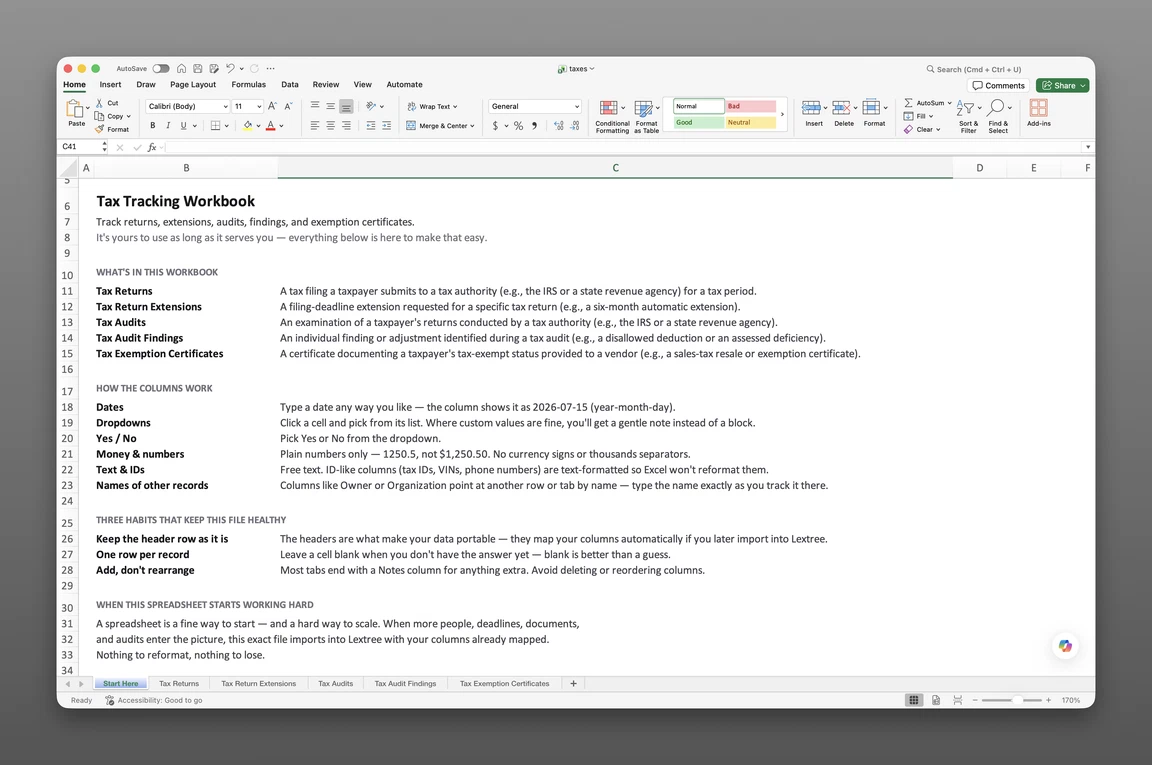
Inside the tax compliance tracker template
- Start Here
How the workbook works — column conventions, dropdown lists, and the habits that keep the tracker audit-ready a year from now.
- Tax Obligations
One row per standing filing obligation — taxpayer, tax type, jurisdiction, tax authority, frequency, filing responsibility, and a Status: Event, Status: Date, and Status: Description timeline for the obligation itself.
- Tax Returns
One row per filing — taxpayer, the tax obligation it fulfills, tax period, preparer, original and extended due dates, filing date, confirmation number, and an amended-return flag.
- Tax Audits
Each examination from notice to outcome — tax authority, jurisdiction, representative, examination method, audit period, proposed and agreed assessment, and outcome.
- Tax Exemption Certificates
Sales tax exemption certificates by vendor and jurisdiction — certificate type, exemption or registration number, coverage, effective date, and expiration date.
Get the template
Enter your email and we’ll send the tax compliance tracker template to your inbox. Free — no credit card, no call, no follow-up sequence you didn’t ask for.
- Tracked fields across the four data sheets
- 77
- Pre-built dropdown lists
- 14
- Worksheets, ready to fill in
- 5
What a tax compliance tracker does
A controller closes out a franchise tax return for one entity, filed on time. A property tax return for a different entity, due that same week, slips — nothing on the calendar showed both deadlines side by side. Weeks later, a notice for the missed filing arrives, and someone has to explain why.
A tax compliance tracker exists to close that gap. It records what your organization owes, where, and when: every standing obligation, return, audit, and certificate, across every entity and jurisdiction. For a company with more than one legal entity, that record spans income, franchise, sales and use, payroll, and property tax obligations, each running on its own calendar, in its own state or country. This tracker covers the full lifecycle, not a single checklist. A standing obligation gets fulfilled by an actual return, and a return can be extended, amended, or rejected before it’s accepted. A tax authority opens an audit, works through it with a chosen examination method, and reaches an outcome, while a vendor’s exemption certificate stays valid only until it expires. Most spreadsheets built for this job stop at the first step, a list of due dates. This one tracks the rest: what’s owed on a standing basis, what’s actually been filed, what an audit turned up, and which certificates are still current.
This isn’t a tax calculator — it doesn’t estimate liability or compute what’s owed, and it isn’t a payment ledger either. Each row in this tax compliance tracker template answers three questions: what’s due, is it filed, what happened. The math stays with your tax preparation software or accounting system.
What’s inside the Excel workbook
Most tax calendars start as a list in an inbox, then migrate to a shared spreadsheet nobody fully trusts. This tax compliance tracker template ships as one Excel workbook, five worksheets deep:
- Start Here — column conventions and the log-rather-than-delete habits that keep the workbook usable well past the first quarter you fill it in
- Tax Obligations — 15 fields
- Tax Returns — 22 fields
- Tax Audits — 24 fields
- Tax Exemption Certificates — 16 fields
That’s 77 tracked fields in total. A hidden Options sheet powers 14 pre-built dropdown lists, and every primary sheet also carries a Status: Event, Status: Date, and Status: Description column, a lightweight timeline of what happened to that obligation, return, audit, or certificate, and when.
Fields like tax type, filing responsibility, and examination method stay consistent from row to row, instead of drifting into free text. The workbook opens in Google Sheets as well as Excel, so no team gets locked into one spreadsheet program.
Standing obligations and returns
Tax Obligations (15 fields) is the standing record: taxpayer, tax type, jurisdiction, tax authority, frequency, and who’s responsible for filing, whether that’s the internal tax team, an external adviser, outside counsel, or a payroll service. It’s the obligation itself, kept separate from any single filing against it: an annual franchise tax obligation stays on the books whether or not this year’s return has been filed yet. The same standing-obligation logic is what an internal tax team running the same obligations in software relies on once the workbook outgrows a single spreadsheet.
Tax Returns (22 fields) records what’s actually been filed against an obligation: tax period, form number, an amended-return flag, original due date, extended due date, filing date, and confirmation number. Original and extended due dates sit in separate columns on the same row, so an extended return never gets mistaken for a late one. See how a return links back to the obligation it satisfies in tracking tax filings across entities and jurisdictions.
Audit lifecycle
Tax Audits (24 fields) tracks an examination the way it unfolds. Notice date, tax authority, jurisdiction, representative, examination method (correspondence, desk, field, or remote data review), audit period, scope, limitation period end, and both proposed and agreed assessment all live in one row, closing with an outcome: no change, adjustment agreed, settled, or determined on appeal. Most tax spreadsheets stop at “audit: yes or no”: this tax audit tracking template follows the whole arc, from notice to outcome.
Exemption certificates
Tax Exemption Certificates (16 fields) logs certificates by vendor and jurisdiction: certificate type, exemption or registration number, coverage (blanket or single purchase), purchases covered, effective date, last renewal date, and expiration date. These certificates exist because of nexus: once an entity has a taxable presence in a state, every vendor there needs its own certificate on file.
An expired certificate still sitting in a vendor file is a common, avoidable audit exposure. An auditor disallows the exemption, and the tax comes due retroactively, with penalties and interest added. This sheet catches the gap before an auditor does.
How to use the template
“Was this return filed, and when?” “What was the extended due date, and did we make it?” These are the first questions an auditor, or a new controller, asks.
Building a tax filing tracker spreadsheet from these four sheets follows a short, repeatable sequence.
- Log every standing obligation once, by entity and jurisdiction. Tax type, jurisdiction, and filing responsibility go on every Tax Obligations row, so nothing gets filed twice or missed entirely.
- File each return against its obligation. Taxpayer, tax period, and both due dates go on every Tax Returns row, with extended due date filled in only when an extension is actually granted.
- Open an audit the day the notice arrives. Start the Tax Audits row at notice date, then update Status: Event as the examination proceeds, instead of waiting until resolution to log it.
- Record the examination method and representative as soon as they’re known. That’s what turns a bare “audit opened” entry into a record someone can act on.
- Log every exemption certificate and sort by expiration date. Coverage and expiration date together turn a static list into something you can act on before a certificate lapses.
One row per obligation
Every sheet in this workbook carries taxpayer and jurisdiction as standard columns, and that’s what makes multi-entity filtering possible. Filter Tax Obligations to one entity to see everything it owes, or filter Tax Returns to the same entity for its filing history. The same discipline applies to lookback: never delete a resolved audit or a filed return, because a tax authority’s window can run for years.
Tracking deadlines and renewals
Original and extended due dates sit in separate columns on the Tax Returns sheet for a reason: comparing them against today’s date drives the filing calendar, entity by entity. The same logic applies to exemption certificates: expiration date paired with coverage catches a lapsing certificate before a vendor or auditor does. See why a granted extension gets its own dated entry for how that second date reaches the return in the first place.
Built for multiple entities
A single-entity tax calendar tracks one taxpayer against one set of deadlines: clean, manageable, easy to maintain. Add a second entity, a second jurisdiction, or a second tax type, and every column in that calendar needs rethinking.
Taxpayer and jurisdiction, country and subdivision, sit on every sheet as standard fields, not an afterthought bolted onto a single-entity template. That makes this a corporate tax deadline tracker template, built for a group across states and countries, not a one-company spreadsheet copy-pasted per entity. Used that way, it works as a statutory tax compliance tracker for the whole corporate family.
The Tax type dropdown alone spans income tax, franchise or capital tax, sales and use tax, VAT or GST, payroll or employment tax, withholding tax, property tax, excise tax, customs or import duty, stamp duty or transfer tax, gross receipts or turnover tax, and information returns. One tracker holds every tax type on the calendar, not just one at a time. Amended-return flags, confirmation numbers, and payment references get their own fields, not a notes column, exactly what due diligence expects for one entity’s history. A general-purpose calendar holds due dates for a single company well enough. It breaks down once a second entity, jurisdiction, or tax type enters the picture, exactly where multi-entity controllers reach for this tracker instead.
When a spreadsheet stops working
This tax compliance tracker template takes most organizations a long way, but it strains in predictable places. There’s no version history, so a changed due date or an overwritten resolution loses whatever was there before. There’s no point-in-time snapshot either: showing an auditor what the calendar looked like on a given date means reconstructing it by hand. With multiple people editing the same workbook, no access control keeps one entity’s rows separate from another’s. And nothing flags an expiring certificate or a missed deadline on its own, the tracker only shows what it holds when you open it.
None of that means the spreadsheet was the wrong starting point: it means recognizing when its job is done. This workbook’s column headers match Lextree’s CSV import templates, so it imports directly into tax compliance tracking software: no re-keying, no remapping. From there, obligations, returns, audits, and certificates share one filing calendar with reminders, part of an entity’s annual compliance calendar.
A reminder fires 30 days before the next deadline, addressed to whoever owns the filing, not just whoever happens to open the workbook.
Frequently asked questions
What is a tax compliance tracker? A record of an organization’s tax filing obligations, deadlines, and outcomes across every entity and jurisdiction it operates in — returns filed, extensions requested, audits opened, and exemption certificates on file.
What should a tax compliance tracker include? At minimum: taxpayer entity, tax authority and jurisdiction, tax period, original and extended due dates, filing date and confirmation number. A complete tracker also covers standing obligations by tax type and frequency, audits from notice through outcome, and exemption certificates with expiration dates.
What’s the difference between a tax compliance checklist and a tracker? A checklist lists the tasks to complete — file the return, request the extension, respond to the audit. A tracker records what actually happened: what was filed, extended, audited, and resolved, per entity, with dates and confirmation numbers attached. A checklist tells you what’s due; a tracker tells you what’s done.
How do I track corporate tax filing deadlines by entity? Give every return its own row with the taxpayer entity and jurisdiction filled in, then filter or sort by entity to see that entity’s filing calendar. Compare original due date against filing date to see what’s outstanding.
Can I track tax return extensions in the spreadsheet? Yes. Every Tax Returns row carries an original due date and an extended due date as separate columns, plus a Status: Event value of “Extension granted” when one applies, so an extended return never looks filed by mistake.
How do I log sales tax exemption certificates by state? Tax Exemption Certificates has one row per certificate — vendor, jurisdiction, certificate type, exemption or registration number, coverage, effective date, and expiration date. Sort by expiration date to see which certificates lapse first.
Does the template track tax audits from notice to outcome? Yes. Tax Audits covers each examination from notice date through outcome, including the examination method, who represented the organization, and both proposed and agreed assessment. There’s no separate findings sheet — the audit’s outcome and assessment amounts live on the same row as the notice that opened it.
Is this a tax calculator? No. The template tracks filing obligations and audit outcomes — it doesn’t compute tax owed, estimate liability, or replace tax preparation software.
Is the template really free? Yes. Enter your email below and the workbook is sent to your inbox — no credit card, no sales call.
The tracker is free. Take it.
Five worksheets, already built — just add your entities, obligations, and returns.