Trust and Trustee Register Template
Free trustee register template for Excel — track trusts, trustees, succession order, and beneficiary interests. Sent to your email.
1 Excel workbook · 4 worksheets — free, no credit card.
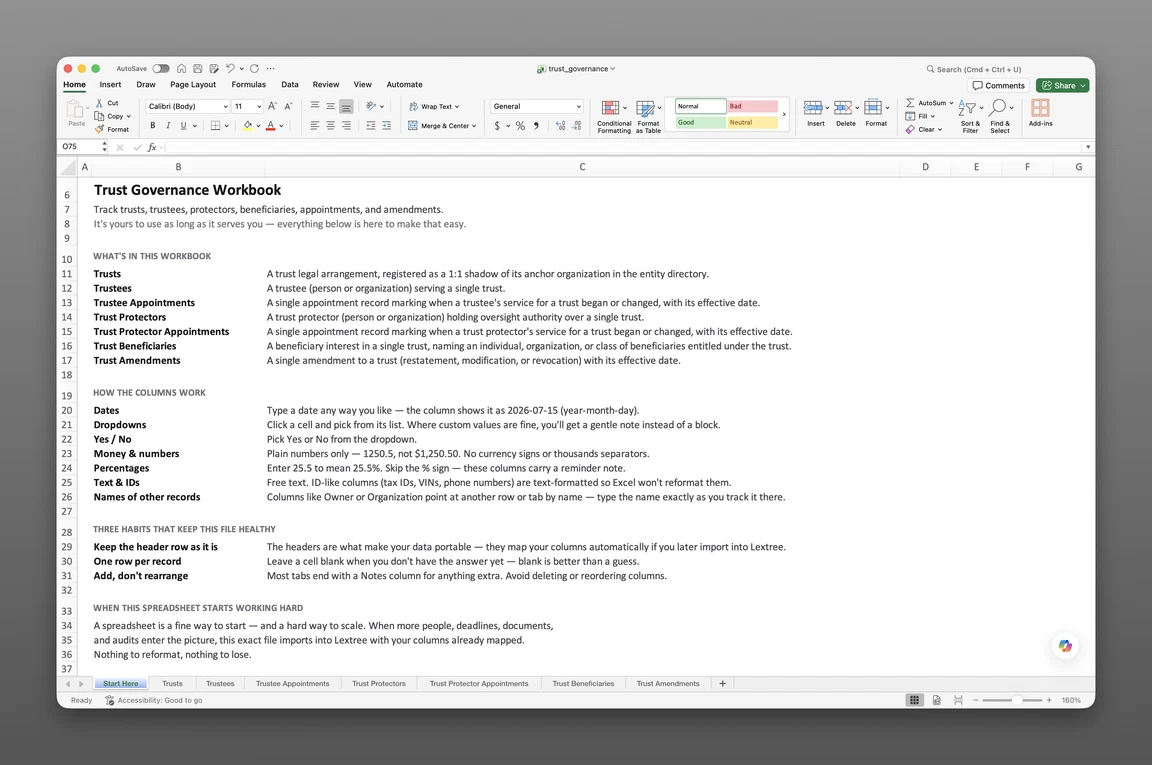
Inside the trust and trustee register template
- Start Here
How the workbook works — column conventions, dropdown lists, and the habit of adding a row instead of overwriting one.
- Trusts
One row per trust — trust type (22 options, from Family and Discretionary to Dynasty, Charitable Remainder, and Grantor Retained Annuity), revocability, tax classification (Grantor, Non-Grantor, Tax-Exempt), governing law and situs, tax ID and residence, accounting year-end month, risk rating, and next review and next accounting due dates.
- Trustees
One row per trustee — trustee role (Sole, Co-Trustee, Successor), capacity (Family Member, Professional, Corporate Trustee, Private Trust Company), succession order, powers held, compensation basis, bond required/amount/expiration, term dates, and a Status: Event / Status: Date / Status: Description timeline.
- Trust Beneficiaries
One row per beneficiary — beneficiary type (Current, Remainder, Contingent), relationship to grantor, share percentage, distribution standard and timing, power of appointment, a protective or spendthrift provision field, vesting age/date/condition, withdrawal rights, and its own status timeline.
Get the template
Enter your email and we’ll send the trust and trustee register template to your inbox. Free — no credit card, no call, no follow-up sequence you didn’t ask for.
- Tracked fields across the three data sheets
- 75
- Pre-built dropdown lists
- 20
- Worksheets, ready to fill in
- 4
What a trustee register is
A trustee register template is a single Excel workbook that records who serves each trust and under what authority — trustees with succession order, capacity, and compensation, and the beneficiary interests each trust holds. This trust structure spreadsheet template keeps that whole structure in one keyed file.
Most templates you’ll find are accounting ledgers — a household money map — or estate-planning deed and will forms. This is neither. It’s a structuring register: the governance surface of a trust, not the money moving through it.
This is not trust accounting: no principal-and-income ledger, no transactions or balances. It’s not a deed or will drafting form either. It records the structure a trust already has.
What’s inside the Excel workbook
The workbook ships as one Excel file, four sheets deep. A Start Here tab leads, followed by three data sheets spanning trusts, trustees, and beneficiaries. No formulas, no sample rows — every dropdown list is pre-built and ready for real data.
Together, those three sheets hold 75 fields behind 20 dropdown lists. This register opens in Google Sheets as well as Excel. Every dropdown list works the same way there, so a shared workbook stays consistent no matter who opens it.
Here’s what a complete trustee register should track, sheet by sheet:
| Sheet | What it tracks |
|---|---|
| Trusts | Trust type (22 options, from Family and Discretionary to Dynasty, Charitable Remainder, and GRAT), revocability, tax classification (Grantor, Non-Grantor, Tax-Exempt), governing law, situs, tax ID and residence, accounting year-end month, risk rating, next review and next accounting due |
| Trustees | Trustee role (Sole, Co-Trustee, Successor), capacity, succession order, powers held, compensation basis, bond required/amount/expiration, term dates, status timeline |
| Trust Beneficiaries | Beneficiary type (Current, Remainder, Contingent), relationship to grantor, share percentage, distribution standard and timing, power of appointment, spendthrift provision, vesting age/date/condition, withdrawal rights, status timeline |
Trusts and trustee roster
Trusts — 34 fields — holds situs country and subdivision, governing law, and tax classification: Grantor, Non-Grantor, or Tax-Exempt. Trust type runs 22 options deep, from Family and Discretionary trusts through Dynasty, Charitable Remainder, and Grantor Retained Annuity trusts. Trust date, funded-on date, estimated value, risk rating, and a scheduled termination date round out the row.
Trustees — 18 fields — keys to the trust with real roles: Sole, Co-Trustee, or Successor. Capacity (Family Member, Friend or Adviser, Professional, Corporate Trustee, Private Trust Company), succession order, and bond detail sit on the same row. Compensation basis and term dates round out what each trustee’s row records.
These two sheets form the keyed spine the rest of the workbook builds on. Trust Beneficiaries references a trust from here. Get one of those two rows wrong, and every beneficiary record keyed to it inherits the mistake.
Trustee powers and succession
Trustees carries a Powers held field — All Powers, Investment Only, Distributions Only, Administration Only — right on the roster, alongside whether a trustee acts on direction and their compensation basis. Succession order ranks who steps in when a sole or co-trustee’s term ends.
A Status: Event / Status: Date / Status: Description trio runs on both Trustees and Trust Beneficiaries. Appointed, Term Ended, Resigned, Removed, Deceased, or Incapacitated — each change gets its own dated row instead of overwriting the trustee’s last known status.
These are record fields, not a full protector power grid — Trust Protectors and its dedicated appointment sheet aren’t part of this workbook. Powers held marks what a trustee holds today; it doesn’t replace a separate protector roster.
Beneficiary interests and vesting
Trust Beneficiaries — 23 fields — holds beneficiary type: Current, Remainder, Contingent. Relationship to grantor, share percentage, distribution standard, and distribution timing sit on the same row, alongside vesting age, vesting date, and vesting condition. A protective or spendthrift provision field marks the interest as shielded from creditors — miss that field, and the protection isn’t there when a creditor comes looking.
Power of appointment (None, Limited, General) and a termination reason (Distribution Complete, Death, Disclaimer, Class Closed, and more) close out the row when an interest ends. This sheet doubles as a beneficiary vesting tracker, keyed to the same trust and trustee roster.
How to keep the register
A trustee register earns its name by keeping every trustee, power, and interest on its own row. Nothing stays buried in a binder. This section shows how to keep a register of trustees and beneficiaries with this workbook.
To keep a register of trustees and beneficiaries:
- Add a row per trust on Trusts. Every revocable, irrevocable, family, or charitable trust gets its own row with type, situs, and tax classification.
- Add a row per trustee, with succession order. Sole, co-, and successor trustees each get a row on Trustees, ranked by succession.
- Log every status change as a new row. Appointed, Resigned, Removed, or Deceased each get their own event, date, and description — never overwrite the last one.
- Record powers held and compensation basis as they’re set. Powers held and compensation basis live on Trustees, alongside bond detail.
- Record beneficiary interests with vesting and spendthrift detail. Share percentage, vesting date or condition, and the protective or spendthrift provision field all live on Trust Beneficiaries.
- Sort Trusts by next review or next accounting due. Either date surfaces the trust that needs attention first.
Recording status changes
One row per status change keeps the history intact. Trustees and Trust Beneficiaries both carry a Status: Event, Status: Date, and Status: Description trio. Neither sheet overwrites a prior status when a new one begins.
Succession order names who steps in next, so a successor trustee stepping in isn’t stuck without record of who came before. A trustee’s incapacitated or deceased status stays on the row, alongside the date it was recorded, rather than replacing the trustee’s earlier appointed status outright.
Tracking vesting and spendthrift protection
Trust Beneficiaries holds vesting age, vesting date, and vesting condition on the same row as the interest itself, plus a protective or spendthrift provision field and withdrawal rights and terms. Termination reason — Distribution Complete, Death, Disclaimer or Renunciation, Class Closed, Removed Under a Power, or Interest Released or Assigned — closes the row when an interest ends.
This sheet works as a spreadsheet to track beneficiary vesting and spendthrift protection. A row per beneficiary, with vesting and protection fields on the same line, means nothing about who’s protected gets lost in a side note.
Built for family offices
Family-office principals and staff, trust counsel, and wealth-structuring advisors running multiple trusts hit the same problem first: a scattered trustee record, one binder per trust. A family trust register template for Excel gives every trust its own row instead of its own binder.
When trust counsel needs a trustee’s powers or a beneficiary’s vesting schedule across a dozen trusts, filtering one workbook by trust name replaces opening a dozen separate binders. Nothing about the beneficiary record changes shape from trust to trust — it’s the same three sheets, keyed differently each time.
That same portfolio view extends to how family offices manage entities and trusts — the entities a family office tracks alongside every trust it administers.
When a spreadsheet stops working
This register holds raw records only, with no version history. An overwritten status row erases its own past, and a bond expiration waits for someone to notice it. Nothing on the sheet flags either problem before it becomes one.
There’s no permission model either. Anyone with the file can edit any trust’s trustee roster or beneficiary interests. A shared link means a shared risk, for every trust in the file.
From workbook to software
This template’s column headers match Lextree’s import templates, so it loads directly into trust governance software — no re-keying, no remapping. A trust’s full history moves with it, row for row, and that’s also where protector powers and an amendment history pick up as linked records beyond what this workbook holds.
That handoff matters most once a portfolio spans a dozen trusts, one overwritten status row away from a dispute over who had authority. Software keys that portfolio to the entities already tracked elsewhere in Lextree. Every trust and trustee lines up with the legal entities the trust already owns.
Powers and dates that surface
Access control replaces the shared file, so only the right people edit a given trust’s trustee roster or beneficiary interests. Reminders fire on bond expirations and trustee term ends, instead of waiting for a spreadsheet check. A status change that happens today shows up the moment it’s recorded.
A keyed status history lines up every appointment, resignation, and removal automatically — not through row discipline alone. Nobody has to remember which row was the latest version.
Frequently asked questions
What is a trustee register template? A trustee register template is a single Excel workbook that records who serves each trust and under what authority — trustees with succession order, capacity, and compensation, plus the beneficiary interests each trust holds. It functions as a trust structure spreadsheet template for a portfolio of trusts.
What should a trustee register include? A trustee register should include the trusts themselves — type, situs, tax classification, and risk rating — trustees with succession order, powers held, and bond detail, and beneficiary interests with distribution standard, timing, and vesting. Each of those lives on its own sheet and its own row, so nothing gets buried when the file grows to cover a portfolio of trusts.
Does it track trust protectors? No — Trust Protectors isn’t part of this workbook. Trustees carries its own Powers held field (All Powers, Investment Only, Distributions Only, Administration Only) for the trustee roster, but protector-specific powers and appointments live in trust governance software as linked records, not on this sheet.
Can it track trustee appointments and removals? Partly. Trustees carries a status timeline on every row — Appointed, Term Ended, Resigned, Removed, Deceased, Incapacitated — with its own event date and description, plus succession order. There’s no separate appointment-history sheet; log a new status row instead of overwriting the last one.
Does it record beneficiary interests, vesting, and spendthrift protection? Yes. Trust Beneficiaries carries beneficiary type, relationship to grantor, share percentage, distribution standard and timing, vesting age, vesting date, vesting condition, withdrawal rights and terms, and a protective or spendthrift provision field.
Does it track trust amendments and court approval? No — Trust Amendments isn’t part of this workbook. The Trusts sheet holds the trust date and termination fields, but restatements, decantings, and court-ordered modifications live in trust governance software as a linked amendment history, not as rows here.
Is this trust accounting software? No. This tracks trust structure and governance, not trust accounting — there is no principal-and-income ledger, no transactions, and no balances. Accounting stays in your accounting system.
Can I use it to draft a trust deed or will? No. This records a trust structure that already exists — it does not draft deeds, wills, or trust instruments. Drafting stays with your estate-planning attorney.
Is this a UK charity (CIO) trustee register? No. This is a US-style structuring register for a portfolio of private and family trusts — trustees, beneficiaries, and succession across as many trusts as a family office administers. A UK Charitable Incorporated Organisation (CIO) trustee register is a different, single-charity statutory document with its own regulator-mandated fields.
Can it manage multiple trusts in one workbook? Yes. Every sheet is keyed to a trust, so one workbook covers a portfolio of many trusts instead of just one.
Does it track bond requirements and term dates? Yes. Trustees carries bond required, bond amount, and bond expiration alongside each trustee’s original term start date and current term end date.
Does the register send reminders or alerts? No. The workbook holds raw dates only, with no built-in alerts. Add your own conditional-formatting rule, or move to software that fires reminders on its own.
Is it free, and does it work in Google Sheets? Yes. Enter your email below and the workbook is sent to your inbox — no credit card, no sales call. It opens in Google Sheets as well as Excel, dropdowns included.
Is there a free family trust register template for Excel? Yes — this one. It’s a free workbook with 4 worksheets and 75 fields, covering trusts, trustees, and beneficiaries — sent to your email.
The template is free. Take it.
Four worksheets, already built — just add your trusts, trustees, and beneficiaries.