Vendor Compliance Tracking Spreadsheet Template for Excel
A free vendor compliance tracking template for Excel — track counterparty relationships and the insurance coverage requirements you hold them to. Sent to your email.
1 Excel workbook · 3 worksheets — free, no credit card.
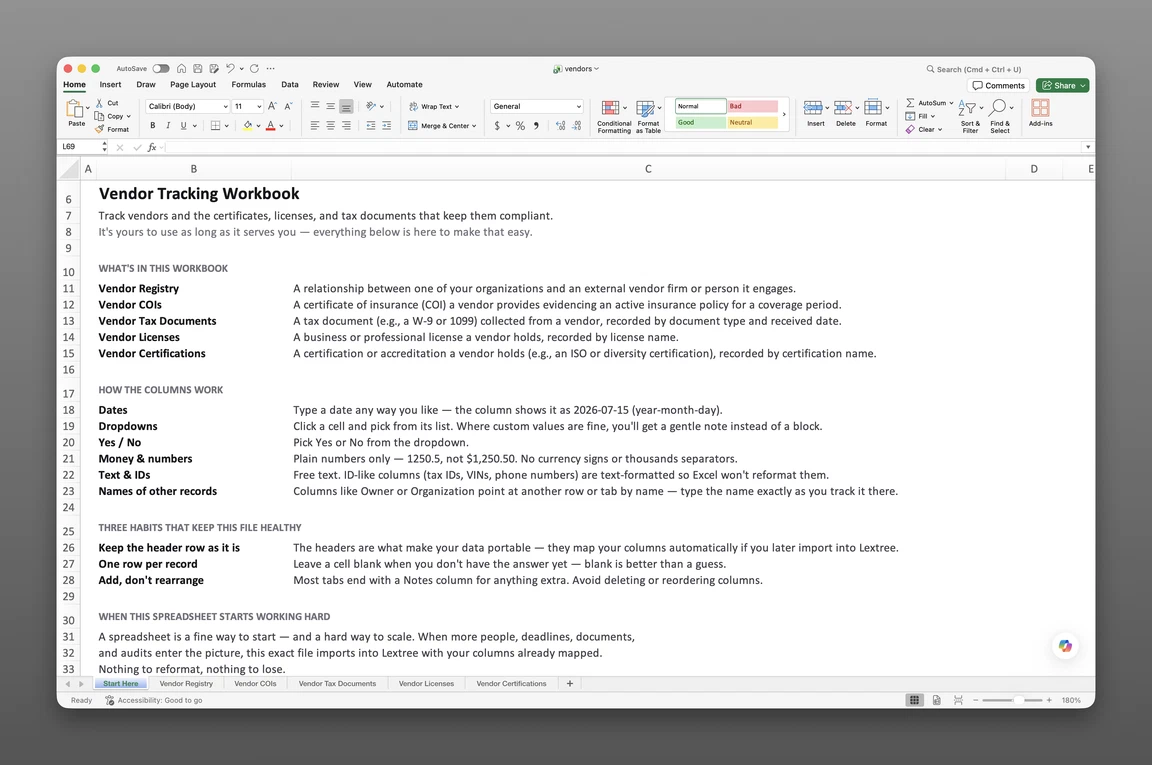
Inside the vendor compliance tracking template
- Start Here
How the workbook works — column conventions, dropdown lists, and the habit of adding a row instead of overwriting one.
- Counterparty Registry
One row per counterparty relationship — relationship type, service category, criticality, agreement basis, diligence completed, tax reporting required, and the latest tax form received.
- Coverage Requirements
The insurance coverage each counterparty must maintain — coverage type, minimum per-occurrence and aggregate limits, additional-insured and waiver-of-subrogation requirements, and whether the current certificate, expiration date, and limits are on file.
Get the template
Enter your email and we’ll send the vendor compliance tracking template to your inbox. Free — no credit card, no call, no follow-up sequence you didn’t ask for.
- Tracked fields across the two data sheets
- 39
- Pre-built dropdown lists
- 9
- Worksheets, ready to fill in
- 3
What vendor compliance tracking is
Vendor compliance tracking is the practice of recording your vendor relationships and the insurance coverage you require of each one, so you always know whether a vendor currently meets what your contract or policy requires — not just whether a certificate arrived at some point in the past.
A subcontractor’s certificate of insurance expires quietly in March, and no one notices until a claim lands in October. Or an auditor asks which vendors carry cyber coverage, and the answer sits scattered across old email threads. This vendor compliance tracking spreadsheet template for Excel keeps that answer current before either moment arrives.
This template tracks the relationship itself and the coverage requirements you hold a counterparty to — not a running log of every certificate, license, or tax form a vendor has ever sent. It’s a current-state answer: is this vendor covered right now, at what limits, with a certificate on file.
What’s inside the Excel workbook
This vendor compliance tracking template ships as one Excel workbook, three sheets deep. A Start Here tab leads, followed by two data sheets — one for the counterparty relationship, one for the insurance coverage you require of it. Together they hold 39 tracked fields, organized behind 9 pre-built dropdown lists, and the workbook opens in Google Sheets as well as Excel.
- Start Here — column conventions and the habit of adding a row instead of overwriting one
- Counterparty Registry — 19 fields
- Coverage Requirements — 20 fields
| Sheet | What it answers |
|---|---|
| Counterparty Registry | Relationship type, service category, criticality, agreement basis, diligence completed, tax reporting required |
| Coverage Requirements | Coverage type, minimum limits required, additional-insured and waiver-of-subrogation requirements, current certificate on file |
This workbook now covers more than vendors: relationship type runs Vendor, Customer, Advisor, Financial institution, Partner, or Grantee, so a supplier, a referral partner, and a grant recipient can share the same registry.
Counterparty Registry
Counterparty Registry — 19 fields — is the master list every coverage requirement keys back to. It holds relationship type, service category — Goods supplier, Contractor, Consultant, Professional services, Software or technology, Staffing, Logistics or freight, Facilities or maintenance, Marketing or agency, Financial services, or Utilities or telecom — and a criticality rating of Critical, Important, or Standard.
Agreement basis — Master agreement, Statement of work or purchase order, Counterparty’s standard terms, or No written agreement — sits alongside diligence completed, tax reporting required, and latest tax form received. Reason for ending — Engagement complete, Replaced by another counterparty, Performance issues, Cost, Compliance or risk, Service no longer needed, or Counterparty ceased trading — closes out a relationship without deleting the row.
That’s a narrower promise than the earlier version of this workbook: there’s no separate log of every W-9 or 1099 copy submitted, no license roster, and no certification roster. Latest tax form received is a single field, not a document history — a fact for right now, not an archive of every form a vendor has sent.
Coverage Requirements, not a certificate archive
Coverage Requirements — 20 fields — replaces what used to be Vendor COIs, and it works differently. Instead of one row per certificate received over time, each row is a requirement you hold a counterparty to: coverage type — General liability, Professional liability, Workers’ compensation, Commercial auto, Umbrella or excess liability, Cyber liability, Property, Product liability, Pollution liability, Crime or fidelity, Employment practices liability, Inland marine, or Cargo — with a minimum per-occurrence limit, a minimum aggregate limit, and whether additional-insured status, a waiver of subrogation, or primary-and-non-contributory wording is required.
Requirement source — Contract, Internal policy, or Regulation — and the window the requirement applies from and until sit alongside the current state: current expiration date, current per-occurrence and aggregate limits, and whether a current certificate has been received. A Status: Event of Covered, Lapsed, or Ended marks where a counterparty stands today.
That current-state model answers “is this counterparty covered right now” directly, but older certificates aren’t preserved on their own row the way the earlier workbook logged every COI received. A lapsed-then-renewed certificate updates the current fields rather than adding a new dated entry.
How to use the template
A subcontractor’s certificate lapses in the middle of a project, and the fastest way to catch it runs through a workbook that’s already current. Digging through email threads at that point wastes the week compliance needs most.
To track vendor compliance in Excel:
- Add a row per counterparty in Counterparty Registry. Relationship type, service category, and criticality go on every row before anything else.
- Add a row per coverage type you require, in Coverage Requirements. A vendor needing general liability and workers’ compensation gets two rows, one per coverage type.
- Set the minimum limits and requirements once. Minimum per-occurrence limit, minimum aggregate limit, and whether additional insured or a waiver of subrogation applies belong to the requirement, not the certificate.
- Update the current fields when a new certificate arrives. Current expiration date, current limits, and current certificate received reflect what’s true today.
- Use Status: Event to mark Covered, Lapsed, or Ended. That status, with its own date and description, is the fastest read on where a counterparty stands.
- Sort by current expiration date. That’s the fastest way to see what’s coming due first across every counterparty.
For example, a general contractor onboards a new electrical subcontractor. That subcontractor gets one Counterparty Registry row, with relationship type Vendor and criticality Critical. Its general liability and workers’ compensation requirements each get their own Coverage Requirements row, with a minimum limit and a current expiration date.
One row per record
Counterparty Registry rows should map one-to-one with counterparties. Coverage Requirements keys back to that counterparty on its own sheet, one row per coverage type required. Flattening a requirement or a certificate into a notes column loses exactly the detail this workbook exists to keep.
Current expirations
Sort or filter Coverage Requirements by current expiration date, and read the additional-insured and waiver-of-subrogation requirement columns next to it. Updating the current fields when a certificate renews keeps the sheet answering “covered today,” even though it doesn’t keep the prior certificate on its own row.
For a visual cue between sorts, add your own conditional-formatting rule to the current-expiration-date column. In Excel: Home > Conditional Formatting > Highlight Cells Rules > A Date Occurring. In Google Sheets, a custom formula rule keyed to TODAY() does the same job.
Either way, a date inside 30 or 60 days highlights on its own.
The workbook ships with raw dates only. It carries no formulas or built-in formatting, and nothing here fires a reminder until you set one up.
Built for subcontractor-heavy operations
General contractors, property managers, and healthcare operators chase subcontractor paperwork every day. Every subcontractor needs a current certificate of insurance, and every critical vendor needs its coverage requirements on file before work starts. Ops and compliance managers, controllers, and risk or office managers are the ones who feel the gap first.
Free templates online typically stop at a vendor list template in Excel — one flat sheet, one column for COI status. This workbook runs the opposite way: a counterparty registry and its coverage requirements each keyed to the same relationship, so a criticality rating and a coverage gap show up on the same filter instead of a separate spreadsheet apiece.
Counterparty Registry carries a Managing Organization column on every row, so one workbook covers counterparty relationships across a corporate family, not one spreadsheet per entity. A holding company with subsidiaries in different states shares a single registry, with each counterparty row pointing back to the entity it serves.
When a spreadsheet stops working
This workbook covers a long list of counterparties before it runs into real edges. There’s no version history, so an overwritten current-expiration date loses its past. With more than one person editing the file, nothing controls who can see which counterparty’s coverage records.
Nothing fires an alert when a coverage requirement lapses, and that gap can run for months. It usually surfaces during an audit or when a claim arrives.
This template’s column headers match Lextree’s import templates, so it loads directly into vendor compliance tracking software — no re-keying, no remapping. From there, expiration dates drive reminders instead of waiting for someone to open the sheet, and every certificate received keeps its own history instead of overwriting the last one. Chase counterparties before a requirement lapses, not after.
Frequently asked questions
What is vendor compliance tracking? The practice of recording your vendor and counterparty relationships and the insurance coverage you require of each one, so you always know whether a counterparty currently meets what your contract or policy requires.
What documents should you collect from every vendor? At minimum, for a vendor requiring insurance: a certificate showing current limits and an expiration date, checked against what your contract requires. This template doesn’t hold a document archive — it holds the current requirement and whether it’s currently met, alongside a single field for the latest tax form received.
What’s the difference between a vendor list and a vendor compliance tracker? A list holds a vendor’s name and contact information and goes stale the moment a coverage requirement lapses or a relationship changes. A vendor compliance tracker keys each coverage requirement to the vendor, with its own current expiration date and limits.
Who is this vendor compliance tracking template for? General contractors, property managers, and healthcare operators chasing subcontractor paperwork, along with ops and compliance managers, controllers, and risk or office managers. It’s built for any organization managing many vendors, especially across multiple entities.
How do I track vendor certificate of insurance expirations in Excel? Sort or filter Coverage Requirements by current expiration date, and read the additional-insured and waiver-of-subrogation requirement columns alongside it. Update the current fields when a certificate renews — the template holds today’s coverage state, not a dated log of every certificate received, and it doesn’t fire a reminder on its own.
How do I track vendor W-9s and 1099 status? Not as a full log anymore. Counterparty Registry carries tax reporting required and latest tax form received as two fields on the counterparty’s own row — enough to flag who needs a form on file, but not a dated history of every W-9 or 1099 copy submitted.
Can I track subcontractor licenses and certifications in one spreadsheet? No, not in this workbook anymore. Licenses and certifications were split out of this refresh; certification tracking now lives in Lextree’s certifications module instead of a Vendor Certifications sheet here.
Does this track our own insurance policies, or documents we collect from vendors? Collection only, and now framed as a requirement, not a raw document log. This template tracks the coverage you require of your vendors and other counterparties, not your own organization’s policies. For your own policies, Lextree’s insurance tracking covers that side.
Is this vendor risk, TPRM, or procurement software? No. This is a document-tracking spreadsheet, not vendor risk management or procurement software. It doesn’t score risk, manage spend, generate purchase orders, or run an onboarding workflow.
Is the template free, and does it work in Google Sheets? Yes. Enter your email below and the workbook is sent to your inbox — no credit card, no sales call. It opens in Google Sheets as well as Excel, dropdowns included.
The template is free. Take it.
Two data sheets, already built — just add your counterparties and their coverage requirements.