Contract Amendment Log: Record Which Terms Each Instrument Changed
How to Track Contract Amendments
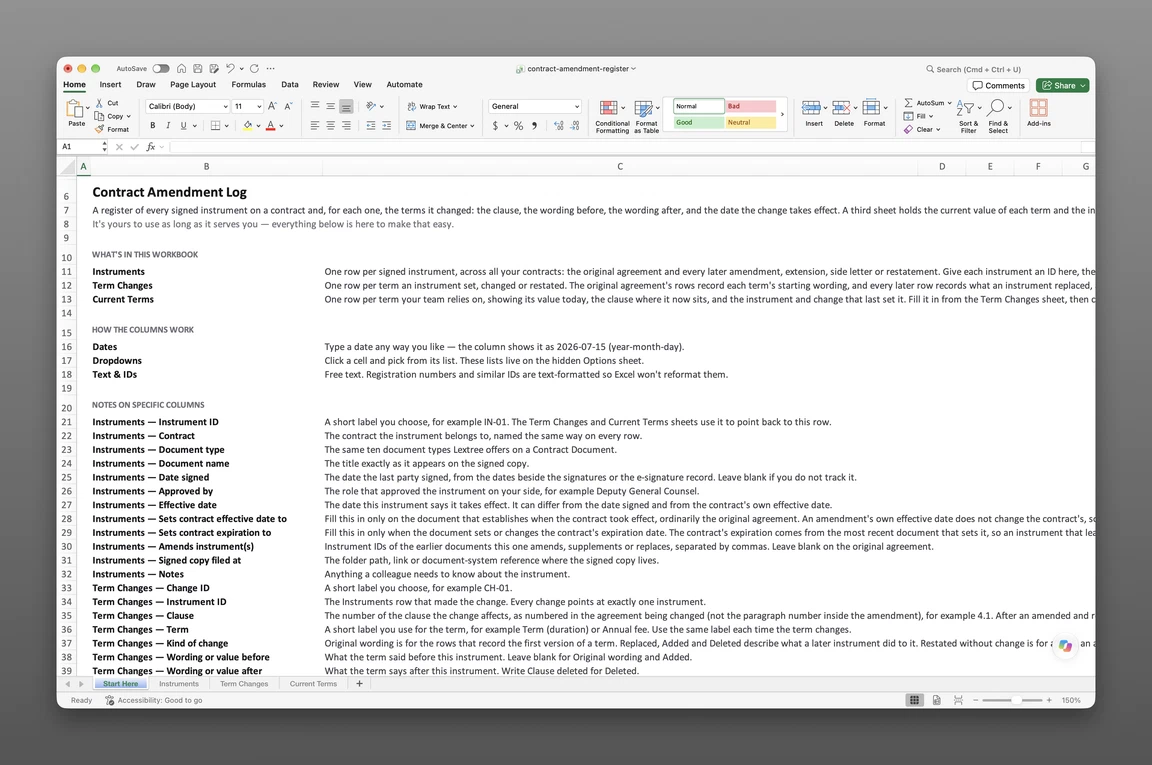
A contract amendment log records every signed instrument that changed an agreement after signing and, for each one, which clause it changed, the wording before and after, and when the change took effect. Kept this way, the contract amendment history answers “which document says that?” without anyone rereading the whole file. Some teams call the same thing a contract amendment register or a record of contract amendments. Whatever the name, it works at the level of the clause.
The work runs in four steps:
- Gather every signed instrument for the agreement.
- List them oldest first, each with a short ID.
- For each instrument, record every clause it changed, with the wording before, the wording after and the date the change takes effect.
- When a later instrument changes the same clause, mark which row replaced the earlier one.
The rest of the page takes those steps in order.
Gather the Signed Instruments
Start with the original agreement and every later signed instrument that changed a term, one row each. Amendments, extensions, side letters, change orders and a restatement all get rows, because each is a signed instrument that changed a term. Work from signed copies. A redline shows what someone proposed, and the log records what the parties signed.
Not every signed paper earns a change row. A notice given under the agreement can sit in the instrument list but changes no clause, so it has nothing to put in the change rows. Whether an email or a purchase order confirming a change gets a row depends on what the agreement’s amendments clause accepts, which is the point of the next paragraph.
Check your own agreement for an amendments clause, often called a no-oral-modification clause, which allows changes only in a writing the parties sign. Many agreements also carry an integration clause, stating that the signed text is the parties’ complete agreement. Both are terms of the contract, so what they say depends on the agreement in front of you. The log follows them by giving rows only to signed instruments.
Federal contractors get a ready-made instrument for each change. Modifications arrive on a Standard Form 30, and FAR 43.301 directs agencies to use it for change orders and supplemental agreements, among others. Each SF 30 is a row like any amendment.
List Them Oldest First
Order the instruments by effective date. Give each a short ID, such as IN-01 and IN-02, that the change rows will cite. Beside it, note the document type, the name exactly as titled on the signed copy, the earlier instruments it amends, and where the signed copy is filed.
Keep the number a document gives itself, such as Amendment No. 2, and never renumber it. Federal practice assigns modification numbers in sequence, for example P00001 under FAR 4.1603.
The instruments for the Sample Software Subscription Agreement look like this:
| ID | Document type | Document name | Effective date | Amends |
|---|---|---|---|---|
| IN-01 | Original Agreement | Software Subscription Agreement | 2023-03-06 | None |
| IN-02 | Amendment | Amendment No. 1 to Software Subscription Agreement | 2023-11-14 | IN-01 |
| IN-03 | Extension | Extension of Software Subscription Agreement | 2025-02-12 | IN-01 |
| IN-04 | Amendment | Amendment No. 2 to Software Subscription Agreement | 2025-09-17 | IN-01, IN-02 |
| IN-05 | Side Letter | Side Letter on Payment Terms and Test Environment | 2026-02-18 | IN-01 |
The extension and the side letter carry no number of their own, while Amendment No. 2 is IN-04. The IN- ID gives every instrument a handle that the change rows can cite.
What Should a Contract Amendment Log Include
A contract register for the agreements themselves holds one record per agreement: the parties, the value, the end date. The log works one level down, at the clause. Each change gets a row holding:
- the instrument that made the change
- the clause, as numbered in the agreement being changed
- a short label for the term
- the kind of change: replaced, added, deleted, or restated without change
- the wording or value before
- the wording or value after
- the date the change takes effect
- the later change that replaced it, if any
Where the signed copy is filed comes through the instrument row, so the change rows do not repeat it. Parties, value, governing law and renewal terms stay in the contract-level record.
The Clause and Its Wording
Cite the clause as numbered in the agreement being changed, not the paragraph number inside the amendment. If Amendment No. 1 changes the fee in its own section 2, the row still says clause 4.1, because that is where a reader finds the fee in the agreement. After a restatement, use the restated numbering. A term that a side letter adds on its own, without inserting a clause into the agreement, is cited by the letter’s paragraph, for example SL 2.
Record a value when the term is a value (USD 48,000 per year) and quoted wording when the words matter. Use one label for a term every time it changes, such as Annual fee or Term (duration), so that a filter on the label returns the term’s whole history.
An amendment that replaces an exhibit or schedule is cited the way the agreement cites it, for example Exhibit B, in a single row. A changed defined term gets one row against the definitions clause, and the Notes column lists the clauses that use the term.
When the Change Takes Effect
Usually this is the instrument’s effective date. It is a later date when the instrument says the change starts later, as with a new fee that begins with the next contract year. An extension takes the extension’s own effective date, even though the added period begins later.
When a later instrument changes the same clause, write the newer row’s ID in the earlier row’s “replaced by” column. Each term then has exactly one row with nothing replacing it.
Add an instrument’s rows when the fully signed copy arrives. An agreed change that nobody has signed yet gets no row. Before a renewal decision or an audit request, recheck the rows in force against the signed copies.
The companion file keeps the log in three sheets. Instruments holds one row for each signed instrument. Term Changes holds one row for each clause an instrument changed, with the wording before and after and when it takes effect. Current Terms is an index from each term in force to the instrument and change that last set it. It comes filled in with the two sample agreements below, and it is sent to your email.
Get the contract amendment log
Enter your email and we’ll send the contract amendment log to your inbox. Free — no credit card, no call, no follow-up sequence you didn’t ask for.
Amendments to Two Sample Agreements
The examples are two fictional third-party agreements: the Sample Software Subscription Agreement, with five instruments, and the Sample Cleaning Services Agreement, with three. The rows below match the companion file. Every party, clause and date is invented, and nothing on this page is legal advice.
Two Amendments, Five Changes
Amendment No. 1 (IN-02) and Amendment No. 2 (IN-04) between them changed five terms of the software agreement:
| Change | Instrument | Clause | Term | Before | After | Takes effect | Replaced by |
|---|---|---|---|---|---|---|---|
| CH-07 | IN-02 | 4.1 | Annual fee | USD 48,000 per year | USD 54,000 per year | 2024-03-06 | None |
| CH-08 | IN-02 | 5.1 | Support hours | Monday to Friday, 9 a.m. to 5 p.m. Eastern Time | Monday to Friday, 8 a.m. to 6 p.m. Eastern Time | 2023-11-14 | None |
| CH-09 | IN-02 | 9.3 | Data retention after end | Customer data kept for 30 days after the agreement ends | Customer data kept for 60 days after the agreement ends | 2023-11-14 | CH-12 |
| CH-11 | IN-04 | 3.4 | Minimum users | Minimum of 25 users | Clause deleted | 2025-09-17 | None |
| CH-12 | IN-04 | 9.3 | Data retention after end | Customer data kept for 60 days after the agreement ends | Customer data kept for 90 days after the agreement ends | 2025-09-17 | None |
An amendment log with effective dates and terms changed shows its value in the Takes effect column. The fee change starts on 2024-03-06, later than Amendment No. 1’s own effective date of 2023-11-14, because the new fee begins with the second contract year. Data retention changed twice, so CH-09 points forward to CH-12. A deleted clause gets a row too, with “Clause deleted” in the After column. Amendment No. 2 leaves the end date alone.
Side Letter and Extension Rows
The side letter, IN-05, took effect on 2026-02-18 and produced two rows. CH-13 varies clause 3.2, Payment terms, from 30 to 45 days after the invoice date. The agreement’s clause 3.2 still reads 30 days, because the letter varies the term without rewriting the agreement’s text. The log is where the two are read together. CH-14 adds a test environment at no extra charge and is cited as SL 2, the letter’s own paragraph, since the letter inserts no numbered clause.
The extension, IN-03, gets one row. CH-10 changes clause 2.1, Term (duration), from “Two years from the effective date” to “Ends 2027-03-05”, and it takes effect on 2025-02-12, the extension’s effective date. It is the only row on this page that moves an end date. When you read it, remember that an expiration date is not the same as a notice deadline.
One Text Replacing the Rest
The cleaning agreement starts with IN-06, effective 2022-06-08. Amendment No. 1 (IN-07, effective 2023-04-12) widens the service area from floors 1 to 3 to floors 1 to 5. Then IN-08, an amended and restated agreement effective 2024-05-22, replaces IN-06 and IN-07 in full.
The logging rule is that the restatement becomes the source of every term it contains. The service area changes again, to floors 1 to 6. The cleaning schedule is repeated without change, and it still gets a row marked “Restated without change”, so the schedule’s source moves to IN-08 and the earlier row points to it. Clause numbers on later rows follow the restated text.
Side letters need one more check. If the restatement’s wording supersedes an earlier side letter, that letter’s terms get restatement rows too. If the letter survives, its rows keep a blank “replaced by”. Which one applies depends on the restatement’s own wording.
| Change | Instrument | Clause | Term | Before | After | Takes effect | Replaced by |
|---|---|---|---|---|---|---|---|
| CH-16 | IN-06 | 3.1 | Service area | None (original wording) | Floors 1 to 3 | 2022-06-08 | CH-18 |
| CH-17 | IN-06 | 3.2 | Cleaning schedule | None (original wording) | Five evenings a week, Monday to Friday | 2022-06-08 | CH-21 |
| CH-18 | IN-07 | 3.1 | Service area | Floors 1 to 3 | Floors 1 to 5 | 2023-04-12 | CH-20 |
| CH-20 | IN-08 | 3.1 | Service area | Floors 1 to 5 | Floors 1 to 6 | 2024-05-22 | None |
| CH-21 | IN-08 | 3.2 | Cleaning schedule | Five evenings a week, Monday to Friday | Five evenings a week, Monday to Friday | 2024-05-22 | None |
Rows for terms this page does not discuss stay in the file.
Tracing a Clause’s Amendment History
To find which amendment changed a clause, filter the change rows by clause and follow “replaced by” until a row has none. That row’s instrument is the document to pull. On clause 9.3 of the software agreement, CH-06 (IN-01, the original 30 days, which the tables above leave out) is replaced by CH-09 (IN-02, 60 days), which is replaced by CH-12 (IN-04, 90 days), and CH-12 has no replacement. Amendment No. 2 is the document to pull, and IN-01 and IN-02 are the earlier instruments that touched the clause. The same lookup on clause 3.2 ends at the side letter, because the agreement’s own text no longer states the payment term in force. A deletion ends a lookup too. CH-11 has no replacement, so Amendment No. 2 is the copy to pull when someone asks why the 25-user floor no longer applies. Two cases need a different lookup. If a restatement renumbers the clauses, filter by the term label instead of the clause number, since the label stays the same while the number moves. And a clause that no instrument has changed returns only its original-wording row, so the original agreement is the copy to pull.
A conformed copy, a finalized version of the contract incorporating the negotiated changes and amendments, shows what the agreement says after its amendments. It does not show which instrument made each change. The log points each change to its signed instrument, and its index of terms in force carries the date someone last compared each row with the signed copy.
Two further uses come up. For SEC registrants, Item 601(a)(4) of Regulation S-K covers an amendment or modification to a previously filed exhibit, such as a material contract filed under Item 601(b)(10). It is filed as an exhibit to a Form 10-Q or Form 10-K unless the earlier exhibit would no longer be required. The instrument rows show which amendments arrived since the last report, and counsel confirms the filing details. And when an amendment replaces a clause that carried duties, reread the clause as you would when extracting obligations from a contract.
Filing Each Instrument in Lextree
In Lextree, each amendment filed as its own Contract Document sits under its agreement. The record takes a Document type (Amendment, Extension, Side Letter and Restatement are among the options the module comes set up with), an Effective date and a Document name. A Document value records an amendment’s incremental commitment, and the signed instrument attaches to the record. Which earlier instrument an amendment changes, and the clause-level detail from the log, go into the document’s Description or Notes as text.
Dates follow the instruments that set them. The original agreement fills Sets contract effective date to. An instrument that sets or moves the end date, like the sample extension, fills Sets contract expiration to, and the contract’s expiration comes from the most recent document that sets it. The help page explains how a Contract Document sets the contract’s dates.
Put the log’s instrument ID in each Contract Document’s name or Notes. A log row and a Lextree record then point at the same signed copy.
Lextree Editorial
Author