Tracking Financial Statements by Entity and Reporting Period
The entity and period index
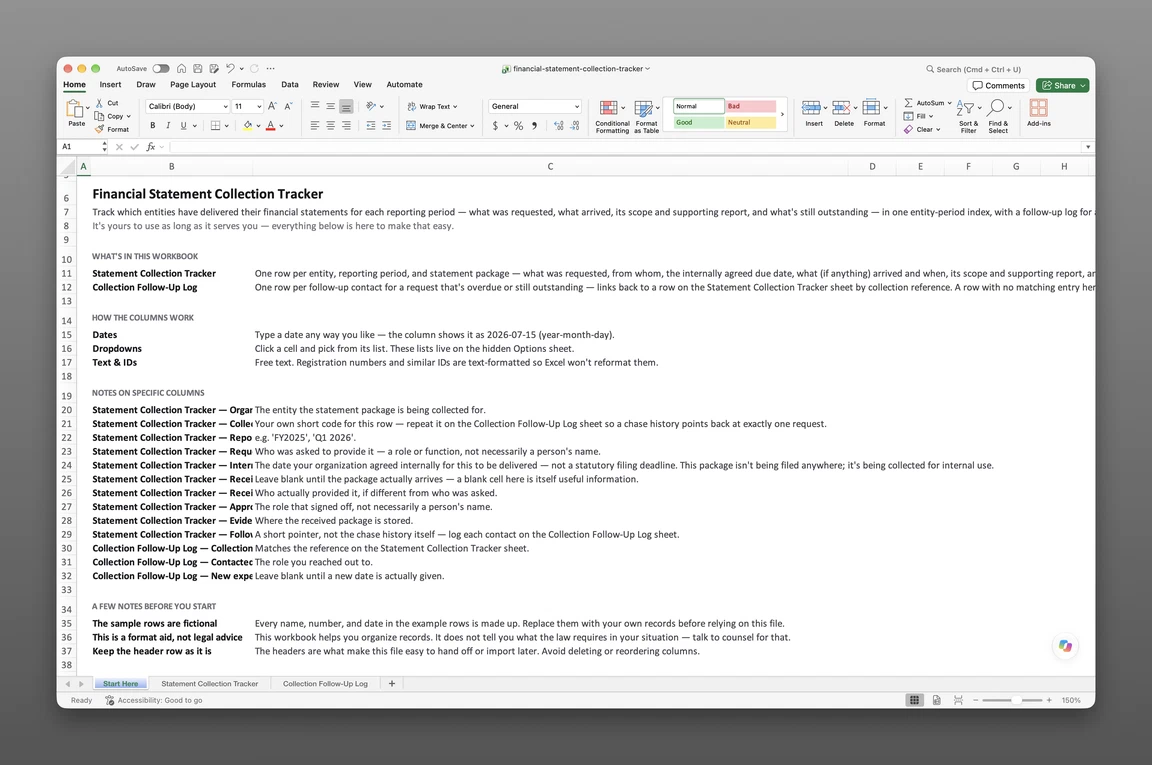
How to track financial statements by entity and reporting period starts with one index. Give the index a row for every entity, for every reporting period that entity closes. Nine subsidiaries with a fiscal year each means nine rows a year — far simpler than searching nine folders when a lender or a board member asks for one. A holding company with subsidiaries in more than one country rarely closes on one shared calendar, so each entity’s own period end sets its row, independent of the parent company’s fiscal year. The index becomes the working record of everything that happens between “someone should ask for this” and “this is on file, approved.”
The same five steps carry every row from opened to closed:
- Open a row for the entity and reporting period.
- Fill in the six request facts.
- Record receipt with a date and a sender.
- Check the received scope against the requested scope.
- Mark the row approved.
What each row asks for
Track financial statements across multiple entities by giving each index row the same fixed set of facts:
- Entity — the organization the statement belongs to
- Period label — the reporting period the row covers
- Period end date — the date that period ends
- Scope requested — standalone or consolidated, whichever set someone actually asked for
- Who owes it — the person or firm responsible for delivering the package
- Due date — the date the package is due back
Six answers on one row, filled in before anything has arrived. A row missing any one of the six isn’t yet a real commitment — it’s a placeholder. A blank due date is usually the clearest sign that nobody has agreed to a timeline yet. Keeping the six fields identical across every entity lets one person scan a hundred rows the same way. No one has to relearn a different layout for every subsidiary’s finance team.
Telling requested from received
Financial statement reporting period tracking works because the index keeps requested and received apart, instead of collapsing them into one status word. Requested is a claim on someone — a controller, a subsidiary finance lead, an outside preparer — that a package is coming. Received is a fact with a date: the package landed on this row, on this day, from this person. A row can sit in “requested” for weeks with nothing wrong. A row that skips straight to “approved” without a received date is the one worth a second look. Keeping the two apart also stops a promised package from reaching a lender or a board as though it were already in hand. Approved or audited status belongs to the finished statement, recorded separately once assurance work is done. That separation keeps the index honest under pressure. A controller under deadline can say exactly which packages are in hand and which are only promised — no promise gets rounded up to a fact.
What a received package contains
Tracking received financial statement packages means treating “it arrived” and “it’s usable” as two separate questions the same row has to answer. A received date on the index proves something showed up. It doesn’t yet say the package matches what was requested — the next two facts on the row settle that. Skipping straight from requested to approved, without checking those two facts, lets an incomplete package look finished on the index when it isn’t.
What makes a package complete
The index checks completeness against the scope requested, not just the fact that an attachment showed up. A package requested as “consolidated” but delivered as three standalone sets isn’t complete, even though something arrived on time. The index row records what was received against what was requested. A scope mismatch shows up as a gap on the row, not a surprise later. That comparison takes a minute the day a package lands. It takes far longer to reconstruct months later, once nobody remembers what the original request specified. The same check catches a package addressed to the wrong period — a prior-year statement filed on this year’s row. It reads as received until someone opens it.
The supporting report reference
Most received packages come with a supporting report behind them — the document an auditor or reviewer produced to stand behind the numbers. A few details here trip people up. Opinion and assurance level are properties of that supporting report, not of the collection row itself. A period end date and a report date are two different dates and belong in two different fields. A later version supersedes an earlier one rather than replacing it outright. A stable file name that includes the entity and period keeps the right version findable months later. None of that makes the index row a copy of the report — it’s a pointer to where the real thing lives.
Three entities, two periods
Subsidiary financial statement tracking gets harder as soon as a group has more than one entity, and it’s easiest to see with numbers instead of description. Picture a fictional holding structure: Sample Alder Group Holdings, its subsidiary Sample Alder Manufacturing LLC, and a second subsidiary, Sample Alder Distribution GmbH, reporting for two periods — fiscal year 2025 and the second quarter of 2026. Two periods and three entities produce six possible rows, and the table below shows exactly where each one currently stands — a scale small enough to read in one sitting, but large enough that no single person’s memory of “what’s still outstanding” would stay reliable without it written down.
The group and its periods
| Entity | Period | Scope | Due date | State |
|---|---|---|---|---|
| Sample Alder Group Holdings | FY2025 | Consolidated | 13 Feb 2026 | Approved 20 Mar 2026 |
| Sample Alder Manufacturing LLC | FY2025 | Standalone | 06 Feb 2026 | Approved 12 Mar 2026 |
| Sample Alder Distribution GmbH | FY2025 | Standalone | 27 Feb 2026 | Approved 03 Apr 2026 |
| Sample Alder Group Holdings | Q2 2026 | Consolidated | 31 Jul 2026 | Requested |
| Sample Alder Manufacturing LLC | Q2 2026 | Standalone | 31 Jul 2026 | Received 04 Aug 2026 |
| Sample Alder Distribution GmbH | Q2 2026 | Standalone | — | — |
Every value in this table is invented for illustration — none of it states any entity’s actual dates, scope, or status, and nothing here is accounting advice.
FY2025 covers the period ending 31 Dec 2025, and all three packages for it came due in February 2026. Sample Alder Group Holdings and Sample Alder Manufacturing LLC reached Approved by mid-March. Sample Alder Distribution GmbH’s package arrived after its own 27 Feb due date and still closed, reaching Approved on 3 Apr 2026. The Q2 2026 row tells a different story for the same three entities. Sample Alder Manufacturing LLC’s interim package came in a few days after its 31 Jul due date and sits at Received, waiting on approval. Sample Alder Group Holdings’ interim package hasn’t arrived at all.
What one blank row means
Two rows in this table carry no due date, and they mean different things. Sample Alder Distribution GmbH’s Q2 2026 row is blank because that entity reports annually only — no interim package was ever expected, so the blank needs no follow-up. Sample Alder Group Holdings’ Q2 2026 row does have a due date, 31 Jul 2026, and as of 15 September 2026 it’s well past due with the state still reading Requested — that’s a genuinely outstanding package worth chasing. Telling the two apart is the entire point of keeping a due date next to a state, rather than reading every blank cell as one undifferentiated kind of “not done yet.” An outstanding-statements report is what surfaces rows like that second one across a whole portfolio, instead of a person scanning down the index by eye.
From one period to the next
Closing one reporting period doesn’t retire the index — it rolls forward. A new row opens for the next period as soon as an entity’s period end date is known. The same person who chases an outstanding package this period usually owns the equivalent row next period, too. Responsibility carries forward with the row, instead of resetting every time a new period opens. A subsidiary added mid-year gets its first row the same way: a period end date once it’s known, a due date once agreed. It doesn’t wait for the next annual cycle to catch up. A row exists for every period on whatever cadence the entity actually reports on. A monthly or quarterly interim package gets its own row on the index, just like an annual statement.
This financial statement collection tracker holds two sheets: a Statement Collection Tracker, one row per entity, period, and package with everything from the initial request through approval; and a Collection Follow-Up Log, a record of each contact made on a package that’s running late. Two sheets, sent to your email.
Enter your email and we’ll send the financial statement collection tracker to your inbox. Free — no credit card, no call, no follow-up sequence you didn’t ask for.
A spreadsheet index like this one is where most finance teams start. It holds up until the row count outgrows what one person can scan by hand. The Financial Statements module keeps statement records by entity and period in one place. The same index lives on the entity’s own record. Each statement record belongs to its organization and carries its own period, so the record of what was received sits with the entity itself.
Frequently asked questions
Requested, received, approved
How do you tell a requested financial statement from a received one? Requested and received are separate facts on the same index row, not two states of one field. Requested means someone has been asked and a due date is on record. Received means a package actually arrived, with its own date and who sent it. A row can sit in requested for a long time with nothing wrong. A row that jumps straight to approved without a received date is the one that deserves a second look.
What proves a received financial statement package is complete? The index checks completeness against the scope requested, not just whether something arrived. A package delivered as three standalone sets against a request for one consolidated set is incomplete, even on time. The index row records the scope received next to the scope requested, so a mismatch is visible without opening the file.
Closing a period
When does a reporting period count as closed on the index? A period closes when its statement is received, checked against the requested scope, and marked approved on the row — not by the period end date alone. A period end date only marks when the period itself ended; the index tracks the collection work that follows it.
Who chases an outstanding statement package? Whoever the index names as responsible for that entity’s row. The collection follow-up record keeps a history of each contact made, instead of one contested memory of who was supposed to ask. Tracking tax filings the same way — by entity and period, with a separate log for what’s still outstanding — follows the same pattern for a different set of obligations.
This index tracks the collection process, not the finished statement itself — a ready-made statement register file is built for that instead. Once a period closes on the index above, that same statement becomes point-in-time proof a lender or acquirer can ask for by entity and period.
Lextree Editorial
Author