Grant Kickoff Checklist: Award Handoff to Program and Finance
Grant Kickoff Checklist: What Development Hands Over
A grant kickoff checklist is the list a development team uses for the grant award handoff to program and finance. It collects the dates, payment schedule, match, reporting commitments, and restrictions from the award letter and grant agreement, puts an owner on each one, and ends with a dated sign-off.
A grants manager, development director, program lead, or finance lead usually runs it in the first weeks after acceptance, before the first dollar is spent. It has six parts:
- Award summary: grantor, grant type, program area, dates, amount, payment schedule, match.
- Reports and restrictions: each commitment as its own line, with the date per the award terms.
- Owners: a development contact, a program owner, and a finance owner for every award.
- Kickoff meeting: who attends, what is handed out, what leaves the room.
- Finance setup: fund or project code, approved budget, first expected payment.
- Briefing and sign-off: program staff hear the restrictions, then each team signs.
Once the handoff is signed, set up portfolio-wide grant tracking so the award joins the rest of the portfolio.
Building the Grant Award Summary
The grant award summary is the one-row record of the award. Start with the grantor and grantor type, then the grant type (general operating support, project or program, capital, capacity building, research, endowment, or emergency or rapid response) and the program area. Add the award date, the start and end dates, and the award amount. Note the funder’s program contact and the documents the terms rest on: the award letter or notice of award, the grant agreement, and any amendment, budget modification, or no-cost extension already issued.
Then record how the money arrives and what comes with it: the payment schedule (lump sum, installments, milestone-based, or reimbursement), the match requirement (none, cash, in-kind, or cash or in-kind), whether the award is a subaward, and the indirect cost rate.
Copy each term as written in the award terms. Where the award letter and the grant agreement differ, note both versions and who is asking the funder to clarify. A handoff that quietly picks one version is the one program staff discover months later.
Reporting Dates and Restrictions
Give each reporting commitment its own line: the report type (narrative or progress, financial, narrative and financial, evaluation or impact, or compliance certification), the reporting period, the due date per the award terms, the submission method, and whether it is the final report.
Give each restriction its own line too: the type (purpose or use of funds, budget category or line item, time-limited, geographic, beneficiary population, prohibited activity, matching or cost-share, or procurement or subcontracting), the description as the agreement states it, the amount, the compliance date, and how and how often compliance will be verified.
One line per commitment is the point. A note reading “quarterly reports and some spending limits” cannot be assigned, dated, or checked off.
Roles and Owners by Team
Every award carries three named contacts: the development contact who negotiated it, the program owner who delivers it, and the finance owner who sets up and reconciles it. Each checklist line and each report or restriction also carries a responsible team: development, program, finance, or shared.
| Item | Usually owned by | Evidence it was done |
|---|---|---|
| Countersigned agreement received | Development | Signed copy filed with its date |
| Fund or project code | Finance | Code confirmation |
| Approved budget loaded | Finance | Budget entry |
| First report scheduled | Program and finance | Dated entry with a named owner |
| Restriction briefing | Program | Attendance note |
| Partner or subaward agreement | Program and finance | Signed agreement on file |
| Award summary shared | Development | Distribution note |
The split above is common practice, not a rule; your award terms and your own roles decide who owns what. If the award is a subaward, or part of it passes to a partner, name who holds the partner agreement and who reviews partner invoices.
The Post-Award Grant Checklist, Step by Step
These steps run in order through six phases: award review, acceptance, kickoff, finance setup, briefing, and sign-off.
- Review the award terms and flag anything to negotiate or clarify.
- Confirm the countersigned agreement is received and filed.
- Fill in the grant award summary.
- Hold the kickoff meeting and assign an owner and a date to every line.
- Complete finance setup: code, approved budget, payment schedule.
- List each report, restriction, and project milestone as its own dated line, starting with the first report due.
- Brief program staff on the restrictions.
- Collect sign-off and index the evidence.
Kickoff Meeting and Award Acceptance
Acceptance comes first. The countersigned agreement is received, and the date it is filed becomes the first dated entry in the record.
The kickoff meeting follows, with development, the program lead, the finance lead, and the grants manager in the room. Hand out the award summary, the agreement, the approved budget, and the list of reports and restrictions. This grant kickoff meeting agenda is enough:
- Walk through the award summary and any differences between letter and agreement.
- Read the reporting commitments and their dates.
- Read the restrictions in plain words, including what costs the award terms allow and exclude.
- Confirm project milestones and the first report due.
- Assign owners and target dates.
- Agree when the handoff will be signed.
What leaves the room is an owner and a date on every line.
Finance Setup and Approved Budget
Finance requests the fund or project code and records its confirmation. The approved budget is entered by line, the indirect cost rate is checked against the award, and the payment schedule and first expected payment are noted. The match amount and its source go in the same place.
The general ledger and fund accounting stay in the accounting system. The handoff record holds the code, a reference to the approved budget, and the evidence that setup happened.
Restriction Briefing for Program Staff
Program staff hear each restriction in plain words: what the money can fund, by when, where, for whom, what is excluded, and how compliance will be shown. A restriction that reads cleanly to development can read differently to the person planning the activity.
Record the briefing: the date, who attended, which restrictions were covered, and the questions raised with the name of whoever is answering each.
Sign-Off and the First 30 Days
Aim to close the handoff within 30 days of acceptance, so the first report and the first spend both start from a signed record.
A workable pace: in week one, file the countersigned agreement and fill in the award summary; in week two, hold the kickoff meeting; in weeks three and four, finish finance setup, brief program staff on the restrictions, and collect sign-off.
A Sample Award Handoff
Sample Riverbend Literacy Project has won a project grant from Sample Hearthstone Foundation, paid in installments, with a cash match. This is its handoff record.
| Item | Responsible team | Evidence | Status |
|---|---|---|---|
| Countersigned agreement received | Development | Signed copy filed, dated | Done |
| Fund or project code confirmed | Finance | Code confirmation on file | Done |
| Approved budget entered by line | Finance | Budget entry reference | Done |
| Cash match amount and source recorded | Finance | Match note in award summary | In progress |
| Interim report scheduled with an owner | Program | Dated entry | In progress |
| Restriction briefing held | Program | Attendance note | Not started |
| Three-team sign-off | Shared | Signed record | Not started |
Every name, date, and amount in this example is invented. It shows what a handoff record can hold and is not legal advice.
Open Items and Sign-Off
At Sample Riverbend Literacy Project, three items are open at the end of the kickoff meeting: the match record, the interim report entry, and the restriction briefing. Each gets an owner and a target date, and nothing closes without a date and evidence.
Development, program, and finance each sign. Record the handoff status, and index the evidence pack: the award letter, the agreement, the approved budget, the code confirmation, and the briefing note, with who holds each document, who reviewed it, and how long it is kept under your retention policy.
Agree, too, who asks the funder for any later change, such as a budget modification, a no-cost extension, or an amendment, and file each with its evidence so the award summary stays current. Where the award terms are unclear on any item, confirm with the funder before marking it closed.
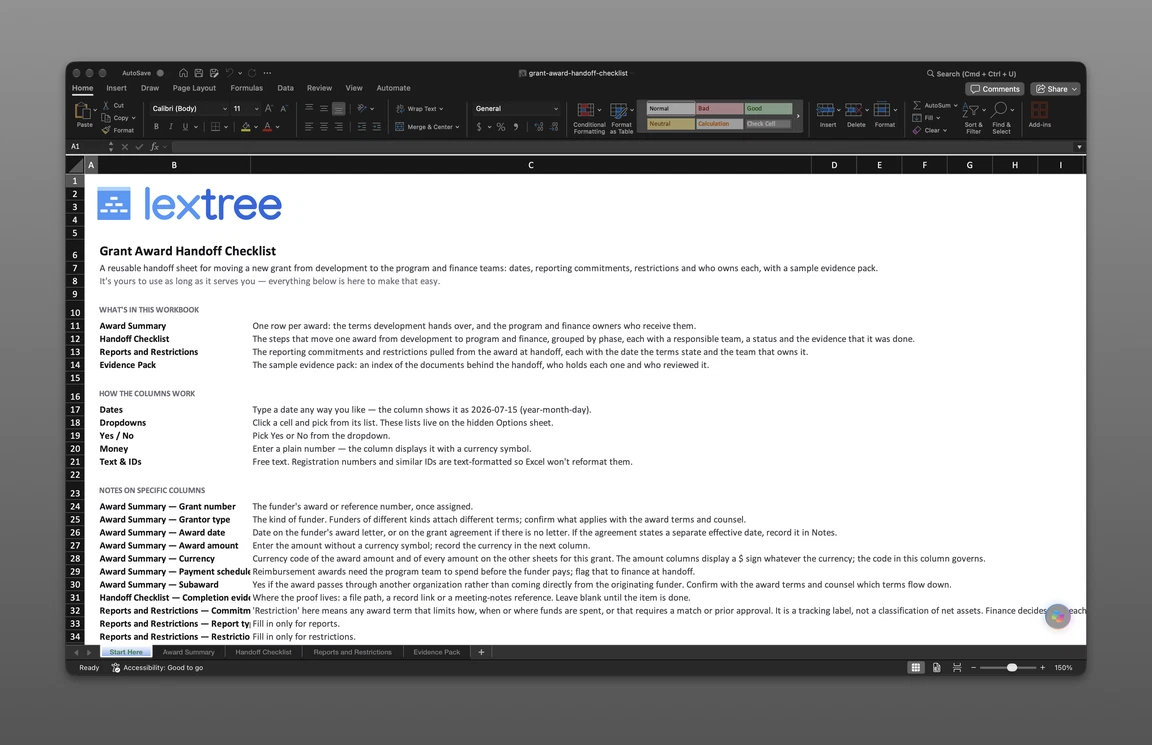
The checklist file that goes with this page follows the same structure, in four sheets. Award Summary holds one row per award, with the terms development hands over and the program and finance owners. Handoff Checklist lists each step by phase, with a responsible team, a status, and the completion evidence. Reports and Restrictions holds the commitments and restrictions pulled from the award, each with its date per the award terms and its owning team. Evidence Pack indexes the documents behind the handoff, who holds each, and who reviewed it. The file is sent to your email after the short form below.
Get the free checklist
Enter your email and we’ll send the grant award handoff checklist to your inbox. Free — no credit card, no call, no follow-up sequence you didn’t ask for.
Running the Handoff in Lextree
Lextree’s Grants module keeps each grant received as a record with Reports to Grantor, Restrictions, and Documents kept underneath it. Reminders cover report due dates and restriction deadlines, and an iCal feed puts them on a team calendar.
The module comes set up with a New Grant Received workflow of four checklist items: award terms review, agreement execution, finance setup, and the report and restriction schedule. A company can change the seeded steps and labels. The responsible team on the checklist file is a column in the file, not a field Lextree assigns.
Lextree is the post-award record, so fund accounting stays in the general ledger, and Lextree documents what the award terms set. Teams building this out for a nonprofit can see how it fits the wider picture in nonprofit compliance with Lextree.
Grant Launch Checklist Questions
Kickoff Timing and Ownership
When should the grant kickoff happen? Soon after the award is accepted and before the first spend. Starting at the award letter, not the project start date, gives finance time to set up the fund or project code before money arrives.
Who owns the award handoff, development or the grants manager? Whoever negotiated the award usually starts it, and the grants manager keeps it moving. What matters is that one named person owns the sign-off, and that the program and finance owners are named on the record.
Is a grant launch checklist the same as a grant kickoff checklist? Yes. Some grant offices call the meeting a launch rather than a kickoff, but the list is the same.
Finance and Program Questions
What goes in a grant award summary? The grantor and its type, the grant type, program area, award date, start and end dates, amount, payment schedule, match requirement, subaward flag, and indirect cost rate, plus the three owners.
Does every grant need its own fund or project code? Record what the award terms and your organization’s accounting policy set. In Lextree, the seeded finance step gives restricted grants their own code.
What if the award letter and the grant agreement disagree? Note both versions on the award summary, name who is asking the funder to clarify, and leave the line open until the answer is on file. Confirm with the funder or counsel before treating it as settled.
Lextree Editorial
Author