Grant Report Submission Tracker: Every Report Owed, by Status
Reading Grant Report Status Each Week
A grants manager with reports out to several grantors gets the same question every week: which reports have gone in, which has the grantor accepted, and which are still waiting? A grant report submission tracker answers it from one log. The log holds one row for each report owed, one current state for each row, and a dated history of every change of state. A filter answers the weekly question, so reading grant report status takes a minute where a search through old inboxes and portal dashboards took an afternoon.
A Sample Grant Report Portfolio
One grants manager has three grantors and six reports at different stages. The reference date is October 13, 2026.
| Grantor | Grant | Report | Due | Submitted | Current state |
|---|---|---|---|---|---|
| Lakeview Foundation | Early Reading | Narrative or progress report | Jul 20 | Jul 14 | Accepted Jul 28 |
| Lakeview Foundation | Early Reading | Financial report | Jul 20 | Jul 16 | Accepted Aug 26 |
| Cedarbrook Giving Program | Community Health Outreach | Narrative and financial report | Oct 20 | Oct 6 | Submitted, awaiting acceptance |
| Cedarbrook Giving Program | Community Health Outreach | Compliance certification | Nov 18 | Not yet | Not submitted |
| Northfield Community Trust | Studio Renovation | Narrative and financial report (final) | Jul 22 | Jul 17 | Accepted Aug 19 |
| Northfield Community Trust | Arts Access | Evaluation or impact report | Sep 22 | Sep 17 | Revision requested, revised report due Oct 23 |
Every grantor, grant, date and confirmation detail in this example is invented. It is not legal advice, so confirm each grantor’s reporting terms in the grant agreement and with the grantor itself.
What Is Still Awaiting Acceptance
Filter the current state for Submitted, awaiting acceptance and one report comes back: Cedarbrook’s narrative and financial report, which went in seven days ago. Northfield’s evaluation report is in Revision requested, and it rejoins the queue when the revised report goes back; the grantor asked for it by October 23. Cedarbrook’s compliance certification has not gone in yet. The other three are accepted, including the Studio Renovation report that carries the final-report flag.
Lakeview shows why the log runs per report. One grant owed two reports for the same period, and the grantor accepted the narrative report on first submission but the financial report only after asking for changes on July 29.
When the Grantor Stays Silent
Some portals stop at Submitted and show no acceptance step. Some grantors accept by email, and some never say anything. The accepted date stays blank until a dated notice arrives from the grantor, and a portal receipt or confirmation number does not fill it.
Portal labels differ, so map whatever the portal shows onto the log’s one state. DD Suite, a grant management portal, uses these labels:
| Portal shows | Log state | What to record |
|---|---|---|
| Not Started or In Progress | Not submitted | Nothing yet |
| Submitted | Submitted, awaiting acceptance | Submission date, method, confirmation number |
| Mod Request | Revision requested | The date changes were asked for and the date the grantor wants the revised report |
| Accepted | Accepted | The accepted date from the status change |
Then follow up and write it down. Log each follow-up on a submitted report with its date, the person contacted, how, and the reply, and ask for written confirmation. A reply that the report is under review is worth logging, but it is still not an acceptance, and the report stays in the queue. For a foundation grant, the person to ask is the program officer. A sample program officer job description published by the National Center for Family Philanthropy lists the “collection and review of all required grant reports from grantees” among the role’s duties. For a federal award, ask the assigned Grants Management Specialist, the contact the Administration for Children and Families names for questions about reporting terms.
One Row for Each Report Owed
A grant report log works at the level of the report. One grant can owe a narrative report and a financial report for the same period, and the grantor can accept one and send back the other, as Lakeview did. The log shows which of the two is still open, and the grantor’s answer on one never changes the row for the other. The grant-level view, with every award and the full grant portfolio and its reporting calendar, lives in a separate record, and the grant report submission tracker sits underneath it.
Where Each Row Comes From
Rows come from the reporting terms set at award. For a federal grant, the Notice of Award (NoA) gives the how, when and where of each report. For a foundation grant, the equivalent is the reporting schedule in the grant agreement or award letter. On a subaward, the grantor on the row is the pass-through entity that made it: the Office of Justice Programs’ guide sheet for pass-through entities lists requesting periodic programmatic and financial reports from subrecipients among their oversight duties. The same organization can hold a direct federal award and a subaward, so one log carries rows for both. Either way, setting up each report at award means one row for each report for each period.
The reports themselves vary by grantor, and the log holds them side by side:
- An SF-425 Federal Financial Report goes to the Payment Management System, with a final FFR at the end of the award.
- A Performance Progress Report (PPR) is most commonly submitted through GrantSolutions.
- A Research Performance Progress Report (RPPR) is submitted in eRA Commons, as an annual, interim or final report.
- A foundation’s narrative report may go through its own portal, and its financial report by email.
Each row records the grantor, the grant, the kind of report, whether it is final, the reporting period, and the due date as the agreement states it. The final-report flag goes on each final report the award owes, such as a final FFR, and whether acceptance of the final reports gates close-out is a term of that grant agreement.
One State, Logged Each Time
Each row has one current state at a time: Not submitted, Submitted, awaiting acceptance, Revision requested, or Accepted. Revision requested is a single state that carries two dates, the date the grantor asked for changes and the date the revised report is due. When the revised report goes back, the state returns to Submitted, awaiting acceptance.
A submission date proves the report went in, and an accepted date proves the grantor took it.
Every change of state also gets its own history row: the date, the new state, how the change arrived (a portal status change, a program officer’s email, a letter), and where that notice is saved. When someone asks in six months why a report shows as accepted, the notice is a click away.
Six Steps to Track Grant Report Submissions
Keeping the log current takes six habits, each tied to an event in a report’s life. Use them to track grant report submissions for every grantor in the same way.
- Add a row for every report the notice of award or grant agreement lists, as soon as the award is accepted: grantor, grant, kind of report, reporting period, due date as written, and whether it is final.
- Record the submission the day the report goes in: the submission date, how it went in (grantor portal, email, post or courier, in person) and the confirmation number the portal or grantor returns, then set the state to Submitted, awaiting acceptance.
- Add a history row for every change of state: the date, the new state, how it arrived, and where the notice is saved.
- Log a revision request when the grantor sends a report back: record the date it asked for changes and the date the revised report is due, and set the state to Revision requested. When the revised report goes back, return the state to Submitted, awaiting acceptance.
- Record an accepted date only from the grantor’s own notice: a portal status change, a program officer’s email, or a letter.
- Filter for Submitted, awaiting acceptance each week, oldest submission first, and log each follow-up and the reply.
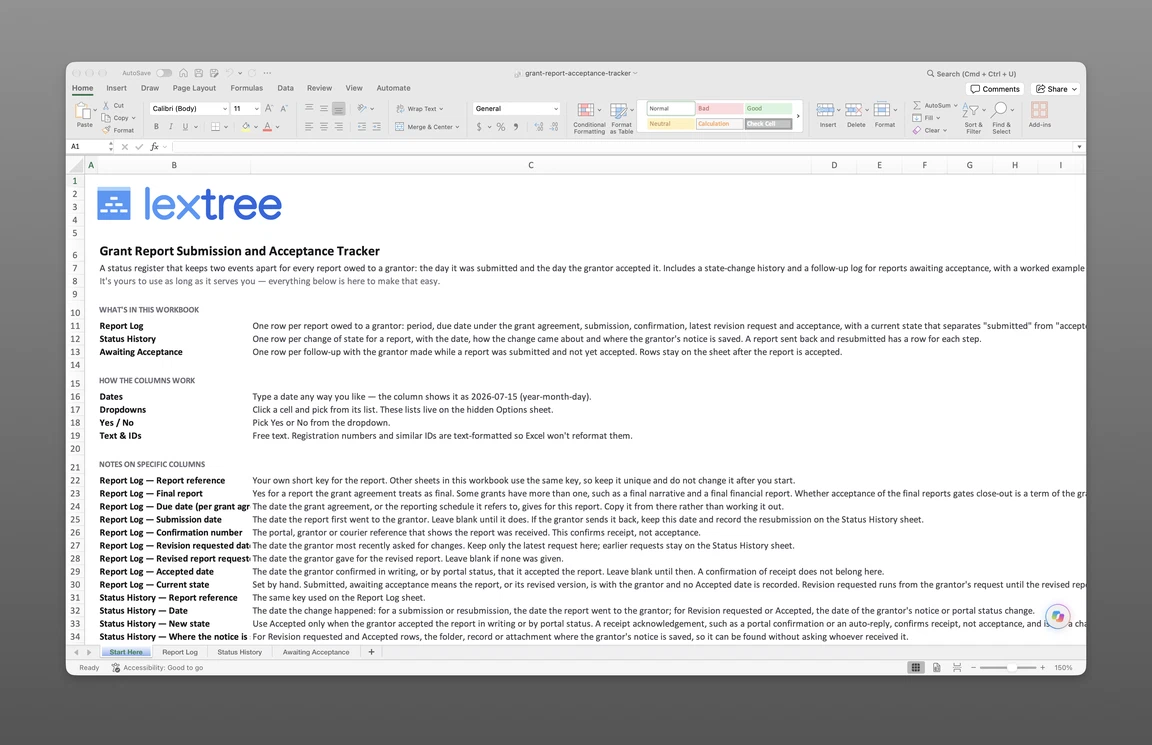
The grant report submission tracker that goes with this page follows those steps in 3 sheets. Report Log holds one row for each report owed, with its dates, submission method, confirmation number and current state. Status History holds one row for each change of state, with the date, how the change arrived and where the grantor’s notice is saved. Awaiting Acceptance holds one row for each follow-up made with a grantor on a report that is submitted and not yet accepted. The sample reports above are filled in so you can see how a row reads, and the tracker is sent to your email after the short form below.
Get the grant report submission tracker
Enter your email and we’ll send the grant report submission and acceptance tracker to your inbox. Free — no credit card, no call, no follow-up sequence you didn’t ask for.
How Lextree Sets Report Status From Dates
In Lextree’s Grants module, each report owed is a Report to Grantor record under the grant received. The module comes set up with six report types: Narrative or progress report, Financial report, Narrative and financial report, Audited financial statements, Evaluation or impact report, and Compliance certification. Each record also has a Final report yes/no field, the reporting period start and end, and the due date. A Submission & Review section holds the submission date, submission method (Grantor portal, Email, Post or courier, or In person), confirmation number, revision requested date, revision due date and accepted date.
The status follows from the dates. A dated timeline on each report adds the Submitted state when the submission date is filled in, Revision requested when the revision requested date is filled in, and Accepted when the accepted date is filled in. A report with no submission date has no Submitted state, and the record’s history is the dated trail the tracker keeps by hand.
The report records in the Grants module sit under each grant received, so the weekly question is answered from the same place as the rest of the award. Teams that handle grants alongside board and filing duties can read about nonprofit compliance beyond grant reports.
Questions From Grants Managers
Scope of the Log
What is a grant report submission tracker? A grant report submission tracker, or grant report log, is a dated list of every report owed to a grantor, with one row for each report. It shows the state each report is in today, along with a history of each change.
When does a report get its row? When the reporting schedule is set at award, well before drafting starts. Every report the schedule names gets a row at that point, so a report due in eleven months already shows as Not submitted. Seeing every report owed in one place, including the ones that are months away, is what lets the weekly filter be trusted.
Can federal and foundation reports share one log? Yes. An SF-425 through the Payment Management System, a PPR through GrantSolutions, an RPPR through eRA Commons and a foundation report through its own portal are all rows, and the submission method tells them apart.
Grantor Responses
Does a revision request take a report out of the queue? Yes, until the revised report goes back. The state is Revision requested while the grantor waits on you, and it returns to Submitted, awaiting acceptance when the revised report is with the grantor again. The two dates, the request and the revised report’s due date, sit on the same row.
What if a grantor reopens a report it already accepted? Some portals allow it. DD Suite lets a funder reset a report that is Submitted, in Mod Request or Accepted back to In Progress. Add a history row with the date and how the change arrived, set the current state to match, and note the earlier accepted date and leave it in the record. The history then shows both the acceptance and the reopening, with the notice for each.
Lextree Editorial
Author