HR Compliance Checklist for a New Legal Entity: Employer Accounts, Benefit Plans and Sponsorships
Scope the Review Before the First Payroll
When a group forms a subsidiary to employ its own staff, or moves people from one group entity to another, an HR compliance checklist for a new legal entity is worth finishing before the first payroll runs. Which employer identification number (EIN) that payroll runs under is one of the first things to confirm. The same list works as an HR checklist for a new subsidiary that starts hiring or takes on group staff. Each item ends with a decision from the adviser who confirms it.
- Name the existing employer and the new employing entity, and the date staff start at the new one.
- Confirm the new entity’s EIN, payroll set-up and workers’ compensation coverage.
- Trace each benefit plan to its sponsor and ask if the new entity joins it.
- Flag work authorizations and permanent residence cases that name another group employer.
- Close each item with the adviser’s dated decision and the document behind it.
Name the Two Employers
Every item compares two organizations. Sample Parent Inc. employs the staff and holds the records today, and Sample Harbor Services LLC is the new employing entity. Each line of the new employing entity checklist starts from the current record at the existing employer: its payroll client account, its plans, its sponsorships.
Both names, and every date, document and decision below, are invented. When the entity joins the group by purchase, the records to confirm when the entity arrives through an acquisition start from a different place.
Who Confirms Each Area
One person in your organization runs each item, and one adviser confirms it. The page never says which rule applies to your group; the adviser does. Start with the documents in the last column; they show what the existing employer holds today.
| Area | Who runs it | Who confirms it | Documents to pull first |
|---|---|---|---|
| Employer filings and accounts | HR compliance manager, payroll lead, risk manager | Payroll provider, tax adviser, outside counsel | CP575 notice or Letter 147C; any Form 8655 the payroll provider holds; an ACORD 25 certificate |
| Benefit plans | Benefits manager | Benefits counsel | The latest Form 5500; the participation agreement or participating employers addendum; insured policy schedules |
| Sponsored work authorizations | HR compliance manager | Immigration counsel | Form I-129 and its Form I-797 notice; the Labor Condition Application; Form ETA-9089 and Form I-140 |
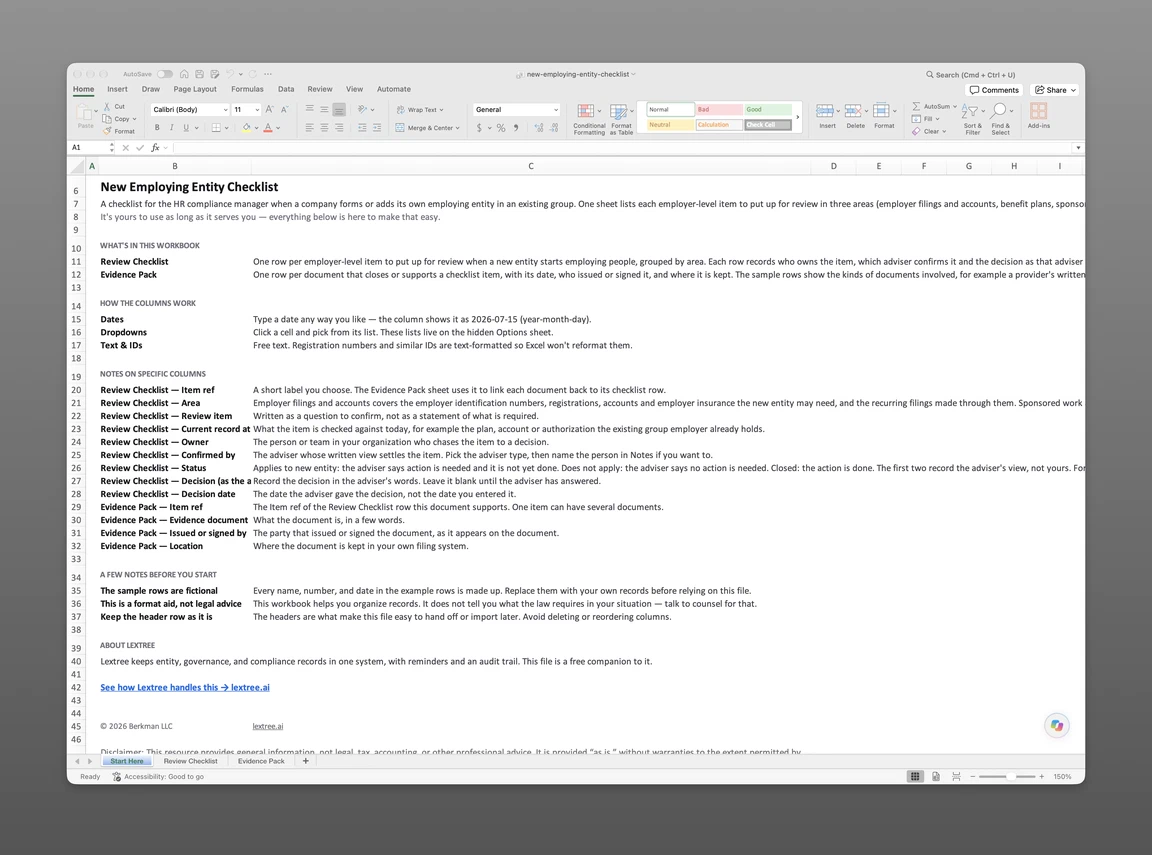
In the companion checklist, Review Checklist lists each employer-level item in the three areas above with its owner, the adviser who confirms it, its status, and the adviser’s decision with the decision date. Evidence Pack lists each document that closes or supports an item: what it is, its date, who issued or signed it, and where it is kept. The file is sent to your email address when you submit the form below.
Get the new employing entity checklist
Enter your email and we’ll send the new employing entity checklist to your inbox. Free — no credit card, no call, no follow-up sequence you didn’t ask for.
Confirm the Employer Accounts and Coverage
Start with the IRS notice that confirms the new entity’s EIN.
The EIN and Its Notice
Form SS-4 is the application for an employer identification number. Once the number is assigned, the CP575 notice confirms it, and that notice is one of the first documents to file on the Evidence Pack.
The process breaks when the notice goes missing. The IRS says the original CP575A-J series, Notice of New Employer Identification Number, cannot be duplicated or recreated. A digital CP575 from the Business Tax Account can stand in as written confirmation, and so can Letter 147C, EIN Previously Assigned. Whichever one your adviser accepts goes on the Evidence Pack.
In the sample, the tax adviser is still working through which employer numbers, registrations and accounts the new entity needs, nationally and in each place where its staff will live or work. The list of places is still being confirmed with the hiring managers, so that item is with the adviser. As each registration is completed, the agency’s notice, letter or other written confirmation of it goes on the Evidence Pack, as the CP575 does for the EIN.
Payroll Under the New EIN
In the sample, the payroll provider’s letter of 2026-10-06 confirms how Sample Harbor Services LLC is set up on payroll. That closes the first item, and the letter sits on the Evidence Pack.
The provider’s authorizations come next. In the sample, the provider holds a client account for Sample Parent Inc. today. Form 8655, Reporting Agent Authorization, lets a reporting agent sign and file certain returns and make deposits and payments for certain returns. The taxpayer signs it, and it names that taxpayer and its EIN, so ask the provider whether it uses one and, if it does, whether it holds one signed for the new entity.
Ask the provider and the tax adviser which federal employment tax returns, such as Form 941, and which year-end wage statements will be filed for the moved staff, and under which EIN. The IRS describes Form 941 as the form employers use to report federal income, social security and Medicare taxes withheld from employees’ paychecks, and the employer’s share of social security and Medicare taxes. The tax adviser also confirms which of the entity’s payroll and withholding tax accounts to open, for example an unemployment insurance account if one applies. Ask the adviser, too, whether any of the existing employer’s unemployment insurance rating history moves to the new entity with the staff.
One more question goes to the provider: how year-to-date payroll totals carry over for staff who move mid-year, if at all.
The Workers’ Compensation Certificate
In the sample, the risk manager owns the workers’ compensation item and outside counsel confirms it, and the item has not started. The first call goes to the insurance broker, to ask how the group’s policy names group employers.
The document to request is an ACORD 25 certificate of liability insurance, with its insured box, its workers compensation and employers’ liability line, and its description of operations box, where brokers sometimes list other named insureds. Ask for one that shows Sample Harbor Services LLC, and for the broker’s written confirmation of how the policy names the entity.
The certificate itself says it is issued as a matter of information only and confers no rights upon the certificate holder. The policy or the broker’s written confirmation answers the question, and the certificate supports it on the Evidence Pack. Whether the new entity needs cover of its own, and where, is a question for outside counsel.
Trace Each Benefit Plan to Its Sponsor
Staff tend to ask HR whether their health and retirement coverage continues once their employer becomes Sample Harbor Services LLC. The answer depends on who sponsors each plan and whether the new entity joins it, and benefits counsel gives that answer.
The Sponsor on Form 5500
If a plan files a Form 5500 or Form 5500-SF, the latest one names the plan sponsor on line 2a, gives the sponsor’s nine-digit EIN on line 2b, and gives the three-digit plan number on line 1b. The Form 5500 instructions say the IRS, the Department of Labor and the PBGC use the plan number together with the line 2b EIN as a unique 12-digit number to identify the plan.
That makes the latest Form 5500 the quickest place to find the sponsor’s EIN. In the sample, the current record at the existing employer for the retirement item is the retirement plan sponsored by Sample Parent Inc., and the plan’s latest Form 5500, if it files one, is where to confirm that. The question went to benefits counsel with the group ownership chart and has no answer yet.
Participating Employer Paperwork
Two documents often record that a new employer has joined a plan. One is a participation agreement, by which a new employer adopts an existing plan as a participating employer. The other, in some pre-approved retirement plans, is a participating employers addendum to the adoption agreement, which lists the participating employers. Ask benefits counsel whether either applies to each plan. Send the group ownership chart with each question, because whether a plan can extend to the new entity, and whether the new entity’s staff affect plans it does not join, can turn on how the group owns the entity.
The sample health plan took the first route. Benefits counsel advised on 2026-10-13 that Sample Harbor Services LLC adopt the group health plan as a participating employer by signing a participation agreement.
Insured benefits such as life or disability cover are a separate question. The broker and the policy schedules show whether the policies extend to the new entity. Other group plans, such as flexible spending, premium-deduction or wellness plans, are one more item for benefits counsel. Whether staff of a new group entity are covered without being added is never assumed; benefits counsel reads the plan terms and says.
Flag Sponsorships That Name Another Employer
Immigration counsel advised in writing on 2026-10-16 that one sponsored person’s move needs a new filing for the new entity. The person’s start date at Sample Harbor Services LLC is on hold until counsel confirms they can start work there. For each person who will move, pull the documents that name the sponsoring employer.
- The Form I-129 petition, whose Part 1, Petitioner Information, gives the company name and Federal Employer Identification Number (FEIN). USCIS describes Form I-129 as the form petitioners use to file on behalf of a nonimmigrant worker.
- The Form I-797 notice USCIS issued for the petition’s approval, or its receipt notice if the petition is still pending.
- For H-1B, H-1B1 and E-3 workers, the certified Labor Condition Application (Form ETA-9035, or ETA-9035E when filed online) the employer filed with the Department of Labor.
- Where the group holds a blanket L approval, the Form I-797 approval notice for the blanket petition, which lists the qualifying organizations (parent company, branch, subsidiary or affiliate) it covers, plus any Form I-129S filed under it.
- For permanent residence still in progress, the PERM labor certification (Form ETA-9089) and the Form I-140, whose Part 1 gives the filing organization’s IRS Employer Identification Number.
Compare the EIN or FEIN on each document with Sample Harbor Services LLC’s EIN, and check whether the new entity appears among the qualifying organizations on any blanket L approval notice. Any document that names Sample Parent Inc. for a person moving to the new entity goes to immigration counsel with the planned move date; in the sample, the list of affected people went to counsel on 2026-10-13. A related item asks whether the new entity needs its own sponsor registration or account. The page flags the mismatch only; counsel decides what, if anything, is filed.
Close Each Item With Its Evidence
An item closes when the adviser’s answer arrives and the document behind it is on the Evidence Pack. An answer that lives only in an email thread leaves the item open.
The Adviser’s Dated Decision
The group health plan shows the two dates. Benefits counsel’s decision is dated 2026-10-13, and the participation agreement by which Sample Harbor Services LLC adopts the plan was signed on 2026-10-16 for both entities. The decision date belongs on the Review Checklist and the document date on the Evidence Pack, and the item is marked Closed once both are in place.
The insured benefits close the other way, as Does not apply. The Evidence Pack holds the broker’s email of 2026-10-09 and benefits counsel’s written decision of 2026-10-14 that the policies extend to the new entity’s staff without a change. The sponsored person’s move, by contrast, stays open as Applies to new entity, with counsel’s written advice of 2026-10-16 on the Evidence Pack.
This page is not legal advice; your advisers decide what applies to your group.
After the Review Ends
Making the HR compliance handoff for a new entity usually means moving the items from a one-time checklist into the records the group already maintains. For the ongoing side, an employer filing log to keep after the review holds the filings, plans and authorizations that stay in place once the entity is running.
In Lextree, the Employment module lets you record each employer’s filing obligations. An Employment Filing Obligation record names Sample Harbor Services LLC through its Employer field and carries an Applies from date. The group health plan’s Benefit Plan record keeps Sample Parent Inc. as Plan Sponsor, with its plan number if it has one, and the signed participation agreement attaches to that record.
A sponsorship that counsel files for the new entity becomes a Sponsored Work Authorization record naming Sample Harbor Services LLC as Sponsoring Employer, with the person’s position and worksite. If counsel confirms that the new entity needs its own sponsor registration, the Sponsor licence or registration field holds it. Payroll and withholding tax accounts sit in Taxes as Tax Obligation records, with the tax type and the tax account number.
Sample Harbor Services LLC’s EIN can be recorded in the Tax ID field on the new entity’s legal entity record. Each record names an organization, so Sample Harbor Services LLC is set up once and referenced from each.
Lextree Editorial
Author