Tracking Lease Renewal Option Notice Deadlines Across Properties
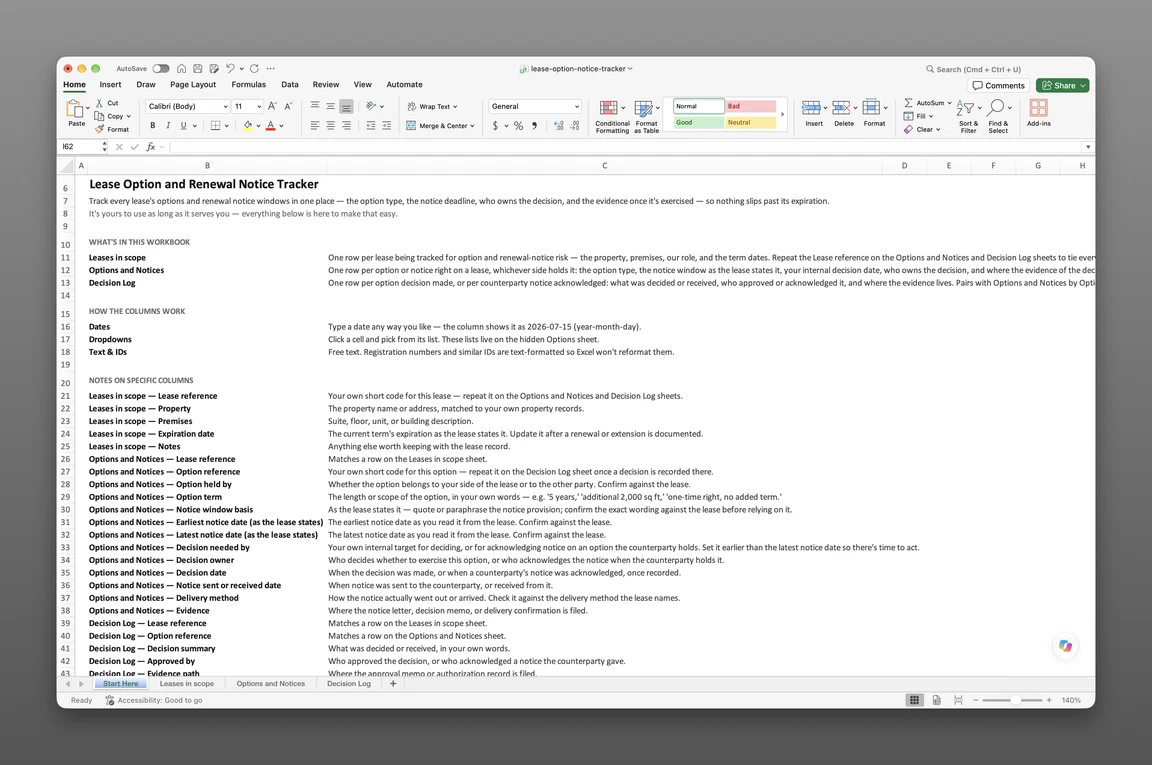
Recording each lease renewal option
To track lease renewal option notice deadlines, record each option right as its own entry. Capture the option type and the notice window as the lease states it. Add the latest notice date, a decision owner, an earlier decision-by date, and the evidence once notice goes out.
A lease administrator holding options across several leased properties needs more than a due date on a calendar. The lease’s expiration date isn’t what matters most. The option’s own notice deadline runs out first, often months earlier — the date lease critical dates tracking has to catch. See the difference between a notice deadline and the expiration it protects for why the two diverge.
Lease options usually sit inside a wider property compliance program. See lease option deadlines alongside insurance and property obligations.
The option, not the lease
The unit tracked here is one option right, not one lease. Sample Riverside Business Park’s Suite 200 lease carries two entries: a five-year renewal option and a right to expand into additional space. Each has its own window, decision owner, and status. Suite 210, a different lease at the same park, carries a one-time termination right and gets an entry of its own too. Every entry carries a lease reference and an option reference so a decision ties back to the agreement it came from.
An owner on the other side of a lease keeps a matching entry for a tenant’s option. It tracks when the tenant’s notice could arrive and who on the team responds to it.
Option types worth recording
An option right takes several forms, worth naming plainly rather than lumped together as “renewal”:
- Renewal — a right to extend the term, for a stated additional period (“5 years”).
- Extension — a shorter continuation of the current term, often used to bridge into a longer renewal.
- Expansion — a right to add space, stated in the terms the lease gives (“additional 2,000 sq ft”).
- Contraction — a right to give space back before the term ends.
- Termination — a one-time right to end the lease early, with no added term.
- Purchase and right of first refusal or offer — a right tied to a sale of the property rather than to the lease term itself.
Record the type and, in your own words, the term or scope it covers — a clause doesn’t need restating in full to be tracked correctly.
Windows as the lease states
Record the notice provision the way the lease states it — quote it or paraphrase it closely. Then read the earliest and latest notice dates from that provision and confirm both against the signed lease. How far in advance a tenant must exercise a renewal option isn’t a rule to look up elsewhere. It’s whatever that lease’s own notice clause sets. That’s why the wording travels with the dates instead of a single day count. Counting a notice period back from a known end date is a related but separate task. See counting a notice period back from an end date for that calculation.
Deciding before the notice window closes
The latest notice date the lease sets is the lease option exercise deadline — the last day notice can go out and still count. The decision-by date is different — the team’s own earlier target, set so approval, signature, and delivery have time before the exercise deadline arrives. Treating the two as one date is how a renewal gets caught with no time left to act.
Each option carries one named lease option decision owner, held as a role rather than a person — VP Real Estate, Director of Facilities, General Counsel. That way the option survives a reassignment or a departure; no one has to hunt for who used to own it. When the person changes, the role and the record stay put. Name a second role as backup at the same time. Set one rule for handing over: if the decision-by date arrives and the status reads window open, the entry passes to the backup. Nobody waits for the owner to come back from leave. The decision-by date exists for this handover, because it leaves room for a second person to decide before the lease’s own date runs out.
An option’s status moves in order: window open, decision recorded, notice sent — or, on an option a counterparty holds, notice received. An option can also end declined, which is a recorded outcome, not a blank. The status this register exists to prevent is lapsed — a window that closed with no decision made.
Proof the notice was delivered
Proof of lease notice delivery is what turns a decision into a record. A counterparty, an auditor, or the next reviewer can check it without asking anyone to remember.
Delivery method and evidence
Record the date notice went out and the delivery method used — certified mail, courier, hand delivery, or email, whichever the lease’s own notice provision permits. Also record where the signed letter and delivery confirmation are filed. A notice with no filed evidence behind it is a date someone remembers, not a record anyone else can check. This entry states what happened and where the proof sits. It makes no claim about what counts as legally effective delivery — that’s a question for the lease’s own terms. When the notice runs the other way, the same fields apply in reverse: the date it arrived, how it came, and where it’s filed. In the example below, the Uptown Plaza tenant’s expansion notice arrived by courier and was acknowledged the next day.
Who approved it, and when
The decision gets its own record, kept apart from the notice: what was decided, who approved it, the date, and where it’s filed. A renewal approved on one date and noticed two days later is two separate facts, not one. The decision record shows when the call was made; the notice record shows when it went out. On an option a counterparty holds, the same entry records the acknowledgment: what was received, who logged it, and when.
Four properties, one review date
Four leased properties, reviewed on 22 September 2026, show how five leases and six option rights sit in the register at once. Some carry weeks of slack; one closes within days. Every lease, date, and role here is invented for illustration. None of it is legal advice.
The options on review day
| Property & premises | Option type & term | Latest notice date | Decide by | Owner | Status |
|---|---|---|---|---|---|
| Sample Riverside Business Park, Suite 200 | Renewal, 5 years | 2026-12-08 | 2026-11-10 | VP Real Estate | Window open (opened 2026-08-10) |
| Sample Riverside Business Park, Suite 200 | Expansion, additional 1,800 sq ft on the same floor | 2026-11-17 | 2026-10-20 | VP Real Estate | Decision recorded 2026-09-16, notice not yet sent |
| Sample Riverside Business Park, Suite 210 | Termination, one-time right | 2026-10-05 | 2026-09-28 | General Counsel | Window open, closing within two weeks |
| Sample Harbor Distribution Center, Warehouse B | Renewal, 3 years | 2026-07-14 | 2026-07-02 | Director of Facilities | Notice sent 2026-06-22 by certified mail, after a 2026-06-18 decision |
| Sample Uptown Plaza, Suite 500 (the one lease where our role is landlord) | Expansion, additional 2,000 sq ft, held by the tenant | 2026-12-07 | 2026-09-24 | Property Manager | Notice received 2026-09-17, acknowledged 2026-09-18 |
| Sample Innovation Campus, Building C | Renewal, 5 years | 2025-03-12 | 2025-03-05 | VP Real Estate | Declined 2025-02-24, decline notice emailed 2025-02-26; lease ran to 2025-09-09 |
Reading each status
Suite 210 is the entry to act on this week. Its decision-by date falls six days after the reference date, its latest notice date thirteen days after — the shortest runway on the page. Suite 200’s renewal is open with weeks of slack before its own decide-by date. Its expansion right is the entry that looks finished but isn’t. The decision was approved on 2026-09-16, yet no notice has gone out — and the lease counts only the notice. An entry in that state stays on the review list until a sent date and filed evidence sit beside the decision. Harbor is finished: the decision, the notice, and the filed evidence all sit in the past relative to the reference date. Uptown is the landlord-side entry — the tenant’s expansion notice, received and acknowledged, not exercised by us. Innovation shows that a declined option keeps its full record rather than dropping off once the answer is no.
After a renewal is exercised
Once Harbor’s renewal notice is sent, any further renewal option that same lease grants gets a new entry of its own. Its window reads against the expiration the exercised renewal sets, not against the 2026-11-12 date the current term was expiring on. Working out that new expiration date, or how the extension paperwork moves it, is a separate task. This register just states, as the lease sets it, what the option’s own window runs against.
Enter every successive option when the lease is signed, not when the one before it is exercised. Leave its notice dates blank and note what they run from, for example “window reads from the expiration the first renewal sets”. That way the register shows the option exists even before its window can be dated. When an earlier option is declined or lapses, go back to every later option on the same lease in the same review. If the lease makes a later option depend on exercising the earlier one, mark the later one declined too. Don’t leave it sitting open with blank dates.
Keeping the option register current
A standing review — monthly, or at each quarter close — opens every entry with a window opening, or a decision-by date before the next review. It re-confirms the decision owner is still the right role and adds entries for new leases and any renewal just exercised. Sort the entries by decision-by date, not by latest notice date, so the list leads with what needs deciding first. Deal with any entry whose decision-by date has already passed at that review, not the next one. Close the review by recording the date it was held, so the register shows when it was last checked as well as what it holds. Critical date tracking across multiple properties holds up only as long as this review happens. A lease option register no one reopens is no better than the lease PDFs it replaced.
This register lives in a companion file with 3 sheets, sent to your email. Leases in scope holds one row per lease, with property, premises, our role, and term dates. Options and Notices holds one row per option right, with its window, dates, decision owner, status, and delivery evidence. Decision Log records what was decided, who approved it, when, and where the approval sits.
Get the free template
Enter your email and we’ll send the lease option and renewal notice tracker to your inbox. Free — no credit card, no call, no follow-up sequence you didn’t ask for.
A file holds the dates but reminds no one on its own. In Lextree, a lease’s notice deadline is a date on the lease record itself. Each notice given is filed as its own row, so the option’s evidence and its deadline stay on the same record, not a separate file. A Lease Notice Deadline reminder fires from that record. Lease-option alerts route to the property manager and finance team so a window doesn’t close unnoticed. See tracking lease options per property in Lextree, or start from a property-and-lease register you can fill in today instead of a blank sheet.
Lextree Editorial
Author