Multi-Location Business License Renewals: Proof of Each Cycle, Site by Site
Before Each Renewal Application Goes In
Multi-location business license renewals multiply the paperwork, because each license at each site can renew on its own cycle with its own issuing authority, and each cycle needs its own dated proof. To track business license renewals across multiple locations, keep two kinds of rows: one row per license per location on a register, and one row per renewal cycle on a renewal log. Your own short license reference ties the two together.
Every cycle leaves three pieces of evidence behind:
- Submitted: the date the application was sent or received, the authority’s confirmation number, and proof of submission, such as a portal confirmation page or email, a receipt, a mailing record, or a copy of the application as filed.
- Issued: the issue, effective and expiration dates exactly as printed, plus the issued license or certificate itself.
- Checked: the date you compared the row with the issuing authority’s own record, plus the lookup result or written reply.
Holder, Location and Authority
To track business licenses by location and issuing authority, put three keys on every register row. The holder is the legal entity named on the license, which can differ from the operating name over the door. The licensed location is the premises the license covers. The issuing authority comes with its level of government, for example municipal or local for a city office, county or regional for a county health department, state or provincial for a state licensing board, and national for a federal agency.
The holder matters most when a group spreads its sites across entities. Applications commonly ask for the holder’s Employer Identification Number, and the IRS lists applying for business licenses among the things you can use an EIN for right away. The IRS also states that a business entity should have only one EIN, so every site held by one entity shares an EIN, and a site held by a subsidiary with its own EIN renews under the subsidiary’s number. One exception to plan for: the IRS says a single-member LLC that is a disregarded entity and has no employees and no excise tax liability does not need an EIN, so note which number each holder uses. The IRS’s CP 575 notice confirms which EIN belongs to which entity. The IRS says a CP 575 that eligible users download from a Business Tax Account can stand in for the original notice series and for Letter 147C, the letter that confirms an EIN already assigned. Keep that document next to the license row, so nobody reconstructs the holder’s number from memory at filing time. In the sample company below, Sample Harbor Foods LLC holds four licenses across Site 1 and Site 2, and Sample Harbor Distribution LLC holds Site 3’s.
Whether a second site needs its own license depends on the rules that apply where it operates. The U.S. Small Business Administration says that requirements and fees vary based on your business activities, location, and government rules. Record each license as the authority issued it, one row per license per location, and ask the authority when you are unsure how it treats a second site.
Changes Since the Last Term
Before filing, compare the license row with today’s facts: the holder’s name, the premises address, and who owns the holder. The application may ask about these. A change in the middle of a term belongs on the license row, because a renewal row describes one term. If anything has changed, ask the issuing authority whether the change makes this filing a renewal, an amendment, or a new application, and whether it expected to hear about the change when it happened. If the authority treats it as a new application, give it a new license row.
Label the cycle on the renewal log too. The first term is an initial issue, later terms are renewals, and a license the authority reinstates after it ended is a reinstatement.
Submitting the Renewal Application
Filing the application starts the renewal row. It carries a renewal period (for example 2026-2027), the renewal type, and the status Submitted. The row stays at Submitted until the authority answers. In Lextree, a renewal workflow launched from the license records the same submitted date and confirmation number and leaves the renewal at Submitted until the outcome is in.
Sent Date or Received Date
The submitted date is either the day you sent the application or the day the authority received it. Pick one, use it at every site, and say which in the notes. Which date counts toward a deadline depends on the rules that apply. The proof depends on how you filed:
- Online portal: save the confirmation page or email as a PDF the day you file.
- In person: keep the counter receipt.
- Mail: a Certificate of Mailing on PS Form 3817 is an official record that, in the USPS’s words, “shows the date your mail was presented to USPS for mailing.” The Postal Service does not keep a copy, so the certificate you hold is the only copy. Certified Mail combined with a Return Receipt gives a delivery record showing the recipient’s signature, and the printed return receipt is PS Form 3811.
The mail record earns its cost when an authority says an application never arrived. A return receipt shows to whom the envelope was delivered and on what date; a Certificate of Mailing does not record delivery. Whatever the method, keep a copy of the application as filed.
In the sample company below, the 2026-2027 application for LIC-001 went in on 2026-02-17, and its receipt is saved at renewals/LIC-001/2026-submission-receipt.pdf.
Business License Renewal Confirmation
A business license renewal confirmation is the number, page or email the issuing authority gives you when the application goes in. It shows the application went in. It does not show that the renewal was granted.
Record the number exactly as given. The fee stays off this record, though a payment receipt can sit beside the number as one more piece of submission proof.
Some licensing portals let a business renew several of its licenses in one submission. When that happens, keep one renewal row per license and record on each row the confirmation number the portal gave.
LIC-002’s 2026-2027 renewal shows how this looks mid-cycle. The filing agent submitted it on 2026-10-21 and the authority issued confirmation number SAMPLE-0000204. On 2026-10-30 the row still reads Submitted, and the issue, effective, expiration and check dates stay blank until the authority answers.
When the Renewed License Is Issued
Take three dates from the issued document: the issue date, the effective date and the expiration date. They are often three different days. LIC-001’s 2026 license was issued 2026-03-10, takes effect 2026-03-12, and expires 2027-03-11. Its previous term ended 2026-03-11, so the two terms meet with no day between them. Laid side by side on the renewal log, adjacent terms show any gap or overlap as you read down the dates. Set the renewal status to Granted only once the authority has issued it, then save the issued license or certificate and note where the file lives.
The same dates then flow up to the license. In Lextree, the renewal records kept under each business license follow the same pattern, one record per renewal period. The license’s current effective and expiration dates are filled in from the granted renewal with the latest effective date, and a Renewed entry joins the license’s timeline, dated by that effective date.
A renewal the authority denied, or one you withdrew, carries no issued dates. Record the outcome as the status and put the authority’s reason in the notes.
Proof of Business License Renewal
Proof of business license renewal comes in layers, and the last layer is the one that confirms. The receipt shows the application went in. The issued document shows what was printed on it. Checking the renewal against the issuing authority’s own record confirms both.
The date of that authority check and the columns recording where each piece of evidence is kept exist only in the companion file; the license record Lextree comes set up with has no field for them.
Online Lookup or Written Reply
There are two ways to check. Many authorities publish an online license lookup. Search for the license, then save the result as a dated PDF or screenshot. Otherwise, ask the authority for a written reply and save that. If an authority publishes no record at all, check against the issued document and say so in the evidence column.
A lookup result changes over time, so a dated capture is what shows the authority’s record on the day you checked it. Compare the license number, the holder, the location, and the effective and expiration dates. A mismatch goes back to the authority before you treat the row as done. A wrong character in a license number or a holder name that predates a restructuring is much easier to take up with the authority while the cycle is fresh.
Store the proof where the license lives. In Lextree, the issued license certificate, each renewal’s confirmation, and correspondence with the issuing authority can be kept on the license record.
In the sample company, LIC-001 was checked on 2026-03-13, the day after its term began, with a lookup screenshot. LIC-003 was checked on 2025-06-26 through the county health office’s written reply.
Licenses With No Expiration
A license with no expiration still needs a record. LIC-005, Site 2’s tax registration, has a renewal frequency of Perpetual. It has one initial-issue row, with the period “2022 onward” and no expiration date. On this register, the authority check is therefore the only step that repeats; anything else the authority asks of the holder in the meantime sits outside this record. Its last check was on 2022-02-10, which is a long gap, so the sample row carries a note to recheck from time to time and record the date each time.
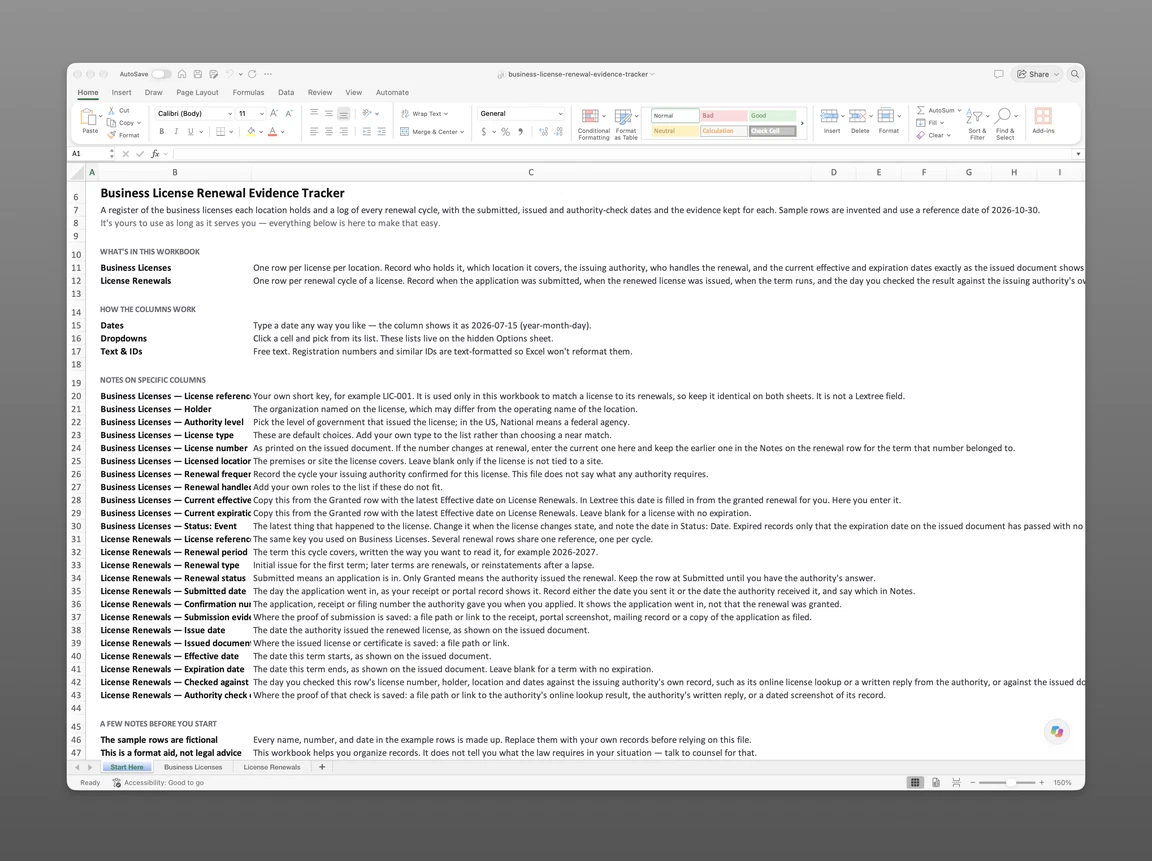
The companion file opens on a Start Here sheet that explains each column. Business Licenses holds one row per license per location, with its holder, issuing authority and current dates. License Renewals holds one row per renewal cycle, with its submitted, issued and authority-check dates and where each piece of proof is kept. Both hold the five sample licenses below. The file is sent to your email. It covers business licenses only; for permits and professional licenses, start from one register for licenses, permits and professional licenses.
Get the license register and renewal log
Enter your email and we’ll send the business license register and renewal log to your inbox. Free — no credit card, no call, no follow-up sequence you didn’t ask for.
Five Licenses Across Three Sites
Sample Harbor Foods LLC runs three sites, and its multi-location business license renewals run on four different cycles. Sample Harbor Distribution LLC holds the license for the third. Together they hold five licenses from four issuing authorities at three levels of government. The status date throughout is 2026-10-30. Every name, number and date here is invented, and nothing on this page is legal advice.
| Reference | License | Site | Issuing authority | Cycle | Latest renewal row on 2026-10-30 |
|---|---|---|---|---|---|
| LIC-001 | Sample General Business License - Site 1 | Site 1 - North Dock | Sample City Licensing Office | Annual | 2026-2027, Granted; checked 2026-03-13 |
| LIC-004 | Sample Operating License - Site 1 | Site 1 - North Dock | Sample State Licensing Board | Triennial | 2026-2029, Submitted 2026-09-09; no outcome recorded |
| LIC-002 | Sample General Business License - Site 2 | Site 2 - Market Street | Sample City Licensing Office | Annual | 2026-2027, Submitted 2026-10-21; no outcome recorded |
| LIC-005 | Sample Tax Registration - Site 2 | Site 2 - Market Street | Sample State Revenue Office | Perpetual | 2022 onward, initial issue, Granted; last checked 2022-02-10 |
| LIC-003 | Sample Food Service License - Site 3 | Site 3 - Cold Storage Annex | Sample County Health Office | Biennial | 2025-2027, Granted; checked 2025-06-26 |
Site 1: Two Authorities
Site 1 has two licenses from two authorities on different cycles: a city office on an annual cycle and a state board on a triennial one. LIC-001, the city license, is Granted and was checked on 2026-03-13.
LIC-004, the state operating license, needs a closer read. The expiration date on its issued document, 2026-09-17, has passed. A renewal was submitted on 2026-09-09, and no outcome is recorded. On the register, Expired records only that the date on the issued document has passed with no granted renewal recorded. It says nothing about whether the license is still in effect. Ask the issuing authority and record its answer in the notes.
Site 2: Annual and Perpetual
LIC-002’s last granted term runs from 2025-11-18 to 2026-11-17 and was checked on 2025-11-20. The 2026-2027 renewal went in on 2026-10-21 under confirmation number SAMPLE-0000204, and the issue, effective and check entries arrive with the authority’s answer.
LIC-005, the tax registration, is the row on this site that needs attention, since its last check was on 2022-02-10.
Site 3: Biennial County License
LIC-003 is held by Sample Harbor Distribution LLC and issued by the county health office on a biennial cycle, with outside counsel handling renewals. The 2025-2027 renewal was submitted on 2025-05-13, issued on 2025-06-20, effective on 2025-06-24, and checked on 2025-06-26 by written reply. The renewal goes in under Harbor Distribution’s EIN.
A group with sites like these also needs one place to look across all of them, which is what business license renewal software is for.
Lextree Editorial
Author