Permit Condition Compliance Log: Cite, Perform, Prove
Find Each Condition in the Permit
A permit condition compliance log holds one row for every condition written into a permit, tied to the place in the permit text where that condition appears. Each row also carries the required activity, how often it recurs, the next due date, the person responsible for it and a pointer to the proof of the last performance. A plant manager, facilities lead or compliance officer can then answer an inspector’s question about any single condition without rereading the whole permit.
The log works for any permit from any agency at any level of government: air, water, building, occupancy, conditional use, liquor, health, fire, zoning, transport and more. The examples here come from federal environmental permit programs because their rules are public and quotable. The same pattern fits a city occupancy permit with conditions listed on page two of the approval letter.
To track permit conditions this way, work in a fixed order:
- Find the condition in the permit and copy its citation.
- Give it the permit’s own number, or assign one.
- Classify it and restate the required activity in plain language.
- Set the frequency and the next due date.
- Record each performance, with the proof, when it happens.
- Revisit every row after the permit is modified or reissued.
Section, Page, Attachment
Conditions rarely sit in one place. An air operating permit may put monitoring in Section 4 and reporting in Section 6. A stormwater permit may push its inspection and training requirements into Attachment B, and a conditional use permit may carry its conditions in the approval letter as numbered items. The log records the section, page or attachment for each, so a colleague can find the exact sentence in under a minute.
One example: Title V air permits are required by 40 CFR 70.6(a)(1)(i) to “specify and reference the origin of and authority for each term or condition.” A planning commission’s conditional use approval may likewise name the code section behind each condition. The log carries that reference forward, so the row shows where the condition is written and the permit shows why it exists.
Condition Number as Key
Use the number or letter the permit assigns: 4.2, Condition C, Item 9. That number becomes the key that joins a condition to its performance history. When a permit leaves its conditions unnumbered, assign your own and say so in the source reference, since a later reader will otherwise look for a number the document never printed.
Type and Required Activity
Classify each condition by type. By default the choices are reporting, monitoring, inspection, recordkeeping, notification, operating limit, training, signage or posting, and financial assurance requirements. Then restate the activity in the words your team uses on the floor. “Read the stack monitor at each shift change” is a row someone can act on, while “comply with Section 4.2” sends them back to the permit. This step carries most of the weight in environmental permit conditions compliance, and in a liquor license or building permit alike. The permit’s wording is written for the agency, and the log is written for the person doing the work.
A few examples of how condition types cluster by permit type:
| Permit type (examples) | Typical condition types |
|---|---|
| Title V air operating permit | Monitoring, recordkeeping, semi-annual reporting, annual compliance certification |
| NPDES individual permit | Sampling, monitoring reports, recordkeeping |
| Stormwater general permit | Quarterly visual inspection, training, plan upkeep |
| Local conditional use permit | Operating hours, posting, signage |
Set the Frequency and Due Date
Every condition row needs a frequency and a next due date before permit condition tracking can work. By default the frequencies are continuous, daily, weekly, monthly, quarterly, semi-annual, annual, one-time and event-driven. A continuous condition, such as keeping a notice posted, still needs a periodic check date, because someone has to look at the notice on a schedule and write down that they did.
These dates run on their own. A quarterly inspection falls due every quarter whatever the permit’s expiration date says, so the log keeps the expiration date on the row for reference and drives the work from the condition’s own next due date.
Two statuses stay separate. Condition status says whether the condition still applies: in effect, satisfied, waived or superseded. Compliance status says how performance is going: compliant, non-compliant, or corrective action underway. A one-time training condition can be satisfied and compliant for years, while a quarterly inspection can be in effect and in trouble. Late or missed performances belong to a separate deviation or exception process, and the log only needs to show the status that results.
Record Each Performance With Proof
Every time a condition is performed, the log gets a new row. The condition row says what is required and when. The performance row says what actually happened and where to find the evidence of permit condition compliance.
One example of a certification: Title V air permits bring an annual compliance certification that asks for a condition-by-condition answer. 40 CFR 70.6(c)(5)(iii)(A)–(B) sets the content. It asks the certification to identify “each term or condition of the permit that is the basis of the certification” and “the method(s) or other means used by the owner or operator for determining the compliance status.” Many permit types, such as a health department operating permit or a building permit’s inspection schedule, have no certification at all. There the per-condition proof serves your own records, an inspector, an auditor, an insurer or a renewal application. A log keyed by condition number, with an evidence location on every performance, supplies the answers either way.
What One Row Holds
A performance row holds the date performed, the period or due date it covers, who performed it, and a reference number when the activity produces one. It adds a short summary, the name of the evidence document, where it is stored, and who verified it and when. The list borrows from federal wording. One example: for NPDES permits, 40 CFR 122.41(j)(3) says records of monitoring information include “The date, exact place, and time of sampling or measurements” and “The individual(s) who performed the sampling or measurements.” A row that captures who performed the activity and when follows the same idea, and it works the same way for an inspection or a posting check.
Leave the reference number blank when nothing was filed. Many performances, such as a daily reading, produce a log entry and no confirmation number, and a blank is more honest than a made-up one. An inspector reading the log looks for blank required fields, and a missing performer or date is a recordkeeping gap on its own.
Give every condition one named owner and a backup so performance does not stop when someone changes roles.
How Long Records Stay
Retention is set by the permit and the program, so read your own. Two federal periods serve as examples, and a city permit may set another. Under NPDES permits, 40 CFR 122.41(j)(2) requires monitoring records to be kept “for a period of at least 3 years from the date of the sample, measurement, report or application” (longer for some records). The Director can extend that period at any time. For Title V air permits, as another example, 40 CFR 70.6(a)(3)(ii)(B) calls for “at least 5 years” of monitoring data and support information. Keep each log row, and the evidence it points to, at least as long as the longest period that applies to its permit.
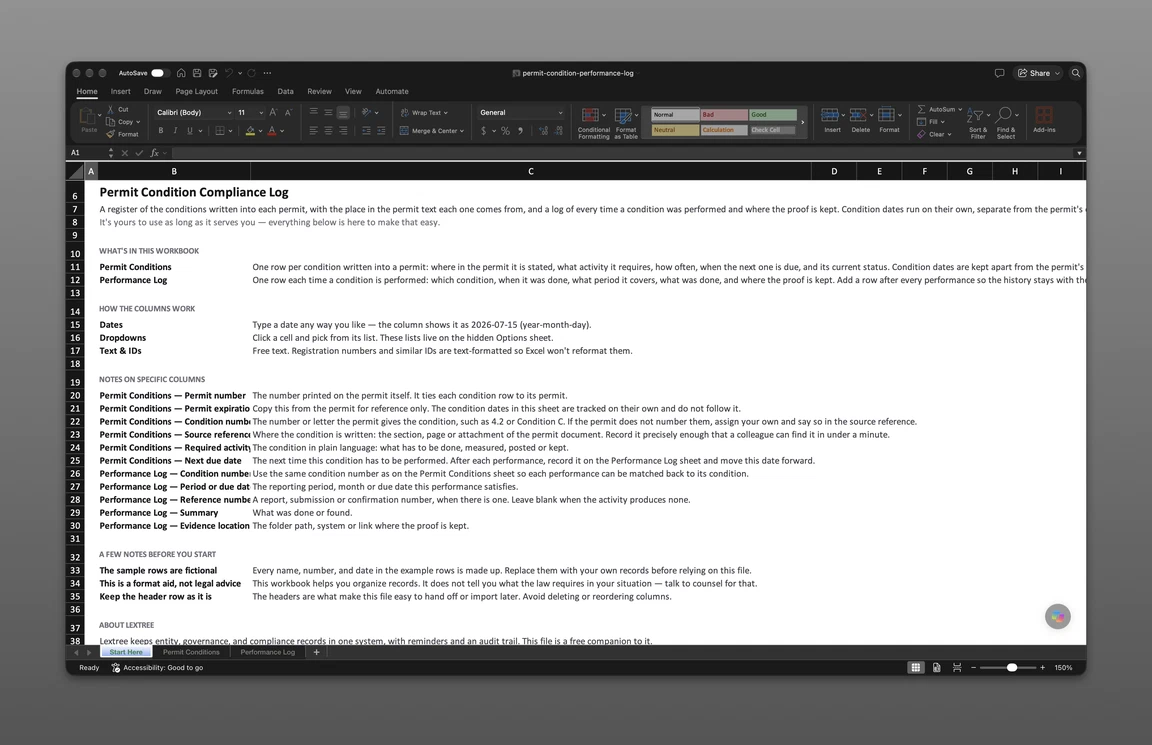
The companion file is built on this structure. Its Permit Conditions sheet holds one row per condition with its source reference, required activity, frequency and dates, and its Performance Log sheet holds one row each time a condition is performed and where the proof is kept. Sample permits are included to show how the rows fill in. The file is sent to your email. It covers conditions only; for the permits themselves, start from one register for every license and permit you hold.
Get the permit condition compliance log
Enter your email and we’ll send the permit condition compliance log to your inbox. Free — no credit card, no call, no follow-up sequence you didn’t ask for.
Revisions and a Worked Example
Superseded, Not Deleted
When a permit is modified or reissued, conditions change. Some are reworded, some are dropped and some move. Mark the old condition as superseded and add a new row with the new number and source reference. The performance history stays with the old condition, which keeps the record of what was required and done under the earlier text. Read every section again after a modification, because numbering shifts, and a condition that was 4.2 may now be 4.3.
Three Sample Permits Walked
The example below is fictional, and this page is not legal advice. The three sample permits, an air permit, a stormwater permit and a conditional use permit, show three different permit types on the same rows.
The Sample Plant Air Operating Permit (SAMPLE-0000001) expires on 2027-09-22 and has two conditions in the log. Condition 4.2, in Section 4 on page 11, is a daily monitoring requirement: read the stack emissions monitor at each shift change. It was performed on 2026-10-23, the stack monitor log is stored under the plant shared drive’s Environmental folder, and the Plant Environmental Manager verified it on 2026-10-26. Next due date reads 2026-10-24. The reference number is blank, since a daily reading produces none. Condition 6.1, in Section 6 on page 17, is a semi-annual reporting requirement. The summary for January to June 2026 was completed on 2026-07-21 under reference SAMPLE-0000101, verified by the Operations Director on 2026-07-24, and the next one is due 2027-01-20.
The Sample Site Stormwater Discharge Permit (SAMPLE-0000002), which expires on 2028-03-14, keeps its conditions in Attachment B. Condition C, on page 3, requires a quarterly walk of the drainage outfalls. The third-quarter walk happened on 2026-09-17, a sheen was noted at outfall 2, and the row shows corrective action underway. The next walk is due 2026-12-18. Condition F, on page 5, is a one-time training requirement. Spill response training was held on 2026-10-08, logged under SAMPLE-0000102, verified on 2026-10-13, and the condition status reads Satisfied, with no further due date.
The Sample Warehouse Conditional Use Permit (SAMPLE-0000003) expires on 2029-06-26. Its Item 9, on page 2 of the approval letter, requires the approved hours-of-operation notice to stay posted at the main entrance. It is continuous, so the log sets a periodic check, next on 2027-02-17, and the first performance row is added when that check is done.
Across the three, the expiration dates run from 2027 to 2029, while the condition dates repeat daily, quarterly and semi-annually inside those terms.
When the file outgrows a sheet, the same structure that a permit condition compliance log keeps lives in Lextree’s Licenses & Permits. Each permit carries its conditions, and each condition has a condition number, a condition status, a compliance frequency, a next due date and a compliance status. You record each completion as a performance with its performed date, reference number and summary. Lextree suggests a “Permit condition due” event from the next due date, with reminders 30, 14 and 7 days before by default. The seeded options are defaults and can be changed to fit your permits. You can store evidence files such as monitoring logs and signed forms with attachments on the record. Standing obligations at a site that are not tied to any one permit belong in Environment, Health & Safety.
Lextree Editorial
Author