Rejected Employer Filings: Resubmit, Correct and Record Each Period
The First Transmission Comes Back Rejected
On March 17, 2026, the payroll systems analyst at Sample Wexcombe Inc. transmitted the employer’s 2025 Forms 1094-C and 1095-C. On March 18 the Acknowledgement showed the transmission as Rejected. The HR compliance manager now has three things to settle for that period: what the authority said, whether to resubmit or correct, and how the record for 2025 should read. Rejected employer filings raise the same three questions whichever authority sits at the other end.
This page covers workforce filings an employer makes to labor, safety and benefits authorities, shown here through the IRS information returns for employer health coverage and the Department of Labor’s Form 5500. Corrections to payroll and withholding tax returns are tracked as tax returns and stay out of scope.
Read the Authority’s Response First
The IRS takes these forms through its ACA Information Return (AIR) system, and AIR gives its answer in an Acknowledgement. Publication 5165 lists the statuses a transmission ends with as Accepted, Accepted with Errors, Partially Accepted and Rejected, and shows Processing until then. The transmitter receives a Receipt ID when the file arrives, and Publication 5165 says that ID “does not provide proof” that the returns were accepted or rejected, though it does prove the IRS received the file.
A transmission that fails the IRS Portal’s initial checks is rejected there with a fault response, an error prefixed “TPE”, and no Receipt ID. Section 7.2.1 of Publication 5165 has the transmitter fix the problem and resend the file using the same transmission type (original, replacement or correction) as the rejected one. Record the fault code against that attempt even though it has no Receipt ID.
Form 5500 goes to the Department of Labor through EFAST2, which uses different terms. The DOL’s EFAST2 FAQ says an Acknowledgment ID is not enough on its own: “You need to check the filing status to ensure EFAST2 received your filing.” The EFAST2 guide for filers adds that “EFAST2 has no status better than Filing Received,” and that a received filing may still be “subject to further detailed review by DOL, IRS, and/or PBGC.”
Who sees the response matters when a vendor does the transmitting. Publication 5165 has the transmitter retrieve the Acknowledgement, and the EFAST2 guide says communications on filing errors and statuses are “directed to the submitter.” If a payroll software vendor, an ACA vendor or a plan service provider sends the filing, the status and the error list reach that party first. For Forms 1094-C and 1095-C, Publication 5165 limits information about a Receipt ID to the Authorized Users on the transmitter’s application. It tells an employer filing through a third-party transmitter to obtain a copy of the records in each submission, the Receipt ID, the status and, for any status other than Accepted, the Error Data File. The publication calls those items critical to making corrections if the transmitter goes out of business or is otherwise unavailable. For Form 5500, the DOL’s FAQ says the transmitter or filing signer can check the status on the EFAST2 website, and anyone can confirm receipt, though not the errors, through the EFAST2 Help Line. The companion file’s Submitted through column shows which channel each attempt went through, so you know whom to ask for its status.
Record the Reason as Stated
Copy the filing rejection reason exactly as the authority gives it. In AIR that is an error code and description in the Acknowledgement, plus any Error Data File, which Publication 5165 says comes with Accepted with Errors and may come with Rejected or Partially Accepted. In EFAST2, “an error code is given, along with a brief description of the error” for each error found. Paraphrasing loses the code that a later reader will search for.
In the sample, attempt 1 was rejected because the Form Data File failed schema validation. The analyst traced it to a malformed field and rebuilt the transmission. The authority’s text and the analyst’s diagnosis go in separate places, because an auditor wants the first verbatim and the team fixing the data wants the second.
Resubmit or Amend: Which One Applies
“Do we amend it?” is the first question after a rejection. The answer depends on what the authority did with the first filing. In AIR, a Rejected transmission of original returns is replaced and an error in an accepted one is corrected. In EFAST2, an error in a filing it counts as filed takes an amended return/report. The authority’s instructions give the form or box to use, and your adviser confirms which applies to your filing.
The table below shows the response, what fixes it, and where the authority says so.
| Authority response | What fixes it | Where the authority says so |
|---|---|---|
| AIR: Rejected (a transmission of original returns) | A replacement transmission carrying all the records of the rejected one and citing its Receipt ID | Publication 5165, sections 7.2.2 and 7.3 |
| AIR: Rejected (a transmission of corrections) | The corrections, fixed and sent again as a correction transmission rather than a replacement | Publication 5165, section 7.3 |
| AIR: Accepted or Accepted with Errors | If an error needs fixing, a correction; a corrected Form 1095-C carries an X in its “CORRECTED” checkbox | Publication 5165, section 7.1; Instructions for Forms 1094-C and 1095-C |
| AIR: Partially Accepted | Replacement submissions for the rejected submissions, and a correction for any error in the accepted ones | Publication 5165, sections 7.1 and 7.3.2.1 |
| EFAST2: Filing_Received, Filing_Error or Filing_Stopped | An amended return/report, sent in full with the line B box checked; after Filing_Received, only if something needs correcting | 2025 Instructions for Form 5500; DOL EFAST2 FAQ, Q38 |
| EFAST2: Filing Unprocessable or Unprocessable Submission | Correct and resubmit; the DOL says EFAST2 does not consider it a filing | DOL EFAST2 FAQ, Q38 |
| EFAST2: an attempt not received because of a transmission problem | Resubmit, leaving the line B box unchecked | 2025 Instructions for Form 5500 |
A Rejected Filing Is Replaced
To resubmit a rejected filing in AIR, the transmitter sends a replacement. Publication 5165 explains why: none of the records in a rejected transmission or submission are kept in IRS data stores, so “a replacement transmission or submission must be submitted.” The replacement “must contain all the records” of the rejected one and a replacement transmission cites the rejected transmission’s Receipt ID in its manifest, while a replacement submission cites the rejected submission’s ID. The publication also advises waiting until the Acknowledgement shows Rejected or Partially Accepted before replacing anything.
In the sample, the analyst sent the replacement on March 20, 2026, after correcting the malformed field. It is attempt 2, and the file labels it a resubmission after rejection.
Whether a replacement counts as filed on time is the authority’s rule to state. Section 7.3 of Publication 5165 addresses it, counting from the date the rejected status became available, so record that date. Your adviser reads it for your filing, and the file records the answer with the date they gave it. A rejected original sent again as a correction runs into section 7.1, which allows corrections only to transmissions the IRS accepted in whole or in part.
A Filed Return Is Corrected
Once the authority has accepted a filing or counts it as filed, the fix is a correction in AIR or an amended return/report in EFAST2, and this is where resubmission vs amended filing divides. Publication 5165 says “Corrections can only be made to previous transmissions” with a status of Accepted, Accepted with Errors or Partially Accepted, and a transmission of corrections carries only corrections. The Instructions for Forms 1094-C and 1095-C say to enter an X in the CORRECTED checkbox “only when correcting a Form 1095-C previously filed with the IRS.”
For Form 5500, the 2025 instructions tell the filer to check the line B box for an amended return/report if the previous 2025 filing “was given a ‘Filing_Received,’ ‘Filing_Error,’ or ‘Filing_Stopped’ status by EFAST2.” An amended filing “must be submitted as a complete replacement,” meaning the entire form with all schedules and attachments, never just the changed part.
One wrinkle for the person keeping the record: the line B instructions write the stop status as Filing_Stopped, while the EFAST2 guide, the DOL’s FAQ and a later passage of the same instructions call it Processing Stopped. That passage also warns that a Processing Stopped or Unprocessable filing may lack a valid electronic signature and, depending on the error, may be considered not filed, which is a question for your adviser. Record the status exactly as EFAST2 or your filing software shows it, without swapping in another document’s term.
Cases That Take Both
A transmission can be Partially Accepted when some submissions in it are rejected and others are not. That one transmission can then need both: replacement submissions for the rejected ones, and corrections for any errors in the accepted ones.
A replacement can also come back Rejected. Publication 5165, section 7.3.1.2, then has the transmitter replace the earliest rejected transmission in the chain, citing that Receipt ID. Each attempt that passes the IRS Portal gets a Receipt ID, and every attempt gets a history line.
The Form 5500 version is an attempt that never arrived. The instructions say not to check the line B box if earlier attempts “were not successfully received by EFAST2 because of problems with the transmission.” The second try is then a resubmission, and no amended return/report is involved. The DOL’s FAQ adds that a filer whose on-time attempt was not received should print the unsuccessful submission notice and include it with the resubmitted return/report as an “Other Attachment.”
Corrected Filings for the Same Period
By April 2026 the 2025 Forms 1094-C and 1095-C for Sample Wexcombe Inc. carried three attempts against a single filing. The filing’s entry shows the latest original or resubmission, the authority’s answer to it, and the date of any later correction. The history keeps each earlier attempt with its date, reference and response, which is how corrected filings by reporting period stay readable a year later.
Rejected, Replaced, Then Corrected
Attempt 2 came back Accepted with Errors on March 23, 2026. The error list showed a name and taxpayer ID mismatch on two employee forms. The HR compliance manager corrected the two employee records and sent a correction on April 14 and, as the adviser directed, furnished corrected copies to the two employees. The correction came back Accepted on April 16. The adviser’s written answer on timeliness is dated April 20.
| Attempt | Submission type | Submitted | Authority response | Response date | Reason as the authority states it | Root cause | Fixed by |
|---|---|---|---|---|---|---|---|
| 1 | Original | 2026-03-17 | Rejected | 2026-03-18 | Sample code and description: Form Data File failed schema validation | Data error | Payroll systems analyst |
| 2 | Resubmission after rejection | 2026-03-20 | Accepted with Errors | 2026-03-23 | Sample Error Data File entries: name/TIN mismatch on two Forms 1095-C | Data error | HR compliance manager |
| 3 | Correction or amended filing | 2026-04-14 | Accepted | 2026-04-16 | (none) | Data error | HR compliance manager |
The employers, dates, references and people in this example are invented. Nothing here is legal advice.
A Correction the Provider Found
The Form 5500 for the same employer’s 2025 plan year shows a different path, because the authority rejected nothing. It was filed on September 28, 2026, under an extension requested on Form 5558 and flagged by the line D box, with dates as the adviser confirmed them. A copy of the Form 5558 stays with the plan’s records. EFAST2 showed Filing_Received. The plan service provider then found an error, traced to missing information, and on October 13 an amended return/report went in full with the line B box checked. It also showed Filing_Received, and the adviser has not yet confirmed whether the amended submission was timely.
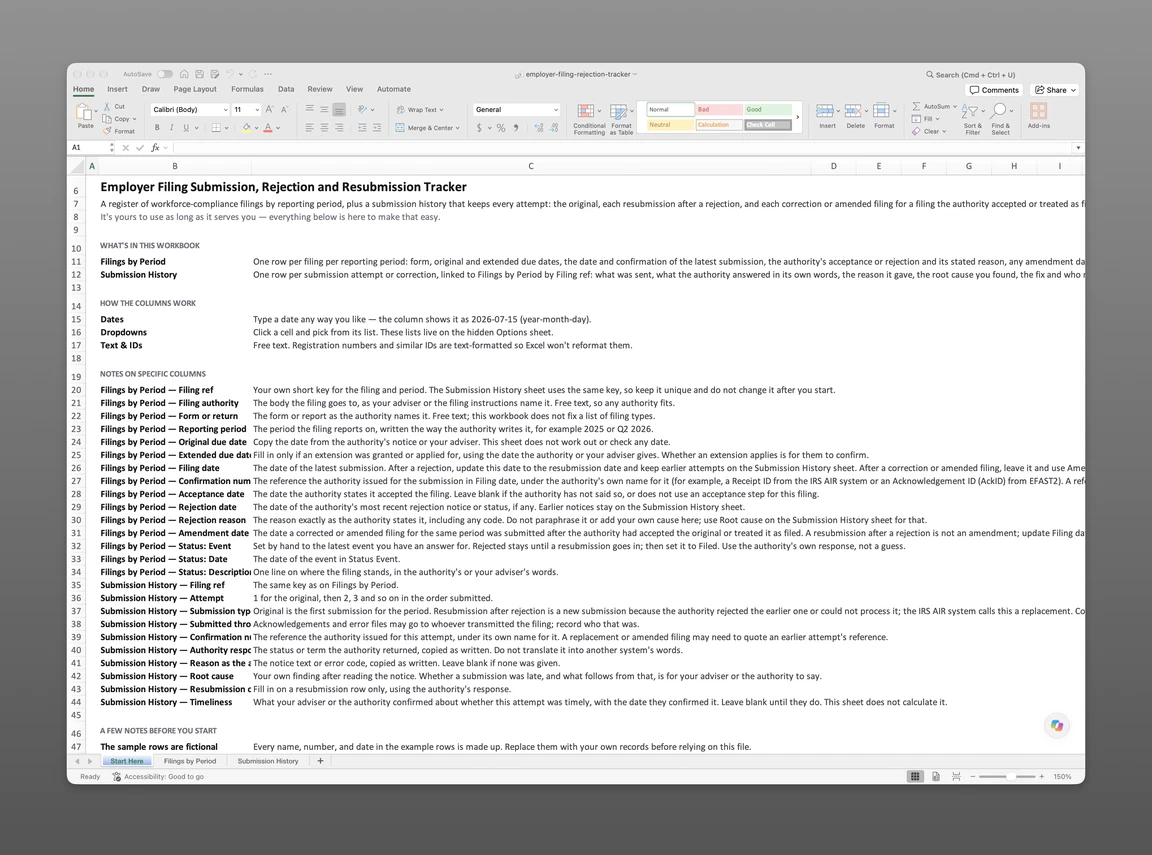
Both sample filings, along with others, sit in the companion file, which is sent to your email. Filings by Period holds each filing for each reporting period, with its due dates, the latest original or resubmission, the authority’s answer and any amendment date. Submission History holds each attempt or correction against that filing, with the authority’s words beside your own diagnosis. The file starts after a filing goes in, while the standing list of filings each employer owes says what each employer owes in the first place.
Get the rejection and resubmission file
Enter your email and we’ll send the rejection and resubmission file to your inbox. Free — no credit card, no call, no follow-up sequence you didn’t ask for.
The Rejection Date in Lextree
To track each employment filing and its outcome, Lextree gives an Employment Filing a Rejection date and a Rejection reason for the authority’s answer. After a rejection, the resubmission’s date and reference go into the Filing date and the Confirmation number in place of the earlier ones. The Amendment date is for a corrected filing submitted for the same period after the filing was accepted, and a resubmission after a rejection is not an amendment. For the first sample filing that means a Rejection date of March 18, a Filing date and Confirmation number updated for the March 20 resubmission, an Acceptance date of March 23 and an Amendment date of April 14. Because the Filing date and Confirmation number then show only the resubmission, keep the rejected attempt’s date and Receipt ID in Notes or in the companion file’s history. In AIR, a replacement that is itself rejected is replaced by citing the earliest rejected Receipt ID.
The Timeline holds a dated state for each outcome: Filed, Accepted, Rejected and Amended, each set by its own date field. The newest dated entry sets the status shown, so nobody types a status in by hand.
Entering a Rejection date suggests a rejection-response workflow, Respond to Rejected Filing, which a user accepts or ignores. The workflow is due 21 days after launch, a task date rather than any authority’s deadline. The first step, Rejection diagnosis, records a Root cause (Data error, Missing information, Wrong form or version, Late submission, Authorization or signature problem, or Authority system error) and a Corrective action. The second, Corrected resubmission, asks the user to update the Filing date and Confirmation number with the resubmission details. The last, Resubmission outcome, records Accepted on resubmission, Rejected again, or Withdrawn or no longer required, and has the user set the Acceptance date if the resubmission was accepted. Due-date reminders stop once a Filing date is entered.
Lextree Editorial
Author