Revoking Signing Authority When an Employee Leaves: A Three-Team Checklist
From Notice to Power Inventory
The day Legal hears that an employee is leaving, the clock starts on every power that person holds. To revoke signing authority when an employee leaves, someone has to know what the person can sign, in which systems, and who will hold the proof that each one has changed. That list rarely exists on the day of notice, so the first job is to build it. This employee departure signing authority checklist follows the order the work happens, from the notice to the last proof.
The Notice and Its Date
Agree on one person who tells both Legal and Treasury the moment HR learns of a departure. The revocation date is a decision, and someone has to make it. For a planned exit it is usually the last working day. For a contested exit it can be earlier, sometimes the day notice is given. Write the date down with the name of the person who chose it.
Notice sometimes arrives late. A manager mentions in passing that someone left two weeks ago. Record the date the departure actually happened and the date Legal learned of it, and leave the revocation date as the day the powers were truly withdrawn. Backdating a revocation hides the gap, and the gap is what a reviewer will ask about.
Powers Held by Name
Start with what is written down: signing authority grants, delegations of authority the person received or passed on, and any officer title the person holds on a bank mandate. A signer who delegated part of an authority to a deputy has created a second record that outlives the first unless someone ends it too. A delegation of authority should be revoked on termination as well as the grant behind it. If your approval limits and co-signature rules live in a matrix, pull up the limits and co-signature rules by entity and read every row that carries the person’s name.
Then check every legal entity. Finance managers and general counsel often act for several subsidiaries, each with its own bank accounts and its own resolutions, and a revocation done for the parent leaves the subsidiaries untouched.
Agents and Outside Filings
Some powers sit outside the signing records. A power of attorney names the person as agent. A tax representative designation names the person with a government agency. Vendors, customs brokers and counterparties may hold a letter authorizing the person to give instructions. None of these appear in an HR offboarding ticket, so list them from the contract files and ask each department head whether the person had any outside authorizations. Ask the person’s manager, too, what the person signed week to week in practice. Habit often runs ahead of the paperwork, and an informal practice of countersigning small purchase orders needs revoking just as much as a formal grant does.
Revoking Each Power in Its System
One update does not change the other systems. A board resolution revokes a grant in the corporate record but says nothing to the bank. An HR ticket closes a login but leaves a bank mandate alone. Each team revokes in the system it owns and obtains its own proof.
Legal: Resolution and Notices
Legal owns the instruments. Draft the resolution or officer’s written action that revokes each signing authority grant and ends any delegation the person made. Banks commonly ask for a certified copy, so order it with the first draft. A typical removal notice names the officer and lists every affected account. It gives the effective date, refers to the board resolution and encloses a certified copy. It also asks the bank to confirm in writing once the change has been processed, as the bank signing officer removal sample lays it out. Who tells the bank matters too: the notice goes out over the signature of an authorized officer who is staying, and the departing employee should never be the one carrying it.
A power of attorney is usually revoked in writing, with copies to the agent and to everyone who relied on it. Where the person was a representative before the IRS, the instructions for Form 2848 cover the revocation. To revoke without naming a new representative, you write “REVOKE” across the top of the first page with a current signature and date, then mail or fax a copy to the IRS. With no copy to hand, you send a signed, dated statement of revocation listing the matters, the periods and each representative’s name and address. An officer with the legal authority to bind the corporation must sign and enter an exact title; read the Form 2848 instructions before anyone signs.
Counterparties that hold a specimen signature, such as the bank, a payment processor or a landlord’s agent, get their own notice. Send them from an officer who is staying.
HR: Offboarding Ticket
HR owns the employment record and, with IT, the access removal. That is its own control. A deactivated corporate login does not remove a bank signer, and a revoked signing authority does not close a payroll or banking portal account. Treat the HR ticket as evidence of one thing: that the employment ended and the access request went to the right teams on a given day.
A SOC 2 style termination control looks for exactly that, a completed termination checklist and a ticket, with access removed within a stated window such as one business day. The SOC 2 access-removal guide describes the control. Borrow the habit: give HR a line on the checklist that points to the ticket number, and let Legal and Treasury add their own lines.
Offboarding signing authority also reaches systems HR does not run. List the approval rights the person held in the ERP, payment and contract systems, and any e-signature account or digital signing certificate issued in the person’s name. Each is revoked by whoever administers it, and each gets a separate line and separate proof.
Treasury: Signers and Users
Treasury owns the bank side, and to remove an authorized signer from a bank account it has to work with two separate records. The authorized signer is the person the bank accepts on documents and instruments. The online banking user is the login that initiates or approves payments through the portal. One credit union puts it plainly: changing an authorized signer is entirely different from changing an online banking user. The same article lists the paperwork that credit union uses, an Account Change Request form, a Business Authorization Resolution and a Certificate of Authority, and recommends telling the bank as soon as a signer leaves. Your bank’s forms will have their own names, so ask for its list. The credit union’s guide to signers and users is a useful comparison.
Before removing the departing person, make sure a replacement signer is active. Remove a sole signer first and payroll can stall on the next cycle. Then work through everything attached to the person: cards, tokens, wire and ACH approval rights and any standing instructions. Keep a record of the bank accounts and their signatories for every entity, so the removal covers each account rather than the one someone remembered. Lextree’s Treasury module keeps bank accounts and their signatories on the same record, with each signatory’s signing capacity.
Confirm the Change With Evidence
A change is confirmed when someone has seen it in the system that matters, and a request alone does not count. For the bank, that means the bank’s written acknowledgment that the signer was removed, with the date. For HR and IT, it is the closed ticket or a system report showing the account disabled. For an IRS representative, it is the agency’s acknowledgment or the faxed or mailed copy with proof of sending. Record who obtained each item and where it is stored, so a successor can find it without asking. This also answers the question people ask most after a departure, which is how long the person’s authority lasted. A grant lasts until it is revoked in each system that relies on it, and the proofs, with their dates, are the record of when each system actually changed.
The failure case to watch for is a partial confirmation. The bank confirms in writing that the signer card has been updated, yet the treasury portal still lists the person as a user with approval rights. Both were true on the same day. Ask for a user report from the portal as well as the letter about the card, and file them together.
This checklist is a format aid and is not legal advice. Which instruments your entities need, and what your bank or counsel will accept, are questions to put to them directly.
Closing the Record
Dates and Status Entries
Once the proofs are in, finish the internal record. Enter the effective date and the revocation date on each grant, move its status to revoked, and reference the proof. Do the same for each delegation and each bank signatory. If the person’s authority was replaced by a new grant to someone else, mark the old one as superseded and link the two.
In Lextree, recording signing authority and delegations in the Authority module tracks a grant’s status from granted through expired, revoked or superseded, with every change timestamped. It stores the authorizing resolution and specimen signature alongside the grant, and a Delegation Handback workflow closes out a delegation with an approval trail. The Treasury module shows every authorized signatory and signing capacity on the bank account record. Lextree does not remove the signer at your bank; that remains a request to the bank, and the record only shows what you have confirmed.
The Thirty-Day Review
Set a review for thirty days after the departure. Take the person’s name and compare it against the current bank signer lists, the approval rights in the portal, the register of powers of attorney and the delegations on file. Anything that still shows the person is either a missed revocation or a record that nobody updated. Fix it, and add the proof. Also review what the person approved in the final weeks before leaving, including payments released and contracts signed, so any use of authority near the exit date is looked at by someone else. Look at the odd places as well: a pooled approval group that still includes the person, a corporate card program, a sub-account opened for a project years ago, or a safe deposit box. These are the entries that survive a first pass because no one thinks of them as signing authority.
A shared record helps because three teams otherwise keep three lists. If you already keep a structured record of who can sign, the review is a query. If you do not, the checklist file below gives the three teams one place to log their work for a departure.
Working From the Checklist File
Open the checklist on the day of notice. Legal takes the instruments and outside authorizations, HR takes the employment record and access requests, and Treasury takes the bank signers, portal users, cards and tokens. Each owner is named on its rows, and nobody else edits them.
The three teams share the file by working in separate rows and by pointing to evidence instead of copying it. A row says what was changed and where the proof is stored. When two teams need the same item, such as the bank letter, the second team references the first team’s entry. The file is sent to your email through the form below, and it opens in any spreadsheet program.
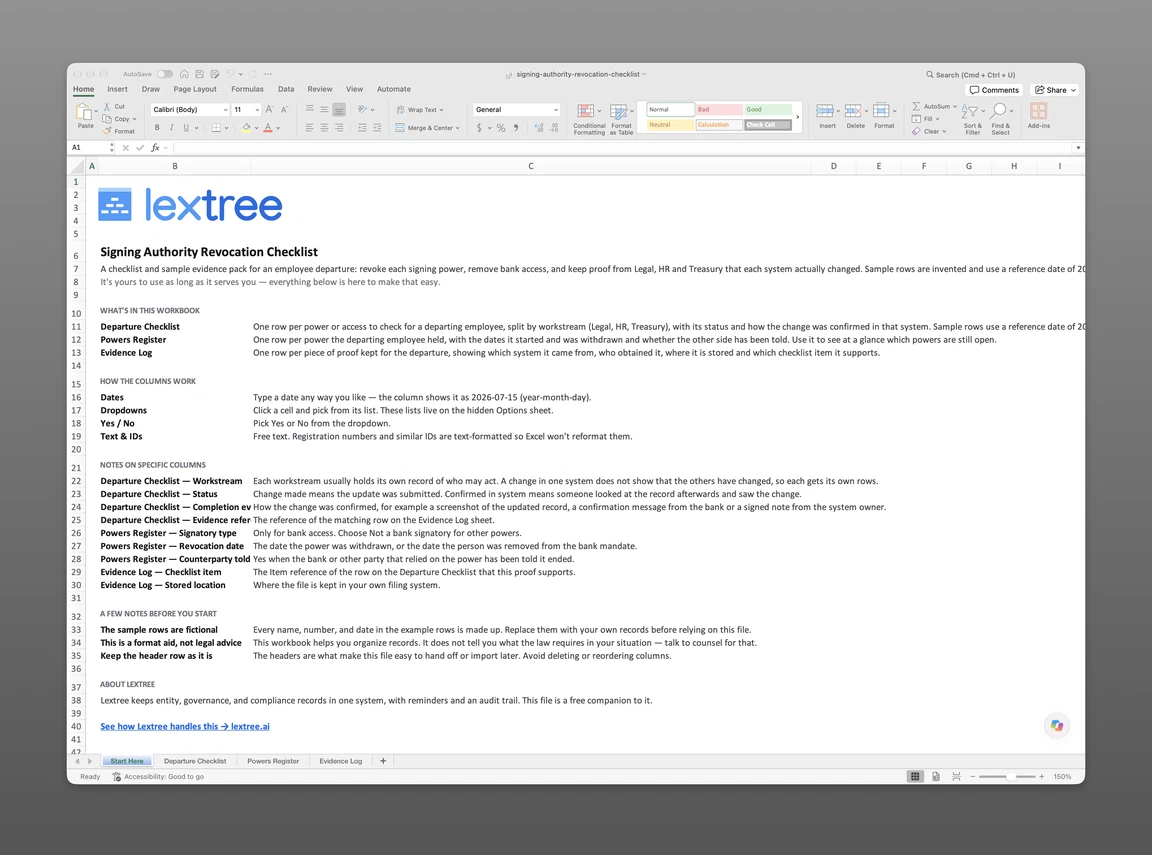
The file has 3 sheets. Departure Checklist lists one power or access to check per row, split by Legal, HR and Treasury, with a status and the evidence that confirmed it. Powers Register lists one power held per row, with its effective and revocation dates, whether a specimen signature is on file, whether the counterparty was told, and its status. Evidence Log lists one piece of proof per row, with the source system, who obtained it, where it is stored, and which checklist item it supports.
Get the free checklist
Enter your email and we’ll send the signing authority revocation checklist to your inbox. Free — no credit card, no call, no follow-up sequence you didn’t ask for.
Lextree Editorial
Author