Vendor Onboarding Document Checklist by Service Category
Set the Documents for Each Service Category
A vendor onboarding document checklist by service category gives each kind of vendor its own list of documents. Your organization sets the lists once, and intake for every new vendor starts from the list for its category.
Two items sit on every category’s list in the starting point used on this page: a tax form (Form W-9 from a U.S. vendor, or a W-8 series form from a foreign one) and a banking details confirmation. The rest change with the work the vendor does. A software vendor gets a security assurance report, and a contractor gets a certificate of insurance and a business license. This vendor onboarding checklist runs in five steps:
- Set the documents for each service category, once, before any vendor.
- Sort the new vendor into one category.
- Send one request built from that category’s list.
- Receive each document and check it as it arrives.
- Record what arrived against the vendor.
What Counts as Evidence
Vendor onboarding documents fall into a short run of types.
- Tax form: Form W-9 from a U.S. person, which gives the correct taxpayer identification number. A foreign entity gives Form W-8BEN-E to document its status, and a foreign individual gives Form W-8BEN.
- Certificate of insurance: usually an ACORD 25 Certificate of Liability Insurance. ACORD says a certificate is not an insurance policy, and the page on what a certificate does and does not show explains the difference.
- Business license: the license to operate the vendor’s trade.
- Professional license: held by the individual who does the work.
- Security assurance report: a SOC 2 report, an examination of controls at a service organization relevant to security, availability, processing integrity, confidentiality or privacy, as the AICPA titles it.
- Business associate agreement: the written contract that HIPAA calls for when a vendor handles protected health information for a covered entity.
- Banking details confirmation: the vendor’s payment details, confirmed by a call-back on a number you already held.
- Conflict-of-interest or code-of-conduct acknowledgment: a signed statement that the vendor has read and accepts your rules.
Your vendor information form, with the vendor’s legal name, remit-to address and primary contact, comes from every vendor and sits outside the category lists. Anything else a category asks for, such as a data hosting questionnaire, a data processing agreement or a signed master services agreement, goes on that category’s list as its own item. Checks your own team runs, such as sanctions screening, are not documents the vendor sends, so they stay off the request.
Required Versus If Applicable
The documents required for vendor onboarding differ by category, so each category marks every document one of three ways:
- Required: asked of every vendor in the category.
- If applicable: asked when a condition your organization writes down is met.
- Not requested: left off the request.
Write the condition beside every If applicable mark, so intake applies a stated rule and not a hunch. A business associate agreement might read “when the vendor will handle protected health information for us”. A certificate of insurance might read “when the vendor’s people work on our premises”. Each condition is set once per category, before any vendor arrives.
Required here means your organization asks for the document. A law can separately require some documents of some vendors, and counsel confirms which.
Marks change as an organization learns. In the sample set, one organization moved the software vendor’s security assurance report from If applicable to Required, because nearly every software vendor it onboards hosts or processes its data. It records that decision, and who agreed it, beside the row.
Onboarding Documents by Vendor Type
These are vendor onboarding documents by vendor type, as starting points that your organization changes. Every category starts with the tax form and the banking details confirmation at Required, so the items below leave them out. Anything an item does not list is Not requested.
| Service category | Also required | If applicable |
|---|---|---|
| Goods supplier | Nothing added | certificate of insurance (when the supplier delivers or installs on your premises), business license, conflict-of-interest or code acknowledgment |
| Contractor | certificate of insurance, business license, conflict-of-interest or code acknowledgment | professional license (when the work is done under an individual’s license) |
| Consultant | certificate of insurance, conflict-of-interest or code acknowledgment | business license, professional license, security assurance report (when the consultant gets access to your systems) |
| Professional services | certificate of insurance, professional license, conflict-of-interest or code acknowledgment | business license, security assurance report, business associate agreement |
| Software or technology | security assurance report | certificate of insurance, business license, business associate agreement (when the vendor will host protected health information for you), conflict-of-interest or code acknowledgment |
| Staffing | certificate of insurance, business license, conflict-of-interest or code acknowledgment | professional license, business associate agreement |
| Logistics or freight | certificate of insurance, business license | conflict-of-interest or code acknowledgment |
| Facilities or maintenance | certificate of insurance, business license | professional license, conflict-of-interest or code acknowledgment |
| Marketing or agency | conflict-of-interest or code acknowledgment | certificate of insurance, business license, security assurance report, business associate agreement |
| Financial services | conflict-of-interest or code acknowledgment | certificate of insurance, business license, professional license, security assurance report, business associate agreement |
| Utilities or telecom | Nothing added | conflict-of-interest or code acknowledgment |
Trades, facilities and staffing carry a certificate of insurance and a business license. Staffing adds a professional license when the placements are licensed roles. For logistics, the license row usually means the federal registration that 49 U.S.C. 13901 requires of motor carriers, brokers and freight forwarders. For a one-time purchase from a goods supplier, the starting point asks only for the tax form and the banking details confirmation, unless one of that row’s conditions applies.
Which vendors need a certificate of insurance at onboarding? In this starting point, the categories whose people come on site or move goods are asked for one outright. Software, marketing and financial-services vendors are asked only when a stated condition is met, and utilities are not asked.
Sort Each New Vendor Into One Category
When the request for a new vendor arrives, pick the category by the work this vendor will do for you in this engagement. A vendor can span two categories, such as a consultant whose work includes hosting your data. Use the category whose list asks for more, and note why. Record the category and the reason before any request goes out.
What the vendor will touch settles the If applicable marks: site access, personal data or protected health information, systems or network access, and payment or banking authority. Write these down at the request stage, because they decide which conditional documents go on the request.
A foreign vendor changes the tax form, with Form W-8BEN-E or Form W-8BEN in place of Form W-9. It does not change the category.
Request and Receive the Documents
The request goes out once. Each document is then checked for completeness as it comes back.
Writing the Vendor’s Request
Build the request from the category’s list: the Required items, plus each If applicable item whose condition the vendor meets. Name each document the way the vendor will recognize it: “Form W-9” or “Form W-8BEN-E”, “an ACORD 25 certificate naming your organization as certificate holder”, “your most recent SOC 2 Type 2 report”. Send everything in one message with a return date, and record the date requested. Items marked Not requested stay off the request.
Banking Details by Call-Back
Suppose banking details arrive by email, or a “new account” message turns up during intake. Confirm them by calling the vendor on a number you held before the banking form arrived, never a number printed on the form or in the email. The FBI’s Internet Crime Complaint Center advises using secondary channels to verify requests for changes in account information with the intended recipient, and a call-back is that advice in practice. A voided check or a letter from the vendor’s bank shows the account details, but neither proves the sender controls the account, so the call-back still happens.
Record who called, which number they used, and the date. No first payment goes out until the details are confirmed.
Documents Another Team Reads
Procurement records that a document arrived and who read it. The owning team reads the substance. The security reviewer reads the SOC 2 report. Legal or privacy signs the business associate agreement, and no protected health information goes to the vendor until it is signed, because 45 CFR 164.502(e) calls for the assurances to be documented in a written contract. Whoever owns insurance review reads the certificate against the contract’s insurance clause, and dating each coverage line from its certificate is the next step for that team.
Once every Required document is in and the vendor is approved, the relationship-and-coverage record that takes over once a vendor is approved carries the vendor forward.
A Software Vendor, Item by Item
The vendors, documents and dates below are invented. This page covers record-keeping and gives no legal advice. Statuses are read as of 2026-10-16.
The Category Row Applied
Sample Brightline Analytics Software Inc. is a foreign entity that will host the organization’s records. Its category row marks the security assurance report Required, on top of the tax form and banking confirmation every row has. The certificate of insurance, business license, business associate agreement and code acknowledgment are If applicable.
Three conditions are met. The vendor hosts records that may include protected health information, so the business associate agreement is requested. It has no staff on the premises, so the certificate is requested for cyber liability and technology errors and omissions cover only. The code acknowledgment is not asked, because the vendor accepts supplier terms that include the code of conduct, and the business license is not requested.
The request went out 2026-09-08. The vendor is foreign and gave a foreign tax ID, so it returned a Form W-8BEN-E on 2026-09-16 and not a Form W-9. Banking details were confirmed by call-back on a number already held, on 2026-09-18. The SOC 2 Type 2 report arrived 2026-09-22, and the security reviewer read it.
Two items are still open as of 2026-10-16: the certificate of insurance and the business associate agreement, both requested 2026-09-08. No records containing protected health information go to the vendor until the agreement is signed.
A Staffing Vendor by Contrast
Sample Northfield Staffing Partners LLC sits on the staffing row. Its certificate, business license and code acknowledgment are Required, and its professional license and business associate agreement are If applicable.
The request went out 2026-08-12. A Form W-9 with an EIN and the code acknowledgment came back on 2026-08-19, the certificate on 2026-08-21, and the business license on 2026-08-26. The professional license was not asked, because the agency places clerical workers only. The business associate agreement was not asked, because placements involve no protected health information.
The banking details form is still outstanding as of 2026-10-16, so payment setup waits, and the call-back happens when the form comes back. The method is the same as for the software vendor. The list is different, and the written condition settled each If applicable mark, with the reason recorded.
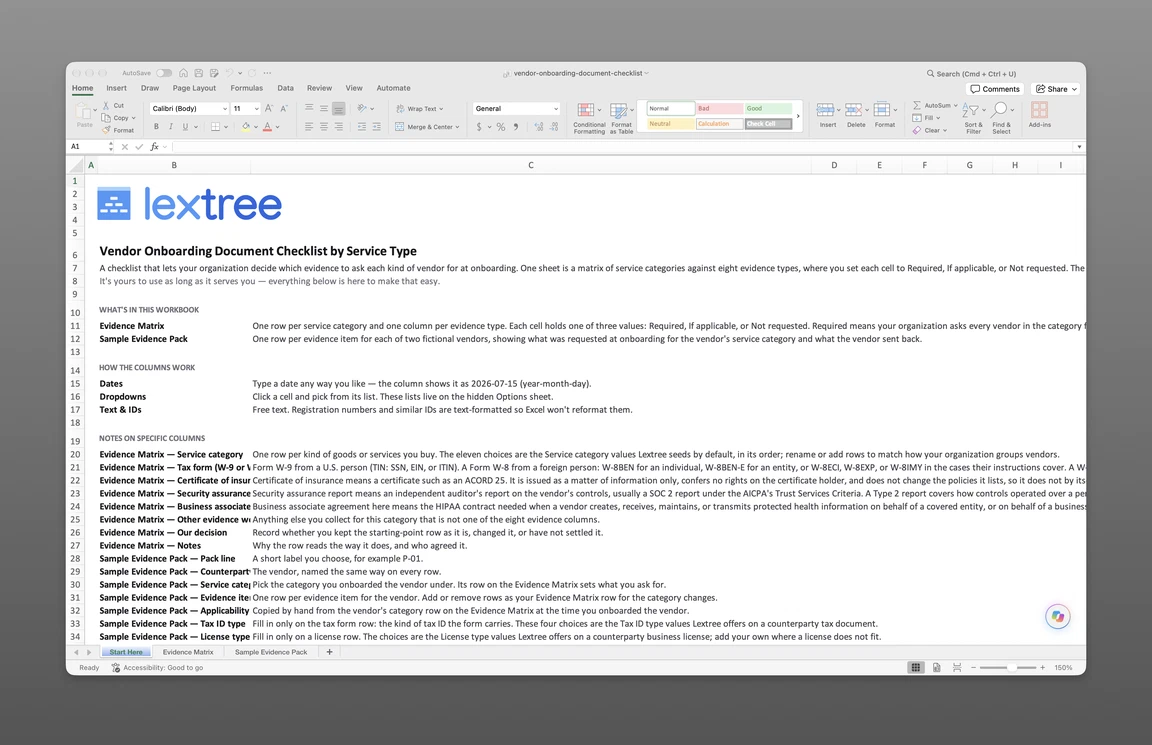
The vendor onboarding document checklist that goes with this page is sent to your email. Evidence Matrix is where you mark each service category’s documents Required, If applicable or Not requested and record your decision. Sample Evidence Pack shows the two vendors above, with what was requested and what came back.
Get the vendor onboarding document checklist
Enter your email and we’ll send the vendor onboarding document checklist to your inbox. Free — no credit card, no call, no follow-up sequence you didn’t ask for.
Recording What Arrived in Lextree
In Lextree, a vendor is a counterparty record in Lextree. The record carries a Service category field, seeded with a default list that you can add to, and an Access granted field that records what the vendor can reach. Compliance requirements is set per counterparty to what it must provide, and you set it from the category’s list by hand.
The seeded Counterparty onboarding workflow is launched by hand from the Counterparties list. Its Onboarding documents step ticks Documents received and holds an Outstanding documents note. Documents are recorded on the new record as tax documents, with W-9 and W-8BEN-E among the document types, as Counterparty Coverage Requirement records with their insurance certificates, and as business and professional licenses and certifications. The approval step records the decision, and finishing the workflow creates the record. See how counterparty documents are recorded for the detail. Sourcing, bids and purchase orders stay in procurement’s own system.
Lextree Editorial
Author